Modify Network Configuration
9
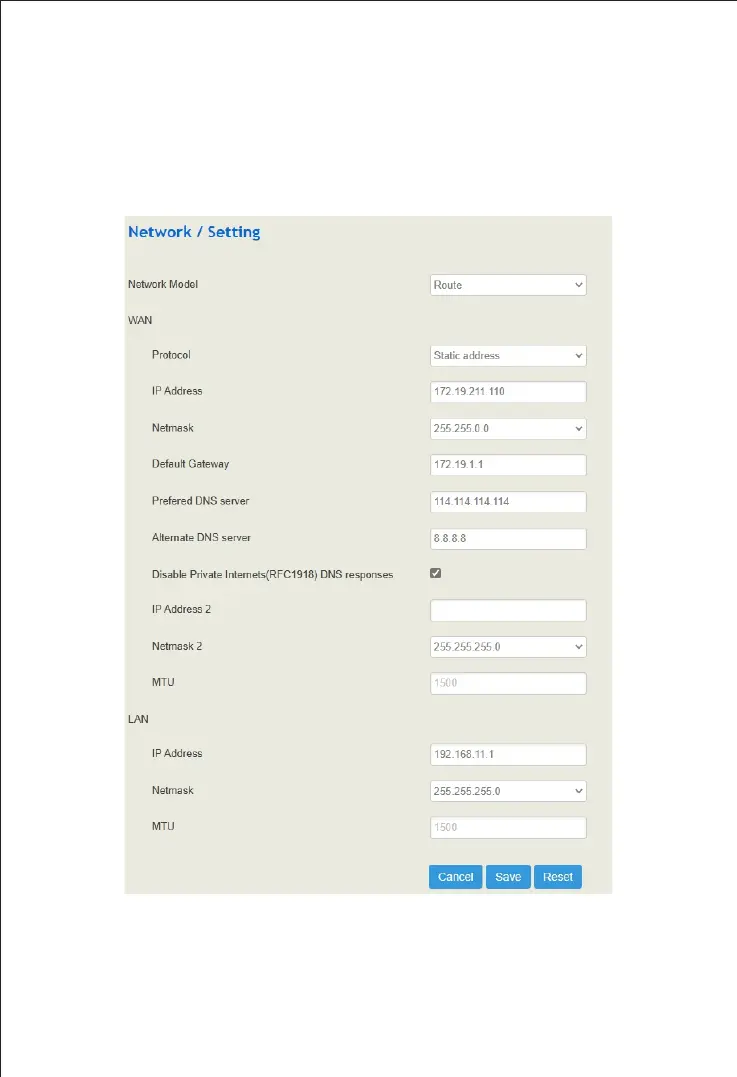
Log into the device and click "Network → Settings" at the top menu bar to configure
IP addresses of network ports. Click “Save” and "reset" to make the settings take
effect. After modification, you need to “apply” or click “Save” and "reset" to make
the settings take effect.
Note: The default network mode of UC120 and UC200 is router mode, and it can be set to
bridge mode. In router mode, the IP address of WAN port and LAN port should be in different
network segments. The default IP address of WAN port is obtained by DHCP, while the default
IP address of LAN port is 192.168.11.1. In bridge mode, WAN port and LAN port use the same
IP address.


 To Next Page