Modify Wi-Fi Settings
10
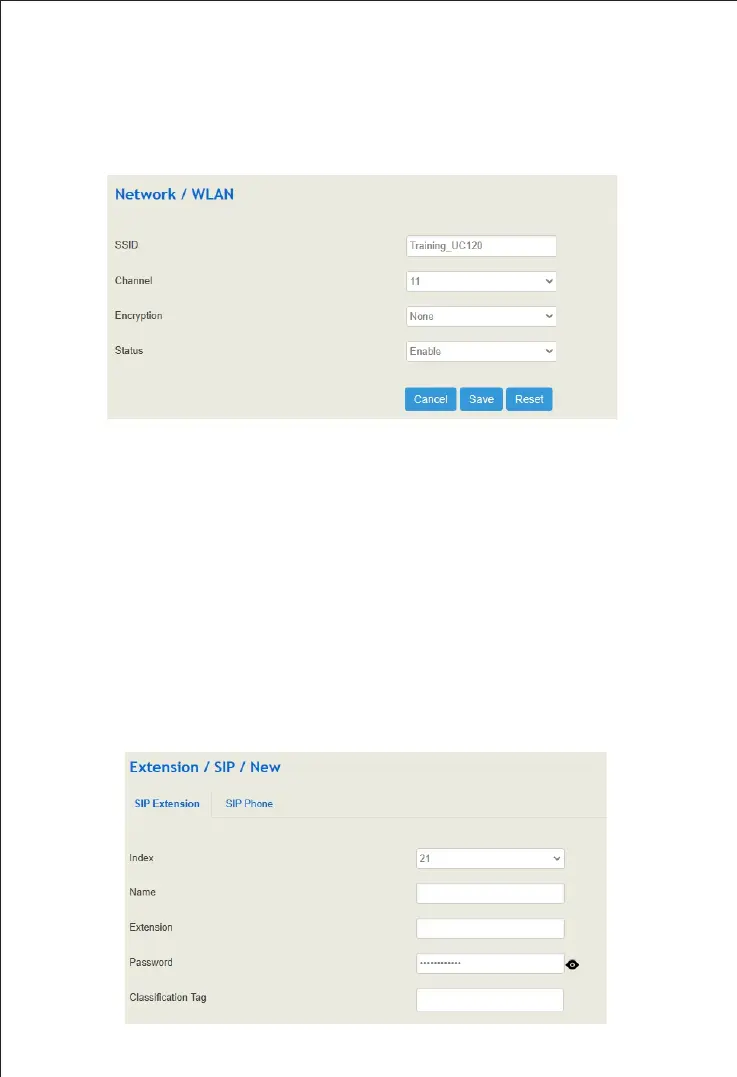
Wi-Fi is enabled by default. Go to "network → WLAN" page to turn off the wireless
or modify relevant parameters.
The default SSID of the device is "domain"_ [last six digits of MAC address] “. Except default
SSID, users can create 3 more SSIDs. After modifying the WLAN parameters, you need to
click "apply" to make the settings take effect.
Create SIP Extensions
11
Click "Extension→SIP" to create the SIP extension. UC Series devices support batch add or
import account files.
When add the extension, the profile should choose the corresponding one. After setting, you
need to click "apply" to make the settings take effect. The registration status of SIP extension
and SIP trunk can be checked on the "Status → SIP" page.
If the status of the SIP account is "unregistered", it means that the device rejects to register
the extension. If the status of a newly added SIP account is "registered", it means that the
device accepts the registration of the extension.
Note: The number of SIP registered users is different for different models. Please visit the
website or contact technical support to get more details.


 To Next Page