EasyManua.ls Logo

DIP DS-68 - Setting the Grinding Time

DIP DS-68
27 pages
Print Icon
To Next Page IconTo Next Page
To Previous Page IconTo Previous Page
Loading...
DS-68 - Operating manual
11Phone: +40 21 345 11 06 • Fax: +40 21 345 11 07
2
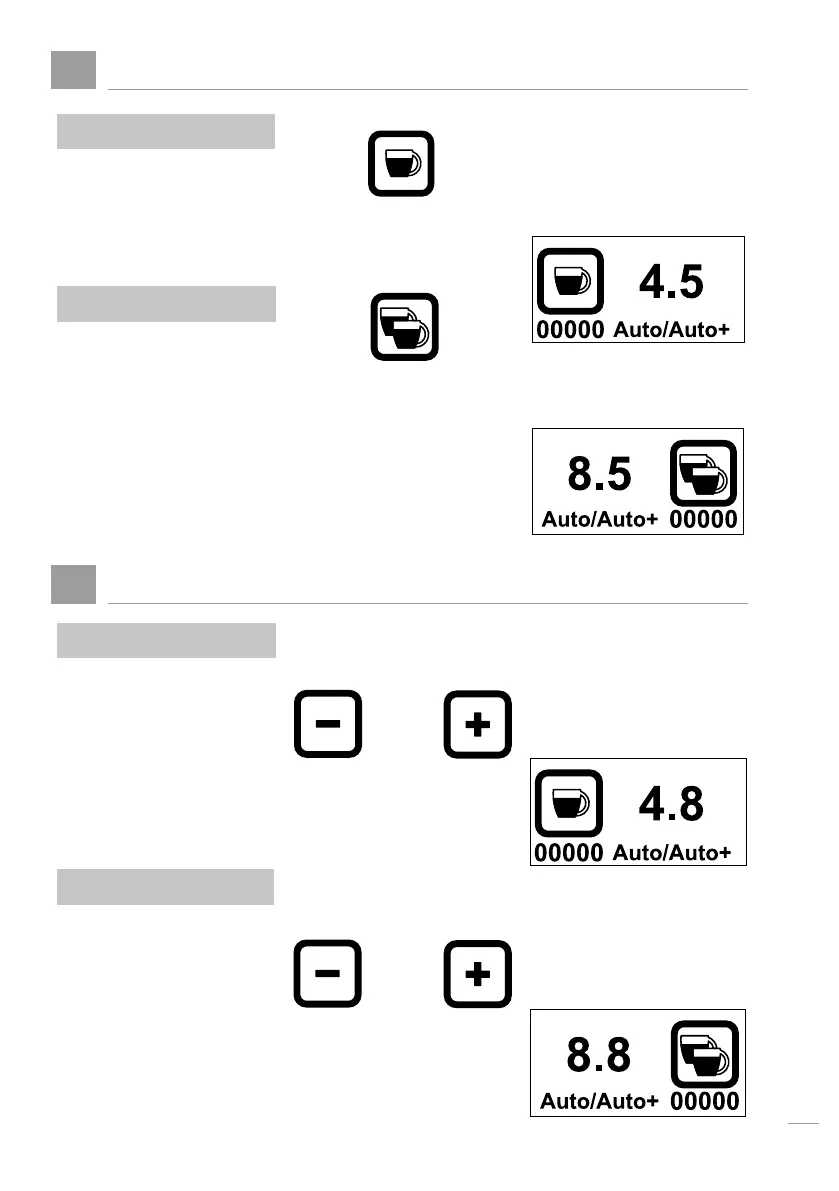
Choosing between Single or Double Dose
3
Setting the grinding time
a. Single shot (Default)
a. When single
b. When double
b. Double shot
To choose for single
To choose for double
When machine is set for
single doze, press:
When machine is set for
double doze, press:
or
or
The following pictogram
appears
The following pictogram
appears
The Grinding time
increments with 0.1 sec.
Ex 4.5, 4.6, 4.7, 4.8.
To increase or decrease
the grinding time
To increase or decrease
the grinding time
The Grinding time
increments with 0.1 sec.
Ex 4.5, 4.6, 4.7, 4.8.
Press

Related product manuals