SUCTION
PRESS
CLICK
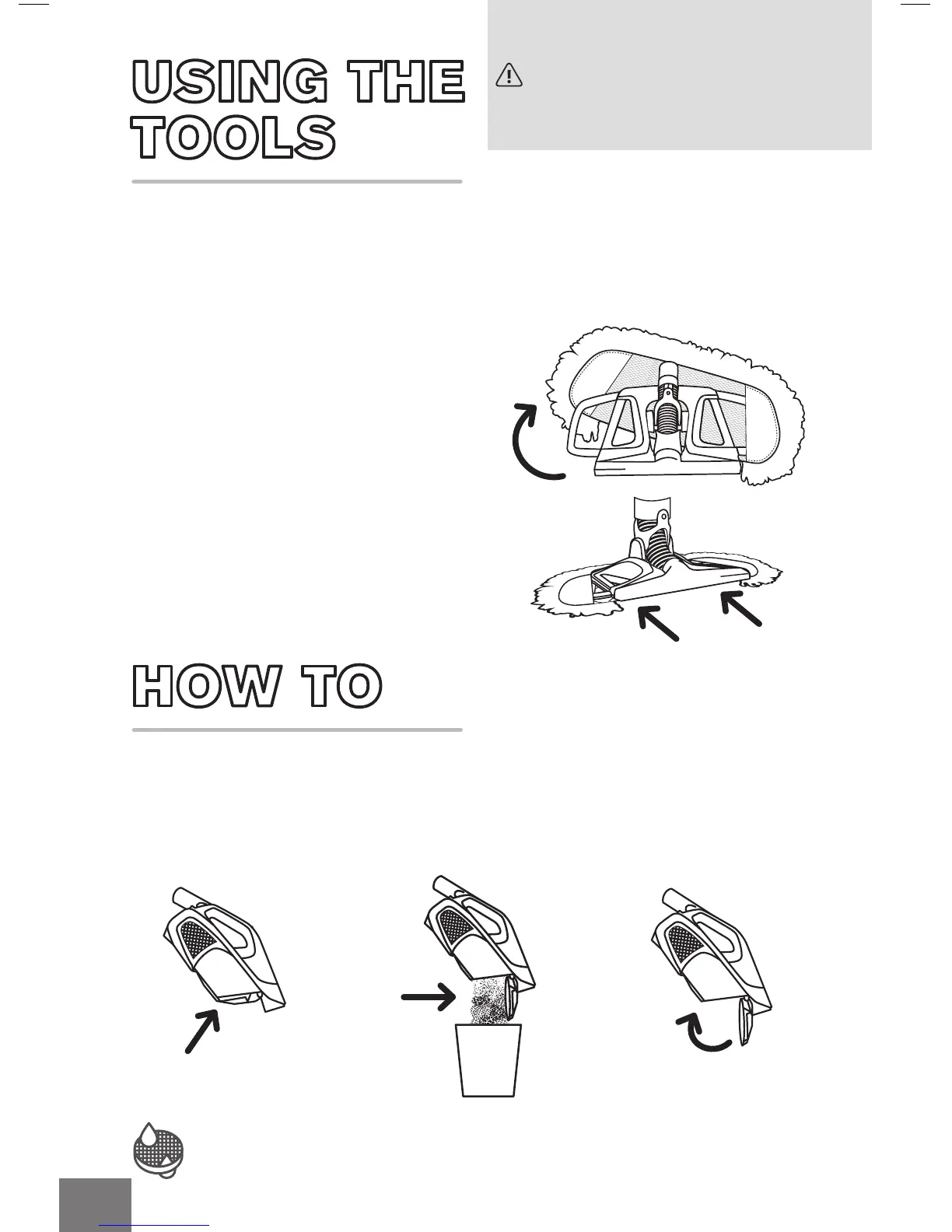
1. Press the Dirt Cup
Lid latch.
2. Ditch the dirt. Give
it a shake to remove
any debris.
EMPTY THE DIRT CUP
3. Close the lid until
the latch clicks.
This would be a good point to check the condition of your filters. Dirty? Check out pages
14 and 15 for cleaning steps of each filter.
WARNING
To reduce the risk of personal injury - Unplug before
cleaning or servicing. Do not use vacuum without dirt
cup or filters in place.
12
HARD FLOOR CLEANING WITH SWIPES
™
Vac+Dust Floor Tool with SWIPES™ Washable Microfibre
Dusting Pad picks up dirt, dust, debris & pet hair.
Works great on sealed hard floor surfaces
such as tile, wood, linoleum and others.
1. Place dusting pad onto one end
of the flexible dust head. Slide
other pocket of dusting pad onto
dust head starting at
the back.
2. SWIPES™ Microfibre dusting pad
picks up fine dirt, dust and pet
hair while the vacuum gets larger
debris.




 To Next Page