6
OPERATING INSTRUCTIONS
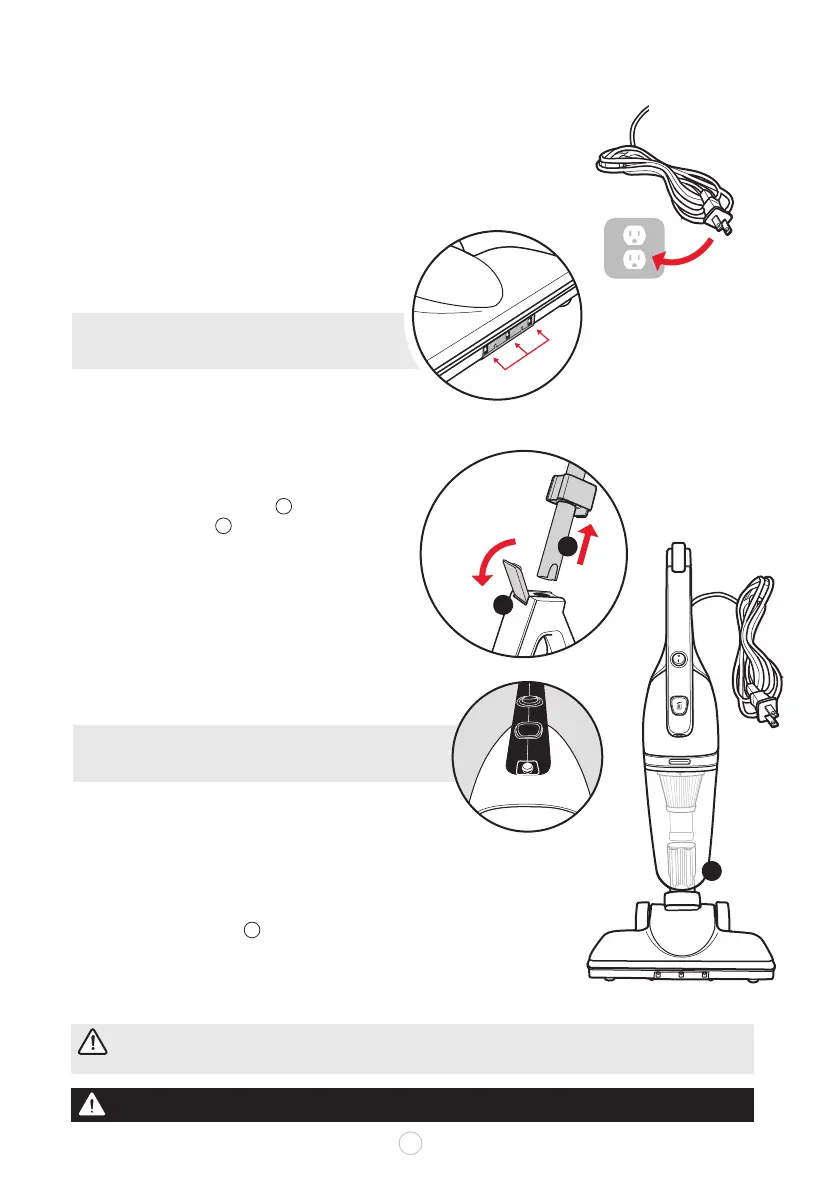
TO USE AS A FLOOR VACUUM
Assemble all parts and include the floor head.
Plug the assembled floor vacuum into a standard AC outlet.
Operate the floor vacuum in slightly angled back or
in swivel mode right or left to easily maneuver under
or around furniture and obstacles.
TO USE AS A HAND VACUUM
Ensure the appliance is switched OFF and
unplugged from the power outlet.
Release the LOCK SWITCH away from pole and
remove the handle from the main body upward.
REMOVE the floor head from the main body.
Plug back into the AC power outlet with
or without the crevice tool or brush attachment.
• Use the appliance as a handheld vacuum cleaner
to clean couches, stairs and hard-to-reach places.
•Switch between the crevice tool and brush tool for
small crevices or upholstered surfaces.
MULTI-SURFACE VACUUM
Unplug vacuum before converting handheld vacuum
to multi-surface vacuum for stairs and other flat areas.
Reattach the floor head without the long handle.
Plug into AC outlet near stairs, or other level surface areas.
ATTENTION:
Do not allow the vacuum to remain in one spot for any length of time when
the brush roller is turning. Damage to carpet may occur.
AC Outlet
Release LOCK switch
and remove handle
LED light
u
v
w
u
v
w
u
v
w
x
NOTE: Three bright LED lights on oor head help
illuminate the cleaning path while operating.
NOTE: A built-in LED beam helps illuminate dark
corners, car interior and other spaces devoid of light.
WARNING:
Do not alter the plug in any way. If the plug does not t fully in the outlet, reverse the plug.
B
C
A
A
B
C
LED lights















 To Next Page