MAINTENANCE
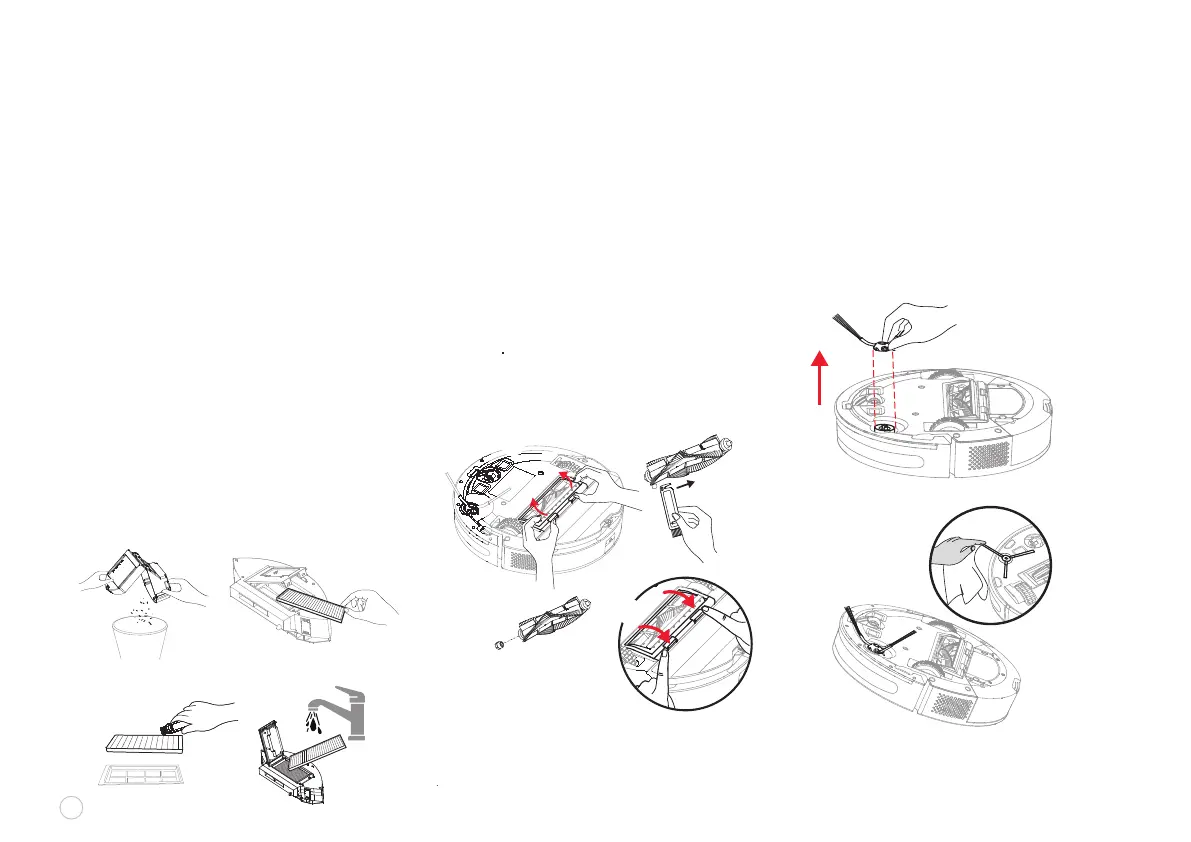
Empty the dust bin. Put the dust bin close
to the trash can, and tap the dust bin gently
to know off excess dirt.
Remove the high-performance lter,
and clean the lter with the supplied
cleaning brush.
If necessary, rinse the dust bin and lter
assembly thoroughly with water.
(NOTE: The lter cannot be cleaned
with hot water or detergent.)
After rinsing, the dust bin and lter assembly
must be thoroughly air-dried for 24 hours.
(Note: Repeated rinsing will destroy the
high-performance lter material and make
it ineffective. Please clean it carefully.)
Reassemble the air-dried dust bin,
and lter assembly, and put them back into
the robot vacuum cleaner.
CLEANING THE DUST BIN
As shown below, press down the buckle to
take out the protective cover, and remove
the driving roller brush upwards.
Clean the main brush with the supplied
cleaning tool. The blade can cut off the
hair entangled on the main brush.
Remove the roller at one end of the
main brush and clean the hair
entangled on the roller.
After cleaning, re-install the main brush
in place by placing one end at a time.
CLEANING ROLLER BRUSH
12
u
1 2
2
3
3
v
w
x
u
v
Remove side brushes, clear them of hair
or foreign matters, and decide whether to use
a wet cloth based on your personal needs.
Re-install the side brush and press it tightly
to ensure it is installed in place. (NOTE: It is
recommended to replace side brushes every
3-6 months to ensure cleaning results.)
CLEANING SIDE BRUSH
u
v
w
x
y
4
1















 To Next Page