11
APP FEATURES
ONLY IN-APP OPERATION SUPPORTED
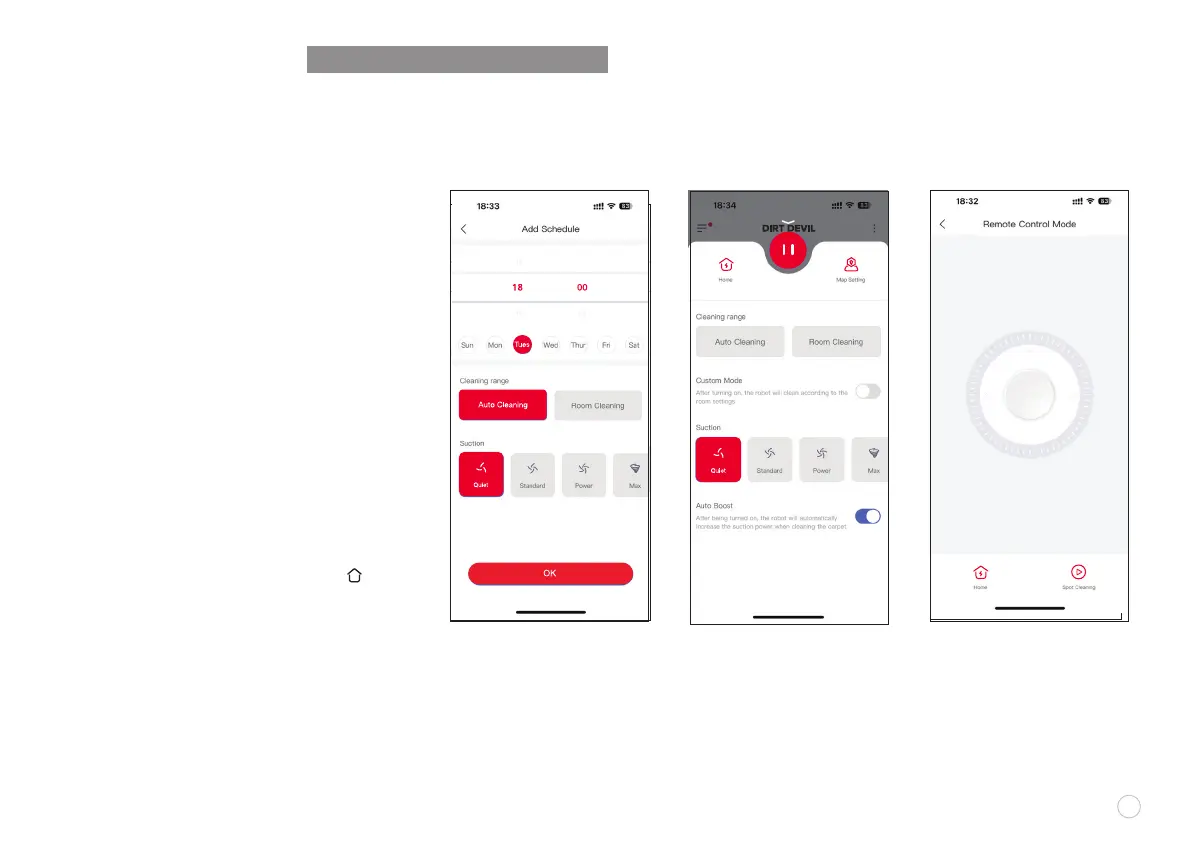
Select an sweep intensity in the ePro Clean app
as needed: Quiet
•
Standard
•
Power
•
Max
SUCTION INTENSITY MODES
SCHEDULE SET UP
REMOTELY CONTROLLED SWEEP
Manual Remotely-Controlled Sweep is available
in the app to make the robot vacuum go to the
area to be cleaned.
SLEEP MODE
If robot vacuum is inactive and the charging
dock is not connected for 10 minutes, the
robot vacuum will automatically switch to SLEEP
mode. The robot will shut down automatically
if it sleeps for more than 12 hours. The robotic
vacuum cleaner will switch to the SLEEP mode
automatically, if there is no operation within
10 minutes after it is fully charged.
SYSTEM RESET
In STANDBY mode, press and hold the “ ”
button for 15 seconds to reset the system.
After resetting the system, the robotic vacuum
cleaner will lose the original settings including
the map and virtual boundary.
ONLY IN-APP OPERATION SUPPORTED
After being turned on ,the
robot will automatically
increase the suction power
when cleaning the carpet.
AUTO BOOST
Within the app, you can
manually control the robot
vacuum using the touch
screen on your mobile device.
REMOTE CONTROL
Customize your cleaning plan,
you can set any time period, any
area, and support suction settings.
Cleaning History: You can view
the robot's previous cleaning
records (cleaning time and area)
to allow you to manage cleaning.
Edit















 To Next Page