7
NETWORK SETUP
u
Before setting up, have your home Wi-Fi network
password ready and make sure your network
meets the following requirements:
• The Wi-Fi router supports 802.11b/g/n
and IPv4 protocols
• EV3320 vacuum cleaner ONLY
supports 2.4GHz frequency band,
it does not support the 5GHz frequency band
INITIAL Wi-Fi SETUP
v
RESETTING NETWORK
• Light ashes SLOWLY: in pairing
mode, waiting for connection
•Light ashes QUICKLY:
connection to Wi-Fi in progress
•White light is normally ON:
Wi-Fi is connected successfully
NETWORK RECOMMENDATIONS:
• Do not use a VPN (Virtual Private Network) or
proxy server.
• If the vacuum cleaner cannot be connected in a
dual-band (2.4/5GHz) Wi-Fi network, make sure
to select the 2.4GHz network for Wi-Fi Setting
prior to pairing the robot vacuum with your home
network. After initial setup you can switch back
to 5GHz frequency band for other devices.
• When connecting to a hidden network,
please be sure to enter the correct network
name SSID (case sensitive) and connect to a
2.4GHz wireless network.
• When using a wireless extender/repeater,
please make sure that the network name
(SSID) and password are the same as those
of the main network.
• Set the rewall and port of the Wi-Fi router
to allow the vacuum cleaner to connect to
the app server.
• Network security requirements:
Use WPA and WPA2 networks encrypted
with TKIP, PSK, AES/CCMP.
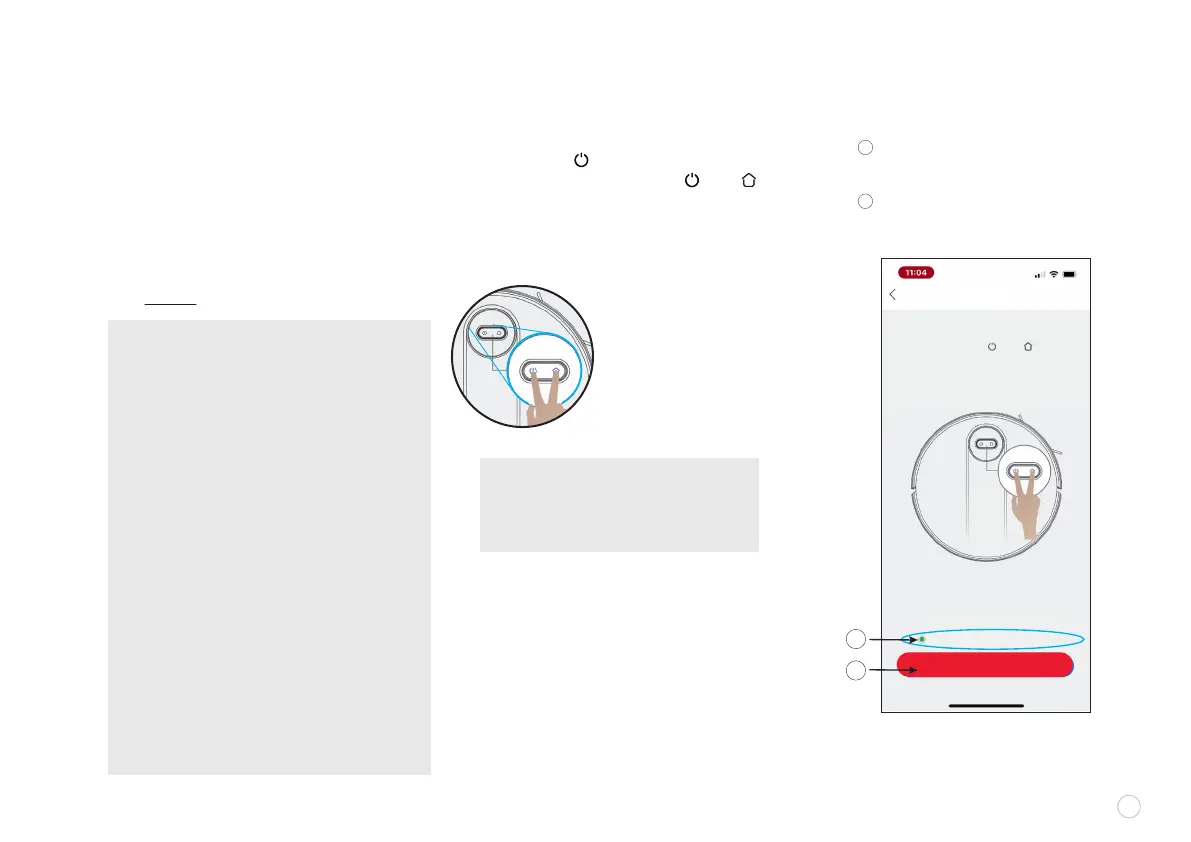
NOTE: as the robot vacuum enters the
PAIRING STATUS, you can see both
buttons ashing slowly in white as an
indicator that the unit is in pairing mode.
When the lights on the unit begin to ash,
Select “Conrm the indicator
is ashing slowly”
Then click “NEXT”
NEXT
Pairing the Robot
• Press and hold the “ ” and “ ” buttons
at the same time for 3 seconds
•Listen for “BEEP”
• Conrm the indicator lights ash slowly
Conrm the indicator lights ash slowly
A
B
A
B
EV3320
Wi-Fi Conguration Help
First press the “ ” for 3 seconds to turn on
the unit, then press and hold the “ ” and “ ”
button at the same time for 3 seconds on the
unit, until you hear an audio “Beep”.















 To Next Page