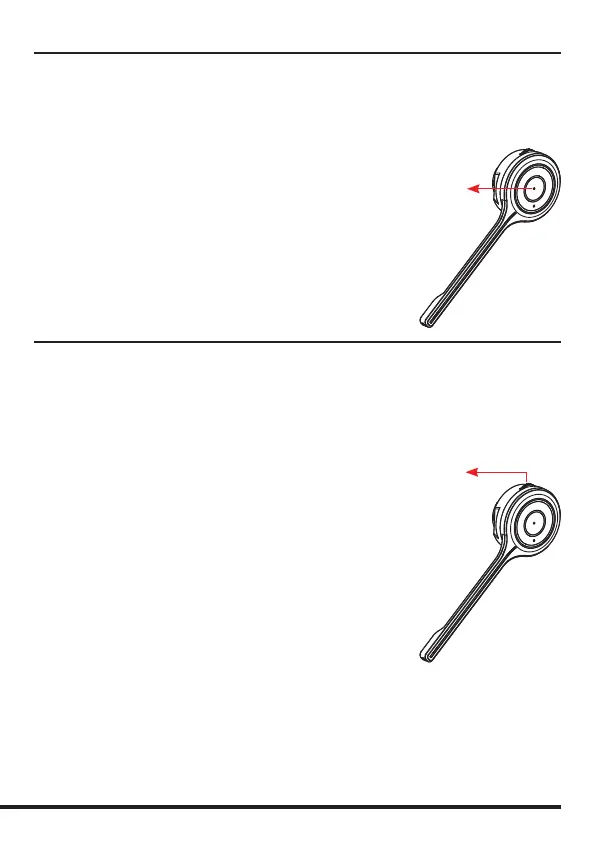
Turn on the headset
Press and hold the answer button for 2 seconds. Release the
button when the purple LED ashes 3 times and “Power on”
voice notication is heard in the speaker.
Turn o the headset
Press and hold the answer button for 3 seconds. Release the
button when the purple LED ashes once and “Power o”
voice notication is heard in the speaker.
Turning the Headset On and O
Answer button
Pairing
Prior to using the headset, it must be paired and connected to
another Bluetooth device, such as a mobile phone. For specic
instructions, check the user guide of your phone.
Pairing button
General procedure
• Turn on the Bluetooth function on your phone.
• Put the headset in pairing mode (make sure the headset
is switched on, press and hold the pairing button for
4 seconds until the blue LED ashes rapidly)
• Perform a search for Bluetooth devices on your phone.
• Connect to >>Adapt 20<< when found.
• Blue LED is On and “Connected” voice notication is heard
in the speaker when pairing is completed.
Dierent smart phones have dierent ways to handle
Bluetooth devices. Read the user manual of your phone for
more information. Some phones will connect to the headset
automatically when it is within range, for example when you
return to your oce. For other phones, it may be necessary to
reconnect manually when the connection has been broken.
The pairing mode is active for 3 minutes. After that, the
headset will enter standby mode. If you want to cancel the
pairing mode, press the answer button and then “Pairing
Cancel” voice notication can be heard.



 To Next Page