Button 4
Status LED Colour and Action
Power On Red LED On (0.5 Sec) & O (0.5 Sec)
Pairing Mode Red & Blue Toggle > 1 minute Time Out
Headset Connected Blue LED On
A2DP Mode (Music) Purple LED Flashes
A2DP Play (Music) Purple LED Flashes
HFP Mode (Call) Blue LED Flashes On & O
Microsoft Teams Mode Purple LED On
Idle Blue LED On
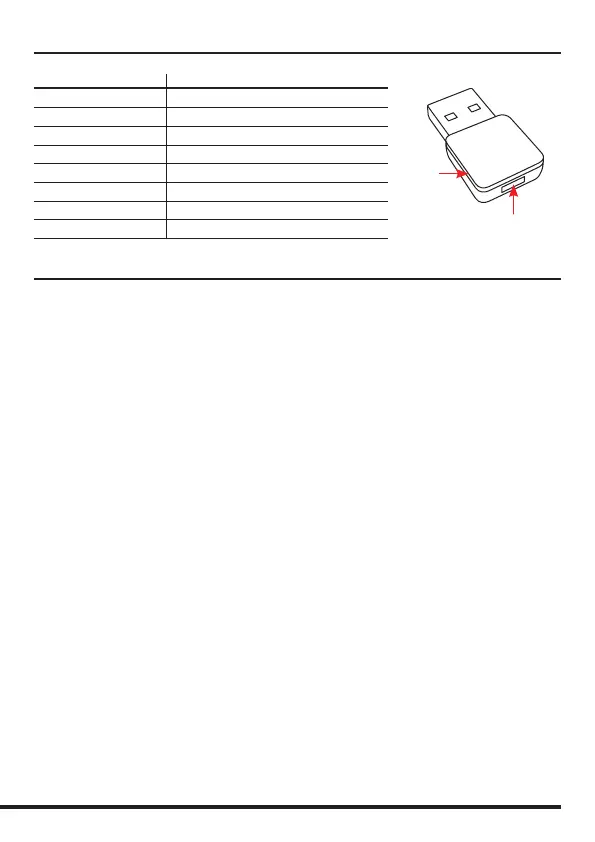
Adapt 20 USB Dongle
Pairing Button
LED
Window
Troubleshooting
If you have problems connecting the headset to your smartphone, do as follows:
• Check that the headset is charged, turned on and within 10 meters of the phone.
• Check that Bluetooth is switched on your phone.
• Check that the headset is listed as a headset device in your phone and also connected. You may
need to re-connect to the headset
• Try removing the headset from the phone, then pair and connect again.
• If the headset stops functioning, even though it is fully charged: Reset the headset by switching
it o, wait for 15 seconds and then turn it on again. You might try to reset the phone as well.
Some features are not possible to use with certain phone models:
• Check the user manual of your smartphone for missing settings or functions that needs to be
activated.
• Dierent mobile phone manufacturers may implement Bluetooth functions in dierent ways.
The unit should work with all phones that support the Headset and Hands-free Bluetooth proles,
but functionality may vary depending on the telephone model you use. You might also want to
check for the latest rmware for your phone.
Maintenance
Your headset is a technically advanced device containing circuit boards and ne mechanics, made
from top grade components. To increase reliability and life span, always treat your headset with
care.
• Do not expose the headset to moisture, liquids, rain or dust.
• Store the product in a dry and dust-free location.
• Use a dry cloth to clean your headset.
• Do not store a fully charged headset on the charging stand for long periods of time.
• In the interest of hygiene, it is advisable to replace the ear cushions of your headset every
6 months. Ear cushions are available to purchase as spare parts.



 To Next Page