Operating instructions
64420 A 98/16 page 11 - 17
3.3.1 Basic setting (calibration)
If the basic setting is incorrect, friction can occur between the grinding discs,
resulting in excessive wear.
- Switch on motor.
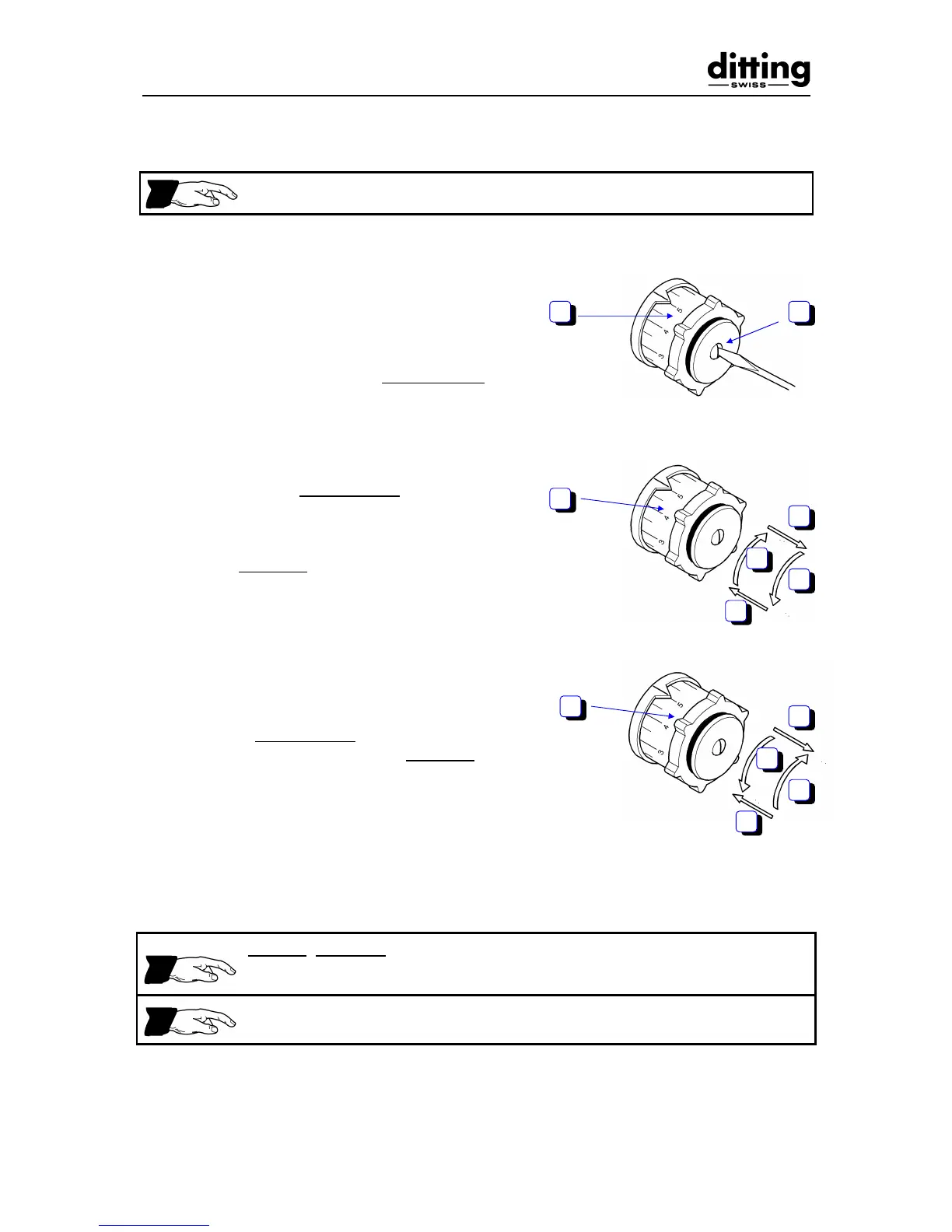
- Unscrew screw (1) at centre of adjusting
knob (2) approx. 3 - 5 mm, do not remove.
- Pull out (3) adjusting knob (2) and turn 1/4
of a revolution anti-clockwise (4). Release
and engage (5) adjusting knob (2). (1
division corresponds to approx. 3 - 4 mm
on the scale.) Turn adjusting knob (2)
slowly clockwise to scale position 1 until
there is a sound of grinding discs rubbing
together (6).
- When the sound of grinding discs rubbing
together is heard, turn back while locked
10 mm anti-clockwise (7). Pull out (8)
adjusting knob (2) and turn clockwise to
scale position 1 (9). Release adjusting
knob (2) and engage (10).
- Retighten screw at centre of adjusting knob
(2).
Checking the setting:
When turning the adjusting knob from scale position 1 - 9 there must on no
account be a sound of metal parts rubbing together.
There must be no sound of grinding discs rubbing together at scale position 1
= excessive wear of grinding discs.
- Switch off motor.


 To Next Page