Operating instructions
64420 A 98/16 page 12 - 17
3.3.2 Changing the scale setting (adjustment
for customer settings)
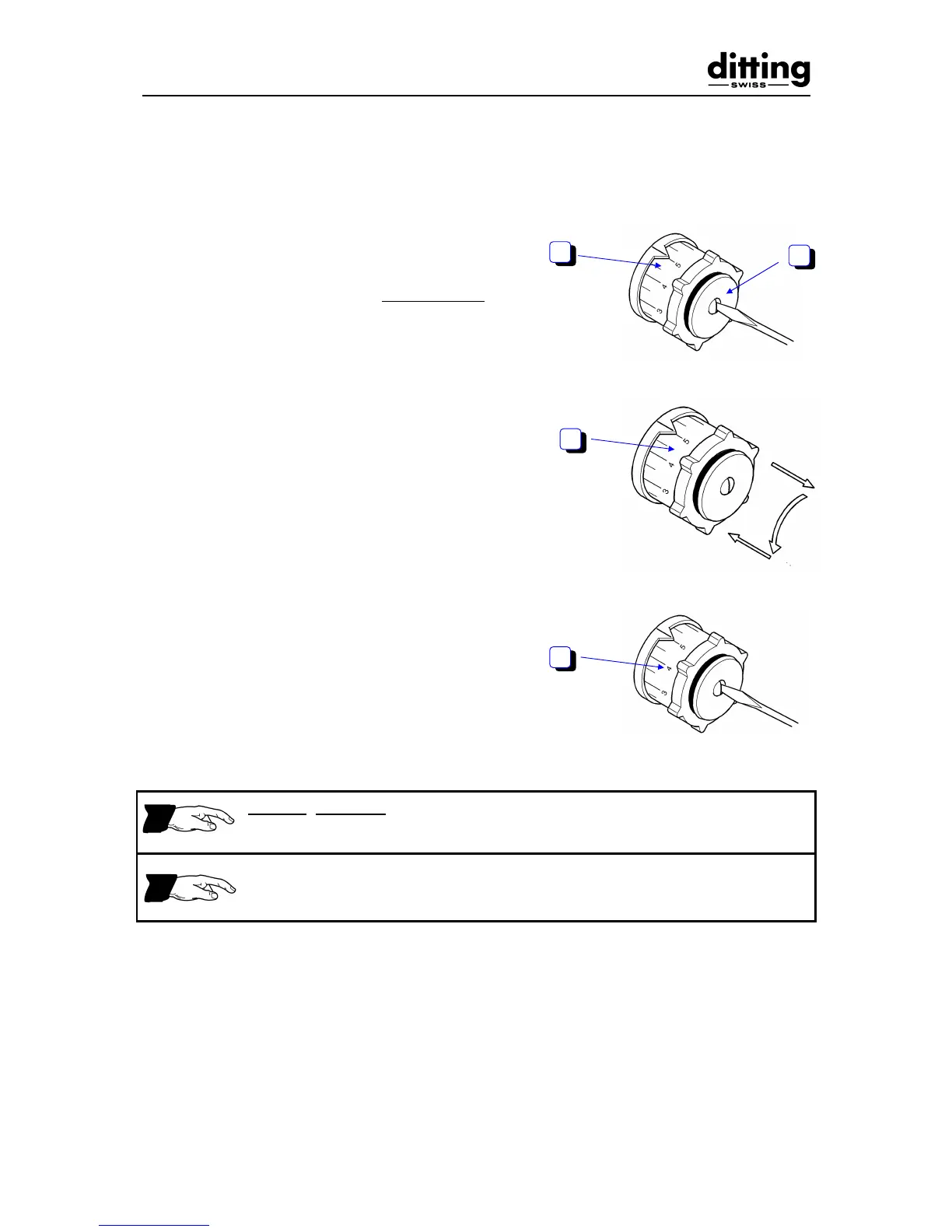
- Switch off motor.
- Unscrew screw (1) at centre of adjusting
knob (2) approx. 3 - 5 mm, do not remove.
- Set required number of divisions by pulling
out adjusting knob (2), turning in the
corresponding direction and re-engaging.
(1 division corresponds to approx. 3 - 4 mm
on the scale.)
• adjustment clockwise = coarser grinding
• adjustment anti-clockwise = finer
grinding
- Switch on motor.
- Retighten screw at centre of adjusting knob
(2).
Checking the setting:
When turning the adjusting knob from scale position 1 - 9 there must on no
account be a sound of metal parts rubbing together.
There must be no sound of grinding discs rubbing together at scale position 1
= excessive wear of grinding discs. If there is a sound, grinding must be set
more coarsely (see 3.3.1).
- Switch off motor.


 To Next Page