3.1 To Setup or Install Safely
!
3.2 Un-Packaging
3.3 Selecting a Location
3.4 Installation
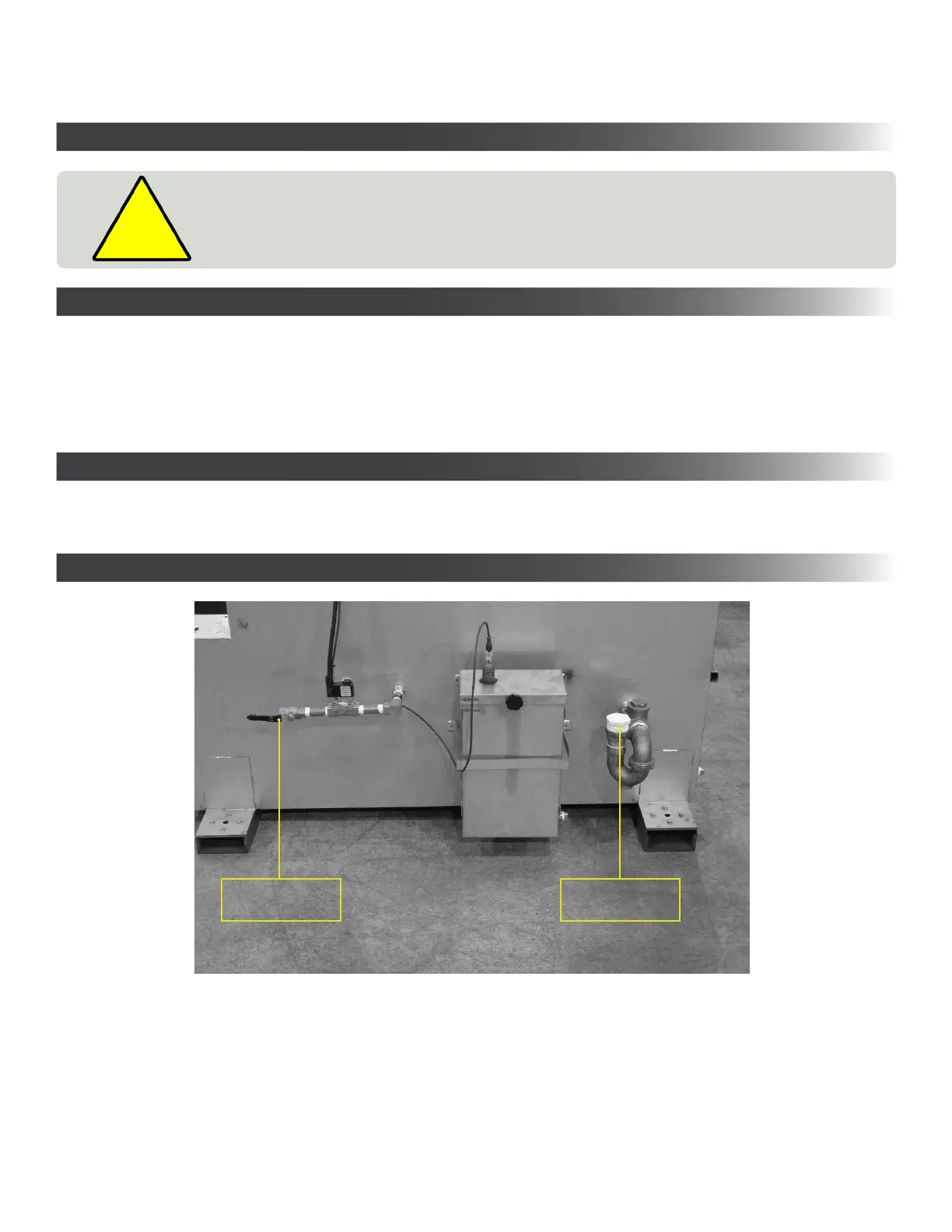
• Connect water feed as indicated
• Diversitech recommends that the overflow drain be connected to a suitable and approved collection/drainage.
The overflow drain is provided in case the water monitoring system fails.
6
SECTION 3 - SETUP / INSTALLATION
1. Immediately upon receiving the unit, carefully examine the carton for damage during transit.
2. Remove packing material.
3. Avoid tipping or inverting during handling.
4. The item serial number, model, and electrical ratings are listed on the nameplate. Record this information in the
Maintenance Record provided in APPENDIX 2: Maintenance Record, or your own preventative maintenance system.
Drain
1 ½” NPT
Water Inlet
½” NPT
• Choose a location where the unit will be used, near the operator.
• Choose a location sufficiently close to a grounded power source.
• Do not place unit near flammables or combustible surface.
• Refer to SECTION 2: Specifications, to know the electrical requirements of the unit you are installing and ensure
adequate input power that is properly sized, rated, and protected.
• This unit must be grounded for safe operation.


 To Next Page