14
Setup and Getting Started
OSD Setup
1. Prerequisition
o Betaflight >= 4.2.8
o Inav >= 4.1
o FlightOne >= 10.1.1.5576 | 10.1 Alpha 29
2. Update firmware VTX and VRX
- Download the latest firmware: www.hd-zero.com/document
- Firmware package (Rev_ddmmyyyy.zip) contains the firmware for all the VTX and VRX
3. Solder/Connect VTX UART to an available UART on your FC board
see installation diagram above
4. Flight controller Configuration (Use Betaflight as example)
- Connect the FC board to computer with an USB cable
- Start Betaflight configurator
- Go to Port TAB
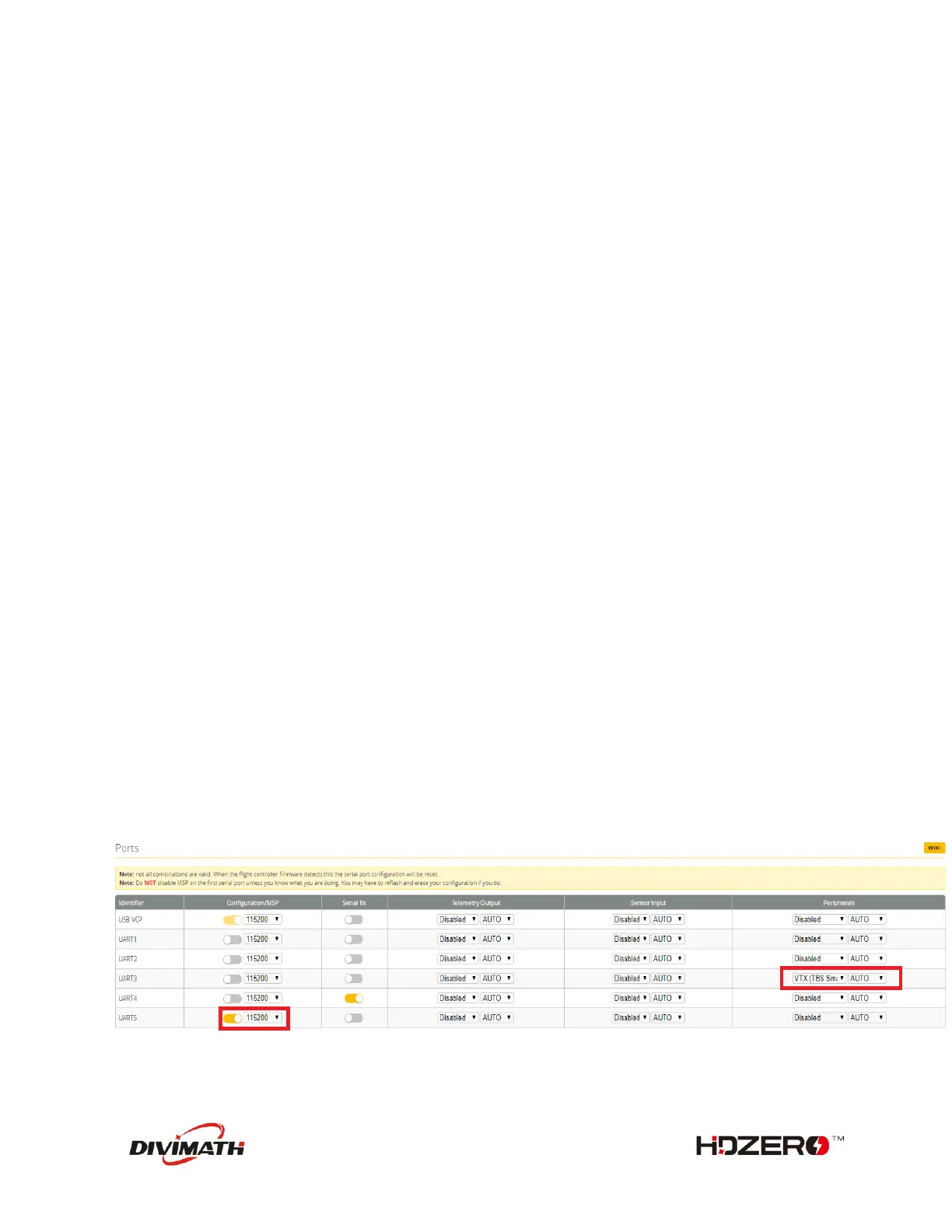
- Activate MSP protocol with 115200 baud-rate on UART number that is used to connect the
VTX
- If you have connected the SA pad to your FC, to use SmartAudio functionalities, activate the
Smartaudio protocol on the UART number you used to connect the SA pad.
- Save and Reboot
Note
- A soft serial UART is not supported for MSP protocol.
- Not all UART ports of FC support SmartAudio, check the FC user manual first.
As an example: UART5 on picture below is used for MSP, and UART3 is used for Smartaudio


 To Next Page