DJI Osmo Action 4
User Manual
24
©
2023 DJI All Rights Reserved.
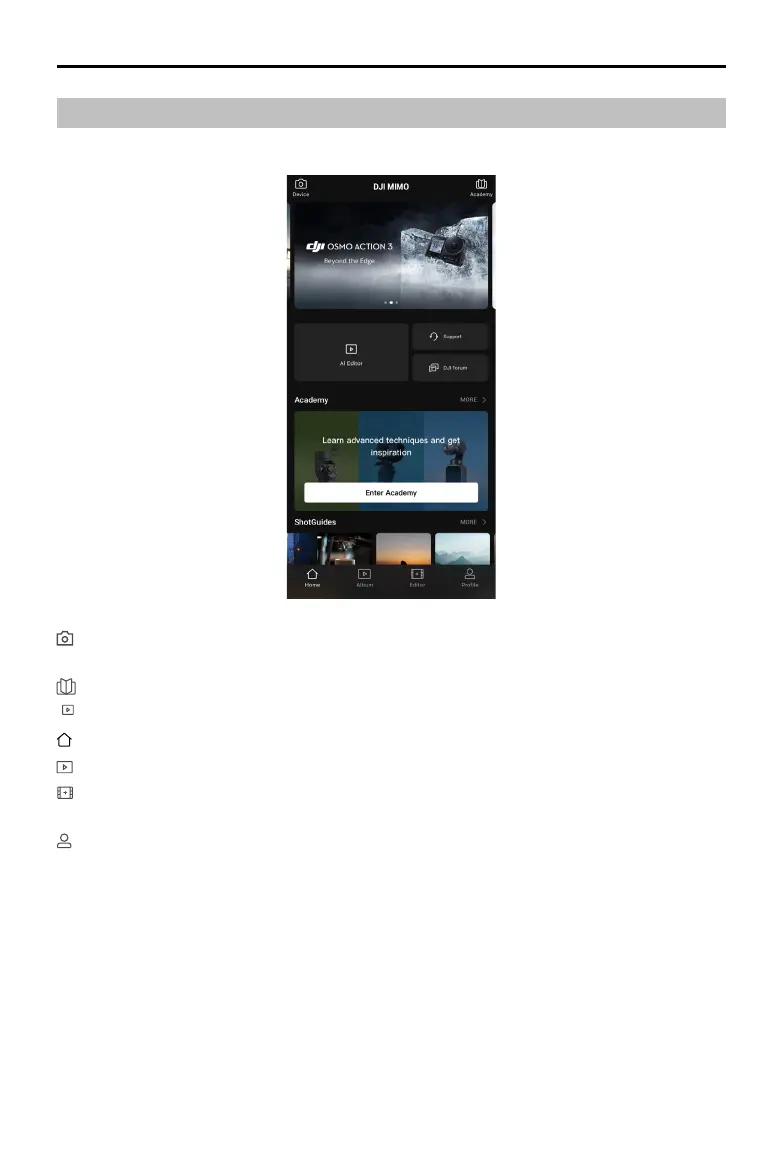
DJI Mimo App Home Screen
Lauch DJI Mimo and enter the home screen.
Device: tap to connect to Osmo Action 4. Once connected, DJI Mimo enters the camera
view.
Academy: tap to watch tutorials and view manuals.
TEMPLATE
AI Editor: provides several templates for editing photos or videos.
Home: tap to return to the home screen.
Album: manage and view footage from a mobile device or DJI device.
Editor: tap to edit photos or videos on Osmo Action 4 or import them to and edit on a
mobile device.
Prole: register or log in to a DJI account. View works and settings, check likes and followers,
send messages to other users, or connect with the DJI Store.



 To Next Page