DJI Osmo Action 4
User Manual
©
2023 DJI All Rights Reserved.
9
Using for the First Time
Attaching the Battery
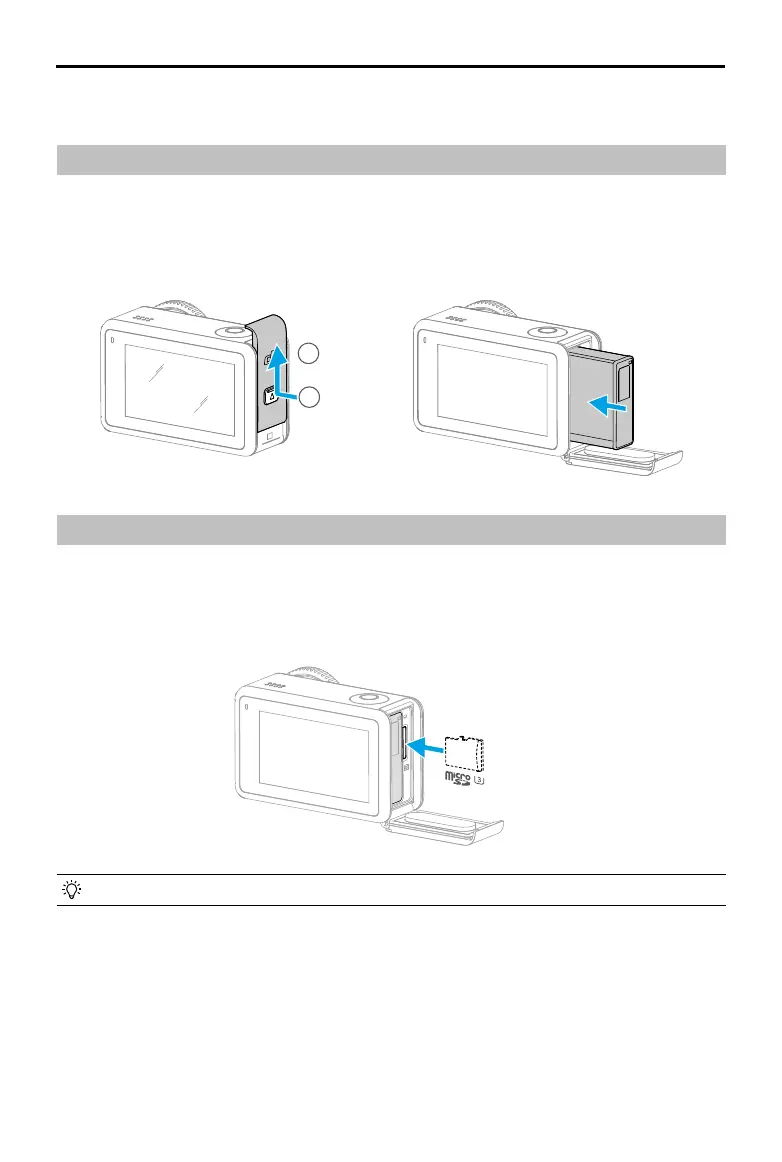
Press the release button on the battery compartment cover and slide upward, then insert
the battery into the battery compartment, as shown below. Make sure the battery is properly
inserted, then close the battery compartment cover. Note: if the battery cover is properly
mounted, the red marks on the bottom will not be visible.
Inserting the microSD Card
The footage shot on Osmo Action 4 is stored on a microSD card. A UHS-I Speed Grade 3
rating microSD card is required due to the fast reading and writing speeds necessary for high-
resolution video data. Refer to the recommended microSD card list in Specications for more
information. Insert the microSD card into the microSD card slot as shown.
• Gently push the microSD card into the camera to partially eject the microSD card.
1
2



 To Next Page