DJI Osmo Action 4
User Manual
20
©
2023 DJI All Rights Reserved.
Status LED Descriptions
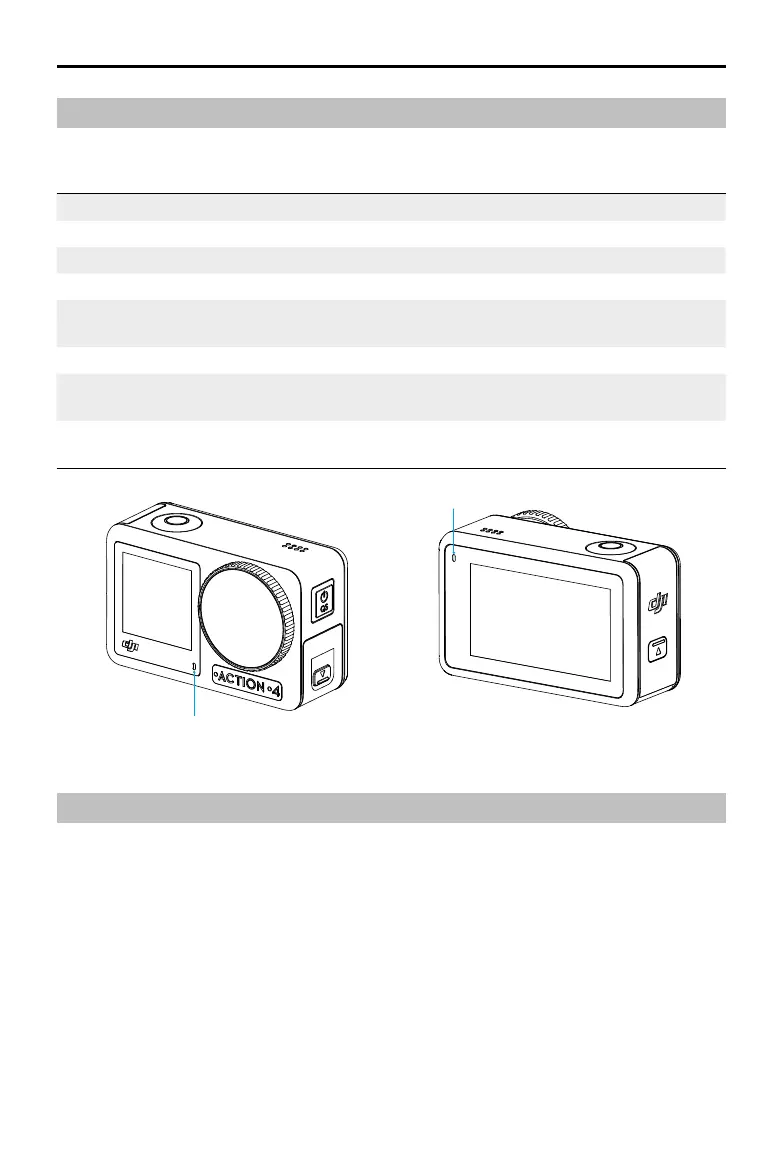
Osmo Action 4 has two status LEDs which indicate the same status information. They can be
turned on and o.
Blinking Pattern Description
Solid green Ready to use
Temporarily o Taking a photo
Blinks green Osmo Action 4 is charging when powered o
Blinks red and green
alternately
Updating rmware
Blinks red slowly Recording a video or taking a countdown photo
Blinks red three times
rapidly
Powers o the camera or powers on the camera at low battery level
O MicroSD card abnormality (no microSD card detected, microSD card
storage is full, or microSD card error.)
Status LED I
Status LED II
Storing Photos and Videos
The footage shot on Osmo Action 4 can only be stored on a microSD card (not included). A
UHS-I Speed Grade 3 rating microSD card is required due to the fast read and write speeds
necessary for high-resolution video data. The photos and videos can be transferred to a mobile
device or computer. Refer to Transferring Files for detailed information.



 To Next Page