DJI RS 3 Pro User Manual
©
2022 DJI All Rights Reserved.
31
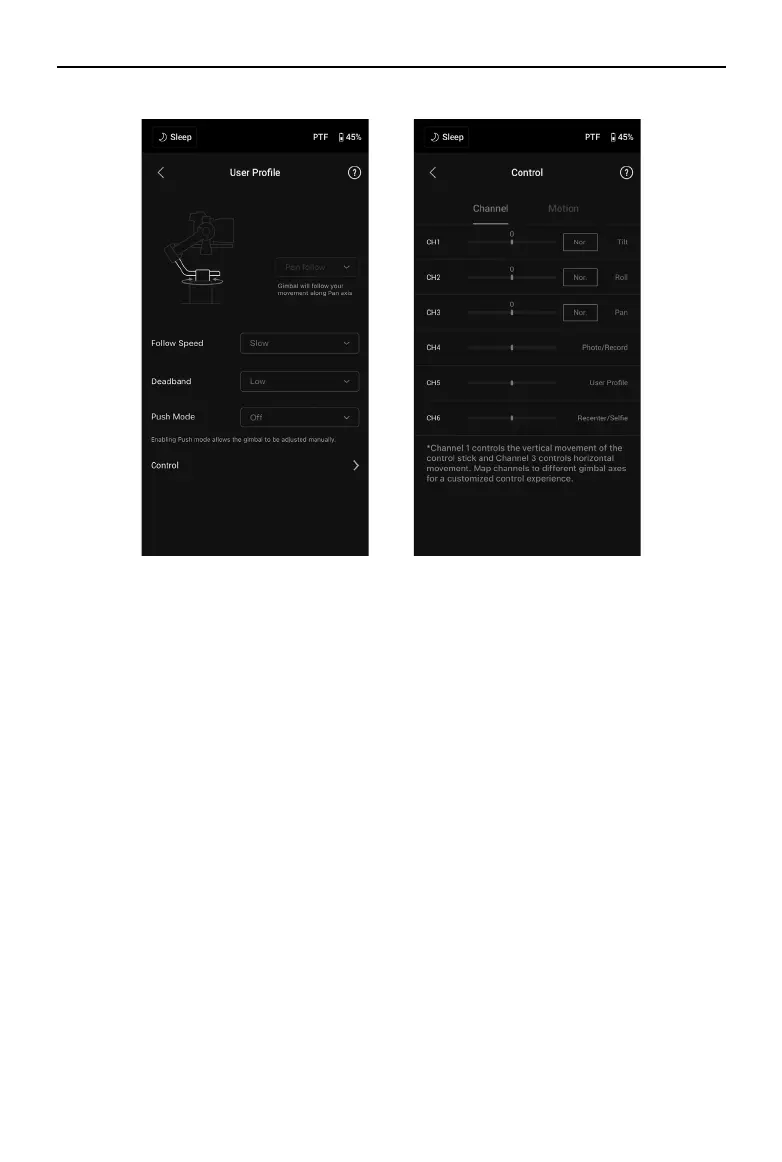
User Prole
Gimbal mode, follow speed, deadband, push mode and joystick control can be set in this page.
Deadband determines how much movement the gimbal tolerates prior to translating the pan, tilt, and
roll movement of the camera.
Control Settings
Channels
The channel indicator provides feedback when conguring remote operation. Pan, tilt, and roll channels
can be reassigned and each axis can also be inverted. Normal means the direction of movement is the
same as the joystick. Inverted means the direction of movement is the opposite of the joystick.
When using the joystick, you can only control CH1 and CH3, which is mapped to tilt and pan axes by
default. You can customize channel mapping by tapping on the name of the axis on the right of the
screen.
Motion
You can set the joystick control by adjusting deadband, max speed, smoothness, and endpoints for
each axis. There are three default proles for each settings.
Deadband: when the deadband value increases, more stick movement will be required to translate into
the actual movement of the gimbal.
Max Speed: allows the remote-controlled rotational speed to be adjusted.
Smoothness: allows you to control the sensitivity of the gimbal.
Endpoint: limits the rotational range of the gimbal by setting the endpoints. The pan axis has a slip-ring,
enabling DJI RS 3 Pro to rotate continuously when the endpoints are set to 180°. On the tilt axis, you
can set up the endpoints according to your requirements. Some longer lenses may hit the gimbal frame.
Set the endpoint angle to prevent such cases.


 To Next Page