

EasyManua.ls Logo

DMHC TC635 - User Manual

DMHC TC635
12 pages
Print Icon
To Next Page IconTo Next Page
Loading...
NanJing DMHC Technology Co., Ltd
V
ersion No.
:
V
1.
1
F
ile No.:
D
M
HC
-
TC635
Prepared:
Li Lulu
Revised:
Wang Xiaolei Approval: Sun Min
Date: 2022-6-21 Date: 2022-6-28 Date: 2022-6-28
TC635-Color Display Manual
Product:Smart Display
Type: TC635
Question and Answer IconNeed help?

Do you have a question about the DMHC TC635 and is the answer not in the manual?

Overview

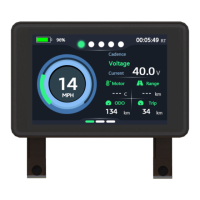
The TC635-Color Smart Display is a device designed for Electric Pedal Assistance Bikes (EPABs) that comply with the EN15194 standard. It features a zinc alloy frame and communicates via UART & CAN protocols. The display provides a comprehensive interface for monitoring various aspects of the e-bike's operation and user interaction.

Function Description

The TC635-Color Smart Display offers a wide range of functions to enhance the e-bike riding experience:

  • Smart Battery Power Indication: An optimized algorithm provides stable power prompts, addressing the issue of battery power fluctuations during motor start and stop. This ensures a more reliable and consistent display of remaining battery life.
  • Pedal Assist Level Adjustment and Indication: Users can easily adjust and view the current pedal assist level, allowing for customized power delivery from the motor.
  • Speed Indication: The display shows real-time speed during a trip, keeping the rider informed of their current velocity.
  • Motor Output Power Indication: Both digital and graphical representations of the motor's output power are provided, giving riders a clear understanding of the motor's performance.
  • Mileage Indication: The display tracks and shows both trip distance (Trip) and total accumulated distance (ODO), helping riders monitor their journey and overall usage.
  • Walk Assist Control and Indicator: This feature allows for easy assistance when walking the bike, with a clear indicator on the display.
  • Light Switch Control and Indicator: Users can control the e-bike's lights directly from the display, with an indicator showing the current light status.
  • Battery Details: For e-bikes with CAN communication-enabled batteries, the display can show detailed battery information.
  • Error Code Logs and Indication: The display logs and indicates any error codes, aiding in troubleshooting and maintenance.
  • USB Charging: The display includes a USB charging port with a maximum charging current of 500mA, allowing users to charge small electronic devices on the go.
  • Turn Light Signal: The display can indicate turn signals, with a corresponding flashing icon.
  • Brake Indicator: A dedicated indicator signals when the brakes are engaged.
  • Motor Information and Temperature Indicator: Provides data related to the motor's operation, including its temperature.
  • Distance Range: Estimates the remaining distance the e-bike can travel based on current battery levels and assist settings.
  • Display Mode Select: Allows users to switch between different display modes, such as Watt, Cadence, Voltage, Current, Speed, and Calorie.

Important Technical Specifications

  • Rated Voltage: 36V/48V
  • Rated Current: 44.9mA
  • Current Limit: ≤70mA
  • Power-off Leakage Current: <1uA
  • Output Current to Controller: 25.1mA
  • Usage Temperature: -20°C to 45°C
  • Storage Temperature: -20°C to 60°C
  • Waterproof Grade: IP65
  • Storage Humidity: 30%-70%
  • Dimensions: 98mm (width) x 64mm (height) x 30mm (depth)

Usage Features

The TC635-Color Smart Display is designed for intuitive operation through a remote control with three buttons: "+", "-", and "On/Off".
  • Power On/Off: A long press (>2S) of the "On/Off" button powers the display on or off. Upon startup, if "read" appears, users can select "Accept" or "Reject" using "+" or "-" and confirm with "On/Off". "Accept" enters the main interface and supplies power to the controller, while "Reject" leads to the LOGO interface, from which "Next" can be pressed to go back, or a long press of "On/Off" powers off the device.
  • PAS Level Selection: After the display starts up, pressing "+" or "-" changes the Pedal Assist System (PAS) level. Motor output power varies with each level. The default range is 1-5, with class 1 being the default upon startup.
  • Function Selection: Pressing "On/Off" allows users to cycle through various display functions like "Watt", "Cadence", "Voltage", "Current", "Speed", and "Calorie".
  • PAS On/Off: A long press of "-" switches the pedal assist function on or off. When the indicator lights up, pedal assist is off.
  • Light Control: A long press of "+" switches the e-bike's lights on or off.
  • Turn Light Signal: Activating the turn signal on the remote will cause the corresponding indicator on the display to flash.
  • Main Interface Display Mode: To enter settings, long press "+" and "-" simultaneously. Use "+" or "-" to select "User", "Param", or "Other", and "On/Off" to confirm and enter the submenu. Within submenus, "+" or "-" selects different modes. "Exit" quits a sub-menu. To quit the entire setting interface, long press "+" and "-" simultaneously again.
  • Settings Menu:
    • Sleep Time: Configurable from 0-15 minutes (default 10min). "0" means always on.
    • Unit: Switch between KM/H and MPH (default KM/H).
    • Backlight Brightness/Light Sensor: Options include Light Sensor ON, Backlight1 (60% brightness), Backlight2 (80% brightness), and Backlight3 (100% brightness). Default is Backlight3.
    • Theme: Allows selection of display color themes (default Blue).
    • Wheel Diameter: Adjustable from 8-30 inches (default 24).
    • Class Selection: Choose between Class 1, Class 2, Class 3, or Off-road. Entering a password may be required. Default is Class 2.
    • PAS/TS Sensor Setting: Configure PAS sensor or Torque Sensor settings. Default is PAS sensor. A password may be required.
    • ODO: Manually reset the odometer.
    • Warn: Enable or disable warnings. A password may be required.
    • Current Limit Setting: Adjustable from 13-25 (default 23). A password may be required.
    • Version No.: Displays the device's software version information.

Maintenance Features

  • Error Code Logging: The display provides error codes for various issues, aiding in diagnosis and troubleshooting.
    • UART Protocol Errors: Includes codes for Brake un-reset, Throttle un-reset, Throttle signal wire short circuit to GND, Speed sensor fault, Over current, Under Voltage, Motor Stall, Motor Phase Wire, Motor Hall, and Unsupported command.
    • CAN Protocol Errors: Includes codes for Over Current, Over Voltage, Under Voltage, Throttle reset, Throttle fault, Under Voltage Protection (Battery), Over Voltage Protection (Battery), Motor Hall Fault, Motor Phase Wire Fault, Motor Temperature Protection, Motor Temperature Sensor Fault, Controller Temperature Protection, Controller Temperature Sensor Fault, Current Sensor Fault, Light Fault, 15V Power Test Fault, Remote Test Circuit Fault, and Speed Sensor Fault.
  • Warranty: Nanjing DMHC Technology Co., Ltd. provides a warranty service for products purchased from DMHC by vehicle manufacturers and distributors. The warranty period is 15 months from the date of delivery. The warranty covers problems arising from product components, materials, and production processes.
    • Exclusions: The warranty does not cover damages due to modification, neglect, improper maintenance, misuse, abuse, traffic accidents, damage during customer transportation, unreasonable installation, commissioning or maintenance, non-material or process reasons, changes in appearance that do not affect function, repairs by non-designated points, or normal wear and tear.
    • Repair/Replacement: DMHC reserves the right to repair or replace faulty products. For quality problems, vehicle manufacturers or dealers can report purchase order, production batch number, and serial number to DMHC after-sales service. Repairs or replacements are free if within warranty scope. Out-of-warranty services will incur charges for components, labor, and transportation.
    • Contact: For repairs of DMHC products installed on a vehicle, contact the vehicle manufacturer or dealer directly. The warranty statement is subject to the current laws of China, and DMHC reserves the right to modify terms without prior notice.

DMHC TC635 Specifications

General IconGeneral
BrandDMHC
ModelTC635
CategoryMonitor
LanguageEnglish