NanJing DMHC Technology Co., Ltd
Prepared:
Li Lulu
Revised:
Wang Xiaolei Approval: Sun Min
Date: 2022-6-21 Date: 2022-6-28 Date: 2022-6-28
7
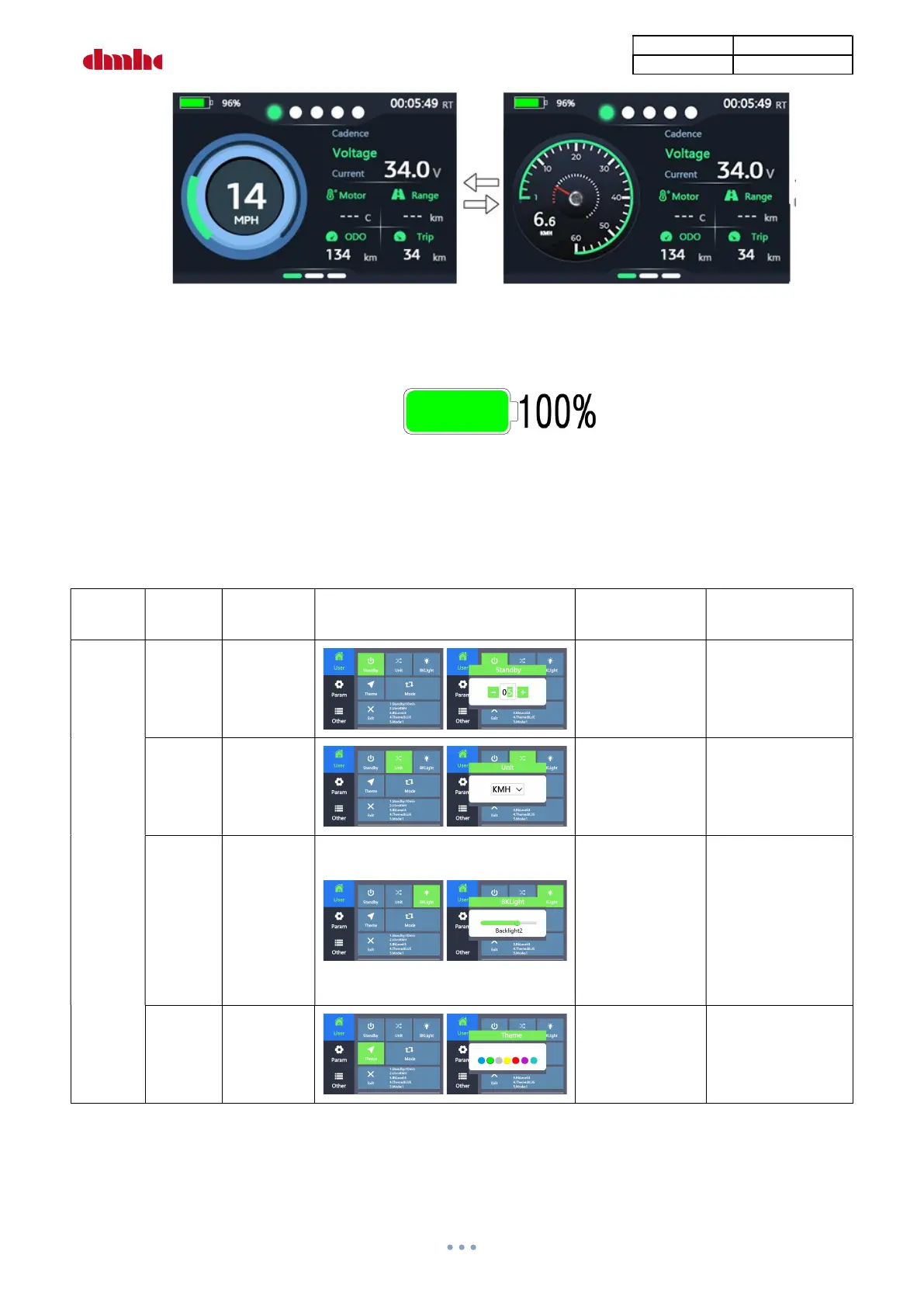
Mode Interface
⑧ Battery Power:
The battery power indicator is as the following by percentage:
Battery Power Indicator
8). Settings
Long press “+”and “-”at same time to enter settings, press “+”or “-”to select “User”、“Param”or
“Other”, press“on-off”to enter submenu, select and press “Exit”to quit submenu,Long press “+”and
“-”at same time to quit setting interface.
Setting
Menu
Item Definition
Setting Interface
Parameter
Definition
Note
User
Sleep Sleep Time
0-15
Default Value:
10min
0: Always On
Unit
Unit
Setting
KM/H
MPH
Default
Value=KM/H
Back
Light
Backlight
Brightness/
Light
Sensor
Light Sensor ON
Backlight1
Brightness 60%
Backlight2
Brightness 80%
Backlight3
Brightness100%
Default
Backlight3
Theme
Color
Setting
Default
Blue


 To Next Page