NanJing DMHC Technology Co., Ltd
Prepared:
Li Lulu
Revised:
Wang Xiaolei Approval: Sun Min
Date: 2022-6-21 Date: 2022-6-28 Date: 2022-6-28
5
7). Operation
“Long press>2S” referred by“long press” “Short press<0.5S”referred by“press”.
① Power On/Off:
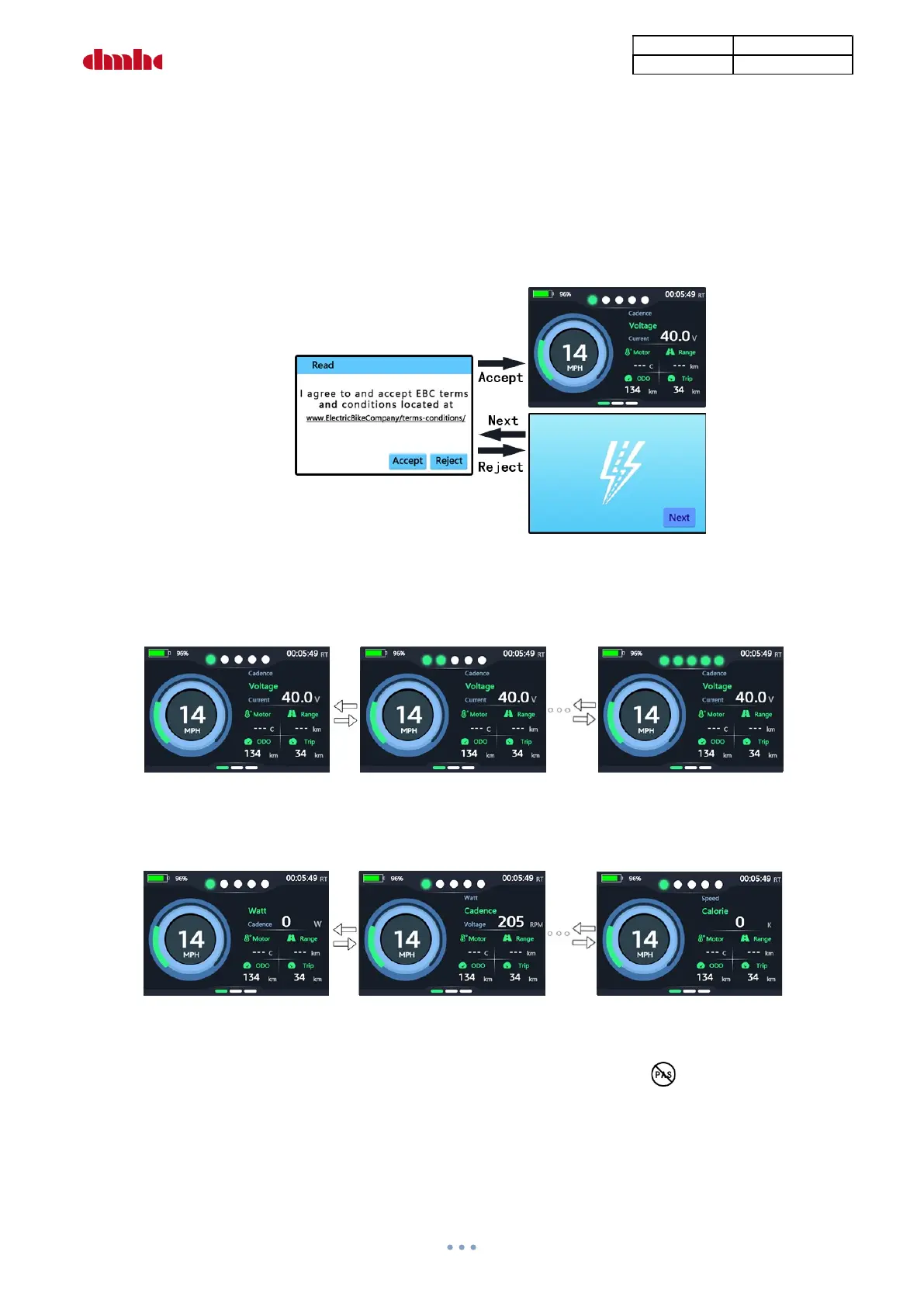
Long press“on-off”to turn on, press“+”or“-”to select when “read” appears,press“on-off”to confirm.
Select“Accept”and press to enter main interface of the display and supply controller power. Select
“Reject” and press to enter LOGO interface, press“Next”to back, long press “on-off” to power off.
② PAS Level
Press“+”or“-”to change the PAS level after display starting up. Motor output power is different under
different level. The default levels range is 1-5, and will be set under class 1when the display starting up.
PAS Level Selection Interface
③ Function Selection
Press“on-off”to select display function: “Watt”/“Cadence”/“Voltage”/“Current”/“Speed”/“Calorie”
Function Interface
④ PAS On/Off
Long press“-”to switch on/off, pedal assist is off when the indicator“ ”lights up.


 To Next Page