CellCom Installation Guide Digital Monitoring Products
3
Rechargeable Battery
TheCellComRTrechargeablebatteryisusedtoprovide24hoursofbackupbatterypowerwhenDCpowerisnot
available.ThebatteryisintendedforbackuppoweronlyandnottooperatetheCellComRTonadailybasis.Ifthe
batteryislow,ornotpluggedintotheJ4batteryconnector,alowbatteryconditionisindicatedbytheCellComRT
Cellular Communicator.
Note:IfremovingtheCellComRTfromservice,disconnectthebackupbatteryfromtheCellComRTJ4connector.
Installing or Replacing the Battery Assembly
Observepolaritywhenpluggingthebatteryconnectorintotheheader.UseonlyDMPModelCELLCOMBAT.
Removing the Battery Assembly
1.DisconnectthebatteryleadconnectorfromtheCellComRTJ4batteryheader.
2.RemovethebatteryPCBfromthethreestandoffsbyunsnappingthetopoftheplasticclips.
3.Properlydisposeoftheusedbattery.
Caution:Riskofre,explosion,andburns.Donotdisassemble,heatabove212°F(100°C),orincinerate.
Properly dispose of used batteries.
Installing the Battery Assembly
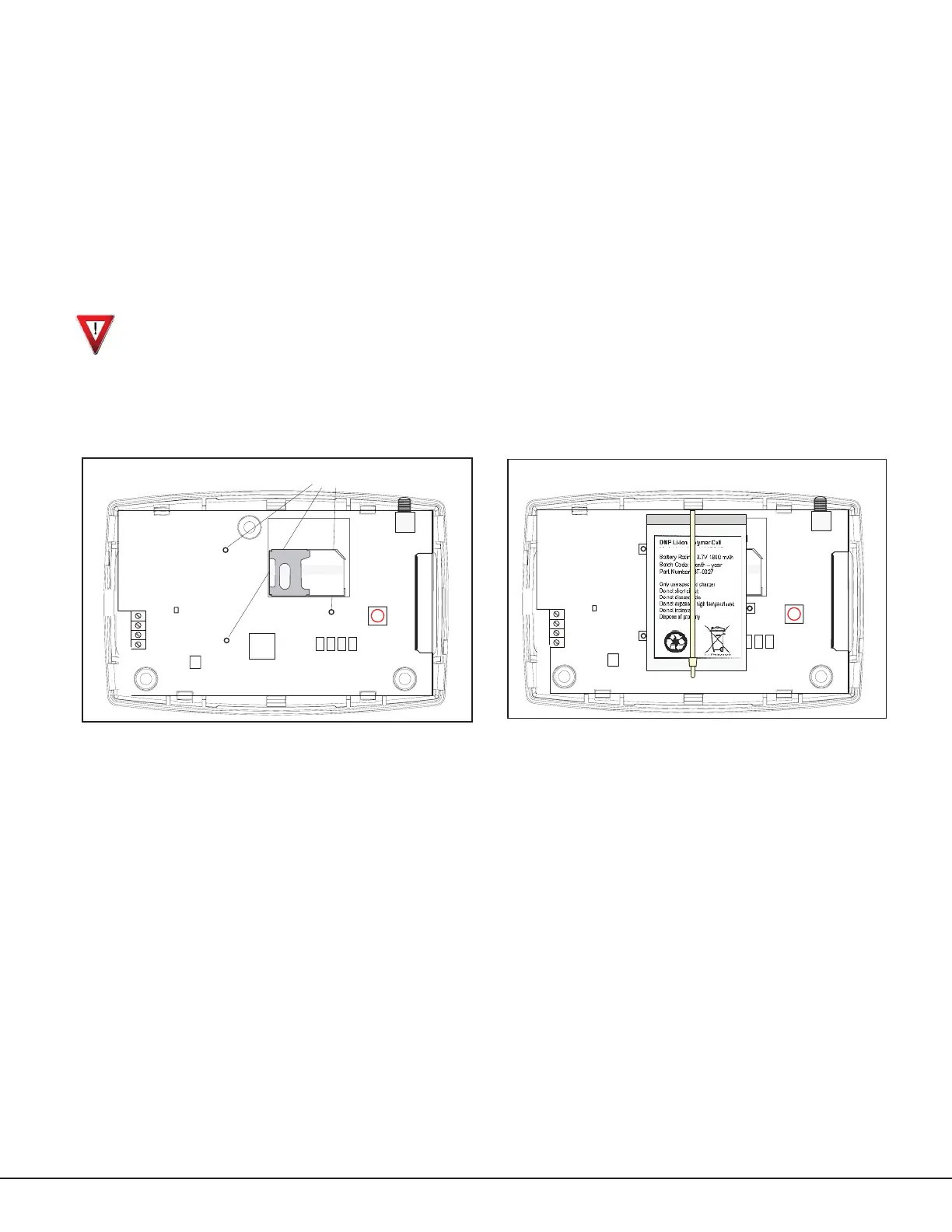
1.AlignthethreebatteryPCBstandoffmountingholeswiththestandoffs.SeeFigure5.
2. Snap the battery assembly in place.
3.ObservepolarityandconnectthebatteryleadconnectortotheCellComJ4batteryheader.
Battery Assembly
Standoff
Antenna
Tamper
Switch
S2
J19
Battery
Transmit LED
J4
SIM Card
Holder
CellComRT
J22
Figure 5: Battery Assembly Standoffs
Antenna
Tamper
Switch
S2
J19
Battery
Transmit LED
J4
J25
SIM Card
Holder
CellComRT
J22
Figure 6: CellComRT Assembly


 To Next Page