Repair
As the baery nears the end of its life, it may lose its ability to
recharge. If this occurs, contact the retailer or an authorized service
center. Do not aempt to service, modify, or replace the baery
yourself.
Disposal
Bring the unit to the recycling center or dispose of it in accordance
with local ordinances.
Instructions for Use
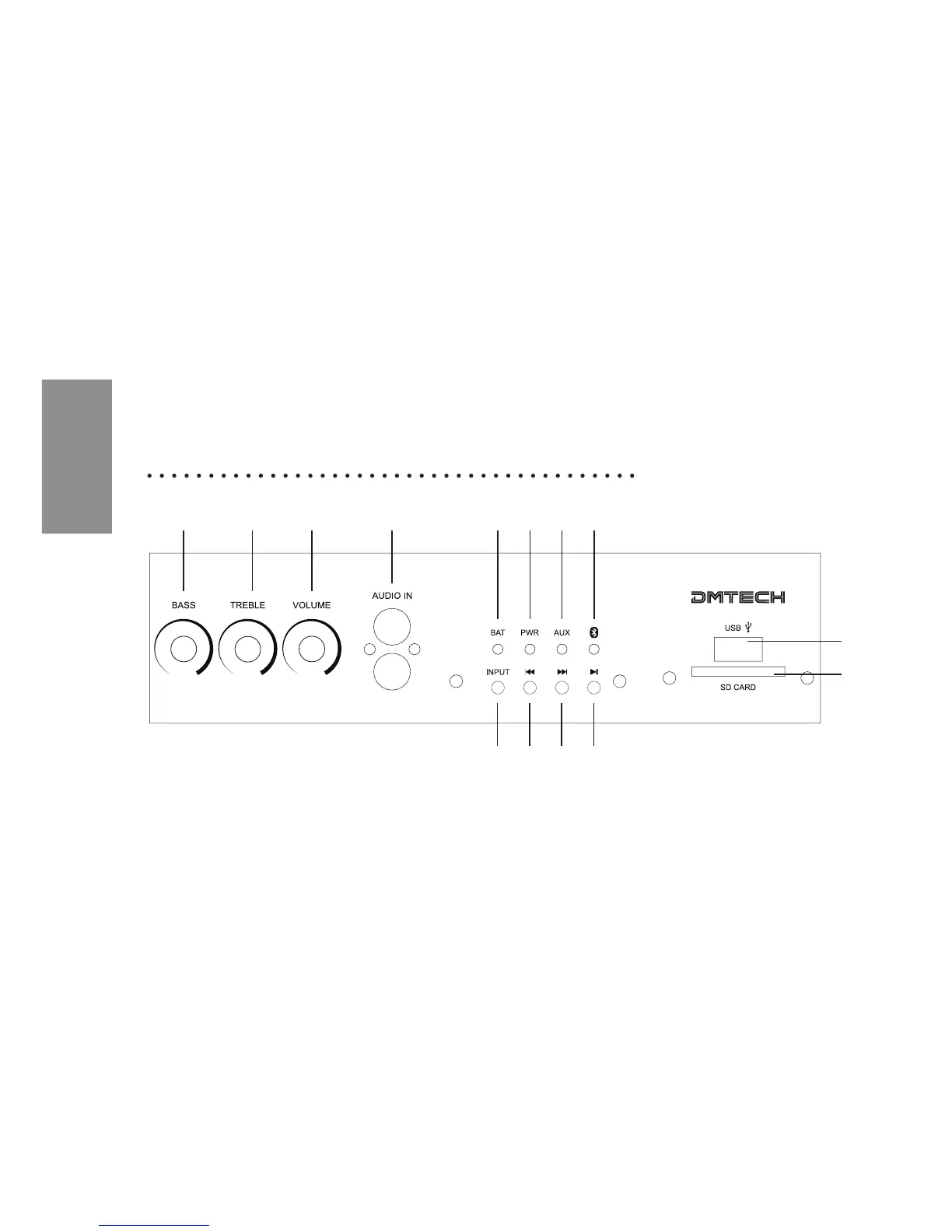
1 2 3 4 5 6 7 8
9
10
11 12 13 14
1. Bass control: Control the bass level of the speaker.
2. Treble control: Control the treble level of the speaker.
3. Main volume control: Control the master volume of the Speaker.
4. AUDIO IN: RCA audio input. Connect with an audio source such
as a CD player, MP3 player, computer or phone, with appropriate
audio cable. Press INPUT, unl the AUX indicator LED is lit. If
music is played on the connected audio device it will now be
played through the speaker.
5. Baery Charge/Low Baery LED: When the baery is fully
recharged, the LED will turn o. When charging, the LED will be
lit in RED. When the baery is low, the LED will be blink in RED.


 To Next Page