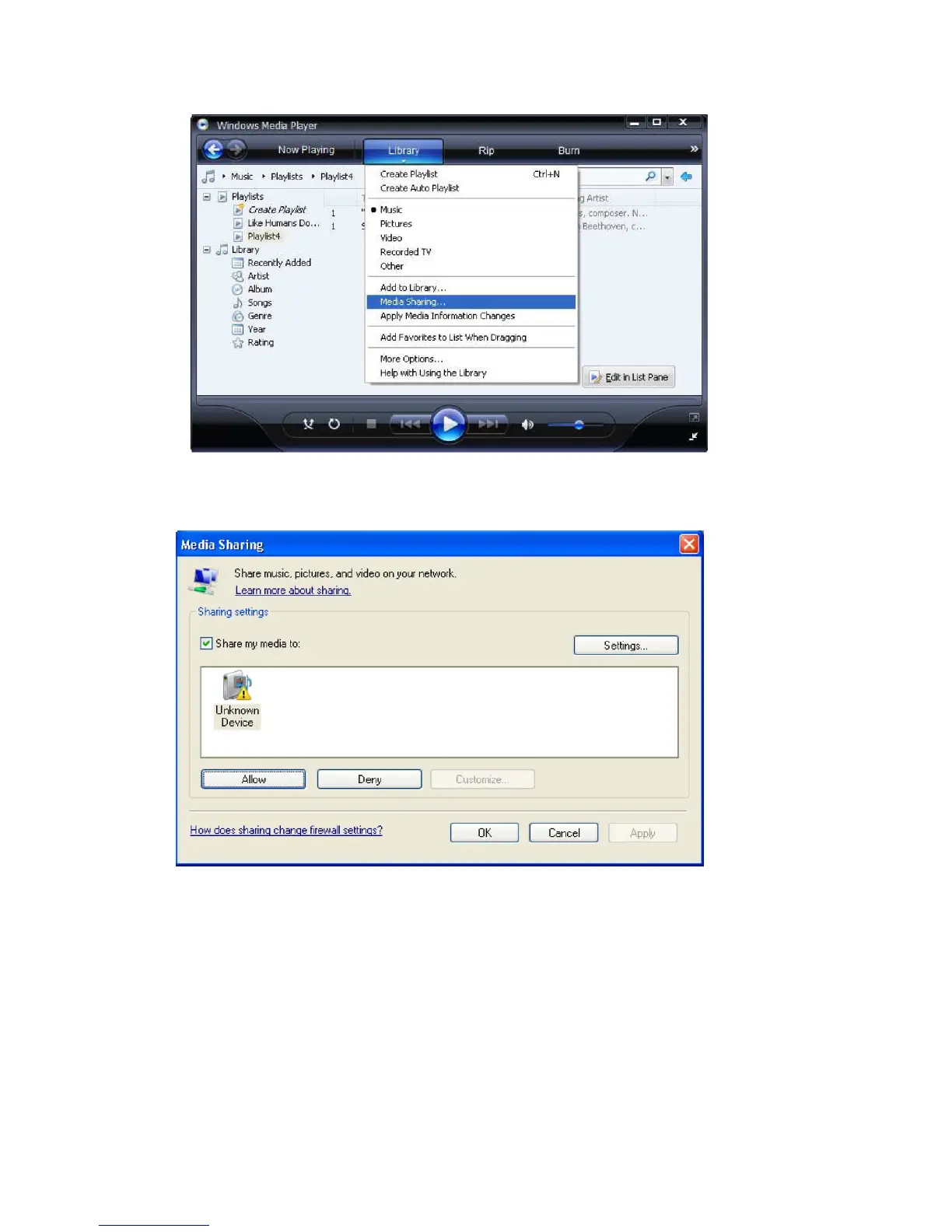
5. From the ‘Media Sharing’ windows, the radio will be listed as an unknown device. Click on the unknown device
listed, then click the ‘Allow’ button and then click ‘OK’ Allowing the Radio to Connect:
6. Once the UPnP server is configure to share media files with the internet radio, you can play the files by doing the
following on the radio.
7. Select ‘Media Player’ from the main menu.
8. Press SELECT and then select ‘UPnP Severs’.
9. Press SELECT and the radio will scan for all available UPnP servers.
Note: This may take a few seconds for the radio to complete its scan and before the scan has completed, the
radio will display ‘[Empty]’ if no UPnP servers are found.
10. After a successful scan, select your UPnP server, by rotating the knob if there is more than on UPnP server, and then
press SELECT.
11. The radio will now list the media categories available from the UPnP server,


 To Next Page