8. Troubleshooting
8.1 Self Test Error Code Display
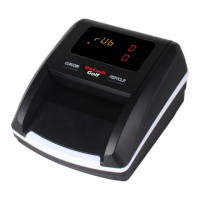
The detector automatically performs a self-test after power on. If red indi-
cator are showed on the display window, it is probable that the sensor is
blocked by banknotes or dust. Please, use a brush or a piece of soft cloth
to clean the dust on the sensor or remove the banknotes, and then restart
the machine.
8.2 Important Notices
◆ If the machine keeps alarm or works abnormally, check the following:
Whether the main power supply is within specified range (AC 100V
-240V/50-60Hz).
Whether the DC output is within specified range : DC 12V±5%.
Whether the supply plug is well connected.
Whether the built-in battery is sufficient to work.
Clear the dust on the sensors.
◆ If a banknote is blocked while it is being detected, please open the top
cover and get out the banknote to detect it again.
◆ Please smooth the banknote before detecting and the banknote must
be put in straightly while it is being inserted.
14


 To Next Page