441
e21_dv67_7e.fm
[441/442]
PC Connection
This section describes the preparation required to connect the
FOMA terminal to your PC, and use a packet transmission and
64K data communication. The flow is as shown below.
* Refer to “DOCOMO Connection Manager operation manual.pdf” for
details on setting DOCOMO Connection Manager.
Use “mopera U” (subscription necessary) for the broadband Internet
connection, etc. There is a plan that only charges for months which the
service was used.
To connect the FOMA terminal to your PC via FOMA USB Cable with
Charge Function 02 for a data communication, installation of the FOMA
communication configuration file from the accompanying CD-ROM is
required.
Make data communication by connecting the FOMA terminal wirelessly to a
Bluetooth compatible PC.
For details on Bluetooth connection nP. 391
Install the DOCOMO Connection Manager from the accompanying
CD-ROM to a PC and make a variety of necessary settings to perform a
packet transmission and 64K data communication connecting the FOMA
terminal to the PC.
AT commands are commands used to set the FOMA terminal
functions from a PC. When AT commands are entered from a PC,
the FOMA terminal performs the corresponding operations.
Refer to “Manual for PC Connection” in the accompanying
CD-ROM for details on AT commands.
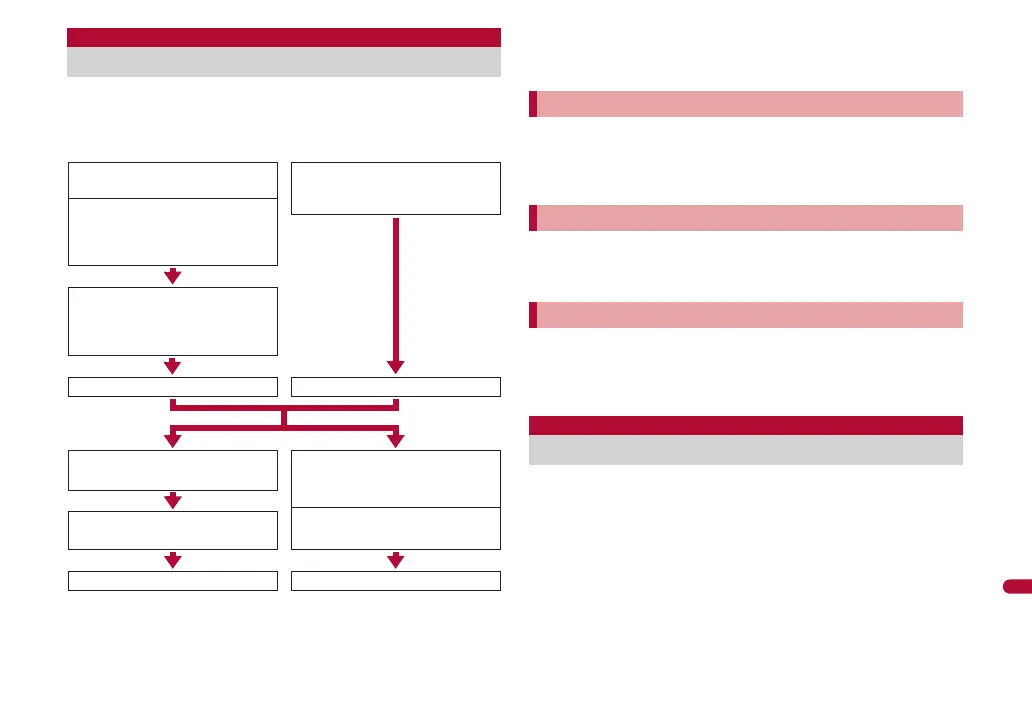
Flow of setup for data communication
Download and install the FOMA
communication configuration file
For USB connection
Connect the FOMA terminal
wirelessly to your PC using
Bluetooth function
For Bluetooth connection
Install from the accompanying
CD-ROM
Download from the DOCOMO
website and install
Connect the FOMA terminal to
your PC using FOMA USB Cable
with Charge Function 02 (sold
separately) (nP. 335)
Confirm installation Confirm the modem
Connect
Connect
Set data communication with
DOCOMO Connection Manager
*
Install DOCOMO Connection
Manager
Set up a communication without
using DOCOMO Connection
Manager
Packet transmission
64K data communication
FOMA communication configuration file
Preparing Bluetooth connection
DOCOMO Connection Manager
AT commands
dv67_E.book 441 ページ 2009年5月25日 月曜日 午前8時53分



 To Next Page