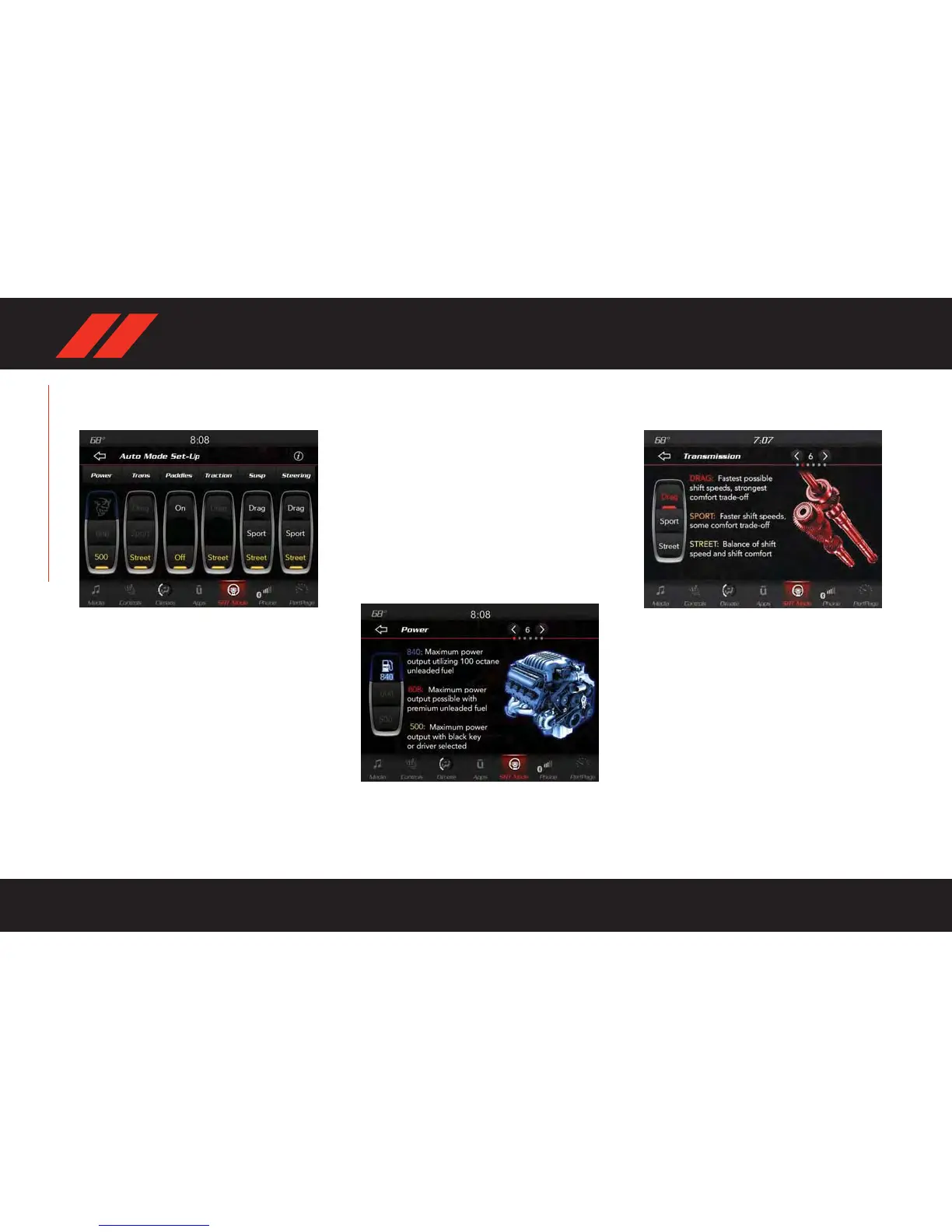
DRIVE MODE — AUTO
PREFERENCES
Available Set-Up Options
At this point, the system has detected which key
fob is present (Black/Red) and has already set
the appropriate AUTO default settings.
Engine Power Output — Auto Mode
Engine power output level is set at a default
based on which key fob is used in the vehicle.
Once in the vehicle, close the door , press and
hold the brake pedal, and push the ENGINE
STOP/STAR T button to start the car . With the
brake pedal pressed, a single push of the igni-
tion button will start the car . To cycle through
the ACC/RUN positions, push the ENGINE
STAR T/STOP button without pressing the brake
pedal. The instrument cluster display will begin
its startup sequence, including gauge activation
and bulb checks, before cycling through any
stored messages if present. The instrument
cluster display will then display either a “Black
Key In Use” or “Red Key In Use” message for
five seconds.
NOTE:
Power level can be set by preference.
Transmission — Auto Mode
Transmission will be in the STREET calibration.
Paddle Shifters — Auto Mode
Paddle shifters can be turned ON or OFF by
preference.
NOTE:
ECO mode will disable paddle shifters.
Drive Mode — Auto Preferences
Power Output Preferences
Transmission Preference
FEATURES OVERVIEW
10















 To Next Page