prove the usability and performance of your
systems or to reduce the potential risk of unau-
thorized and unlawful access to your vehicle
systems.
The risk of unauthorized and unlawful access to
your vehicle systems may still exist, even if the
most recent version of vehicle software (such as
Uconnect software) is installed.
WARNING!
• It is not possible to know or to predict all of
the possible outcomes if your vehicle’s
systems are breached. It may be possible
that vehicle systems, including safety re-
lated systems, could be impaired or a loss
of vehicle control could occur that may
result in an accident involving serious in-
jury or death.
• ONLY insert media (e.g., USB, SD card, or
CD) into your vehicle if it came from a
trusted source. Media of unknown origin
could possibly contain malicious software,
and if installed in your vehicle, it may
increase the possibility for vehicle systems
to be breached.
• As always, if you experience unusual ve-
hicle behavior, take your vehicle to your
nearest authorized dealer immediately.
NOTE:
• FCA or your dealer may contact you di-
rectly regarding software updates.
• To help further improve vehicle security
and minimize the potential risk of a secu-
rity breach, vehicle owners should:
• Routinely check
www.driveuconnect.com/
software-update
to learn about
available Uconnect software updates.
• Only connect and use trusted media de-
vices (e.g. personal mobile phones, USBs,
CDs).
Privacy of any wireless and wired communica-
tions cannot be assured. Third parties may
unlawfully intercept information and private
communications without your consent. For fur-
ther information, refer to “Onboard Diagnostic
System (OBD II) Cybersecurity” in “Maintaining
Your Vehicle”.
UCONNECT SETTINGS
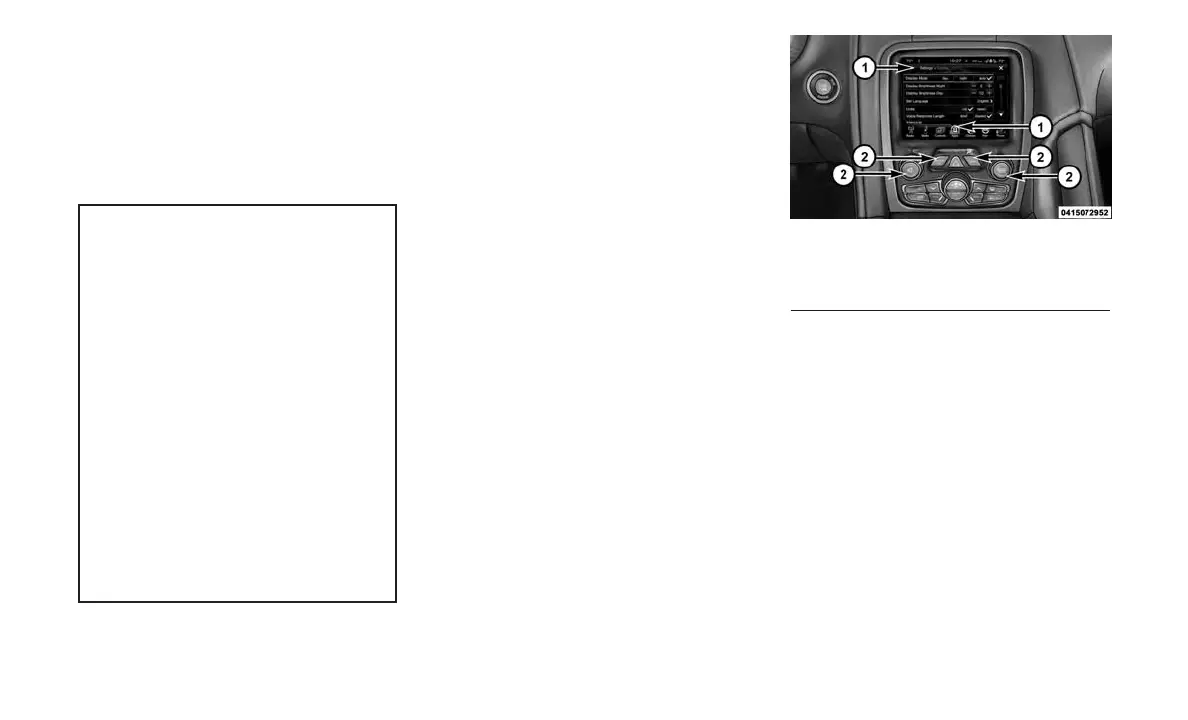
The Uconnect system uses a combination of
buttons on the touchscreen and buttons on the
faceplate located on the center of the instrument
panel that allow you to access and change the
customer programmable features.
NOTE:
Features can vary by vehicle, depending on
vehicle configuration.
Buttons On The Faceplate
Buttons on the faceplate are located below the
Uconnect system in the center of the instrument
panel. In addition, there is a Scroll/Enter control
knob located on the right side of the Climate
Controls in the center of the instrument panel.
Turn the control knob to scroll through menus
and change settings (i.e., 30, 60, 90), push the
center of the control knob one or more times to
select or change a setting (i.e., ON, OFF).
Buttons On The Touchscreen
Buttons on the touchscreen are accessible on
the Uconnect display.
Uconnect 8.4 NAV Buttons On The
Touchscreen And Buttons On The Faceplate
1 — Uconnect Buttons On The Touchscreen
2 — Uconnect Buttons On The Faceplate
83









 To Next Page