18
intensity level to freeze at that current level. In this situation,
if you turn the rheostat intensity dial, the level on the screen
PD\QRWFKDQJHEXWWKHDFWXDOLQWHQVLW\IURPWKHUHFHLYHU
collar will change in agreement with the dial. In this
situation, it is ideal to either wait until your transmitter is
back to working order before emitting a correction, or while
holding the constant button down slowly turn the Rheostat
Intensity Dial while watching your dog’s reaction. Do not
turn the Rheostat Intensity Dial at a rapid increase because
WKHUHFHLYHUFROODUZLOOHPLWDVWDWLFFRUUHFWLRQEDVHGRQWKH
level of the Rheostat Intensity Dial, which might not be
FRUUHFWO\UHÀHFWHGRQWKH/&'VFUHHQ
10. Code setting
Code setting Additional Receivers
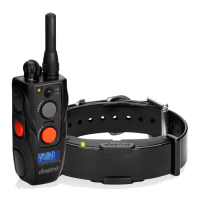
7XUQWKHWUDQVPLWWHURQE\SXVKLQJWKH212))EXWWRQ
located on the side of the transmitter and set the intensity
GLDOWR³´
2. Place the red dot on the back of the transmitter to the red
GRWRIWKHUHFHLYHUFROODU\RXZRXOGOLNHWRFRGH
Hold the two red dots together for about 5 seconds until
the green /('EOLQNVUDSLGO\RQWKHUHFHLYHUFROODU
:KLOHWKHJUHHQ/('LVUDSLGO\EOLQNLQJRQWKHUHFHLYHU
collar, press the 2 orange buttons on the front and side
of the transmitter simultaneously. The LED indicator light
RQWKHUHFHLYHUFROODUZLOOEOLQNHYHU\VHFRQGVZKHQ
the coding is complete.
:LWKWKHGRJUHFHLYHUFROODUFRGHGWRWKH'RJWUD
$5&WKHJUD\EXWWRQVZLOORSHUDWH\RXUH[LVWLQJUHFHLYHU
collar, and the orange buttons will operate the newly
FRGHGUHFHLYHUFROODU


 To Next Page