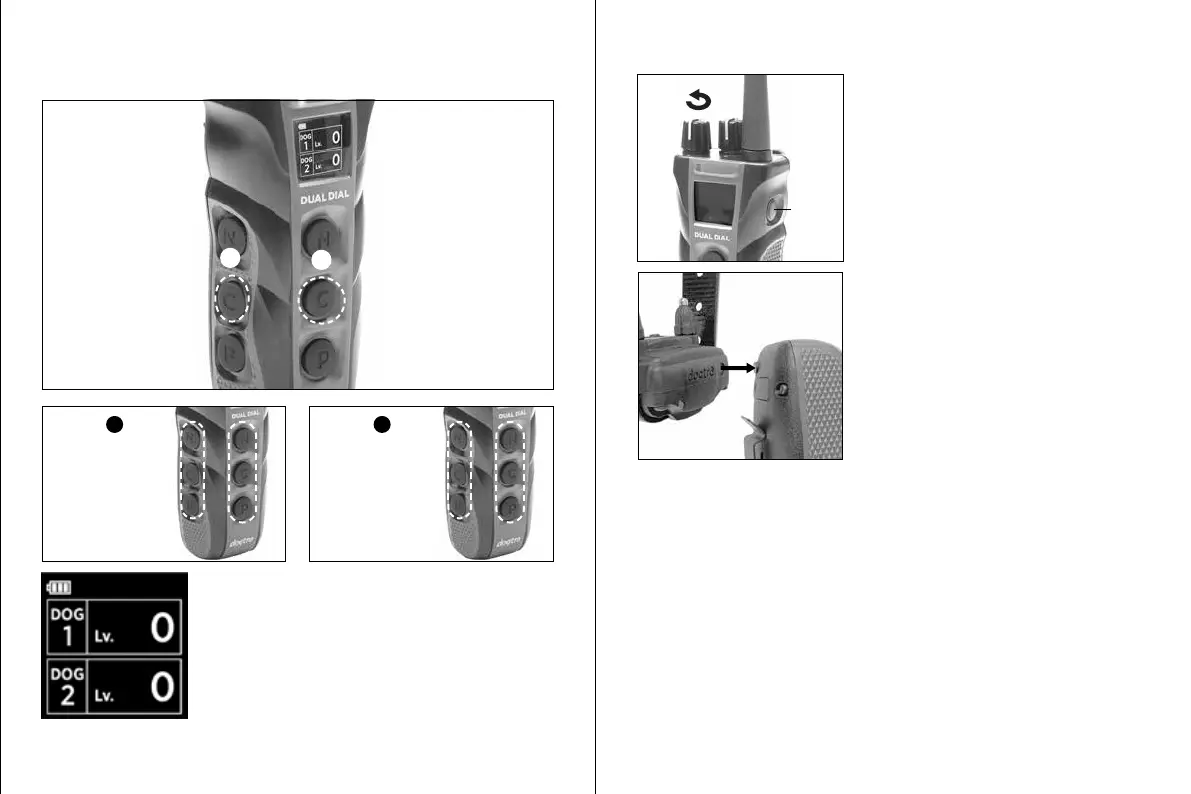
2-DOG SET UP
Press the middle button to set the transmitter as a 2-dog system.
The screen will show that both ‘Dog 1’ and ‘Dog 2’
have been set up.
If you want to change the side, please start over by
putting the transmitter in "Setting Mode."
1
2
or
2
2
1
1
Select
1
Select
2
Front side:
controls Dog 1
Left side:
controls Dog 2
Left side:
controls Dog 1
Front side:
controls Dog 2
RECEIVER CODE SETTING
Turn the transmitter on (or leave on after
code setting the transmitter).
Set the Rheostat Dial to 0.
1.
Turn on
Depending on what model you are coding
the transmitter to, you will either place the
red dot on the back of the transmitter to the
red dot on the receiver or hold the on/off
button on the receiver.
2.
Models with red dot:
Hold the two red dots together until the green LED blinks rapidly on the
receiver and then separate the two devices.
Models with on/o button:
Hold down the on/o button on the receiver until the green LED blinks rapidly
on the receiver.










 To Next Page