This document describes the Dogtra Dual Dial, a remote training system for dogs, focusing on its code setting guide, operational features, and warranty information.
Function Description:
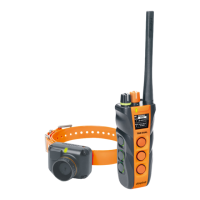
The Dogtra Dual Dial is a remote dog training system designed to provide stimulation to dogs for training purposes. It allows for both 1-dog and 2-dog system configurations, offering flexibility for trainers with single or multiple dogs. The system utilizes a transmitter with a dual-dial design, allowing for intuitive control of stimulation levels. The receiver, worn by the dog, receives signals from the transmitter to deliver the chosen stimulation. The system is designed to be expandable, allowing for the addition of a second receiver if initially configured as a 1-dog system.
Important Technical Specifications:
The Dual Dial transmitter is compatible with a range of Dogtra receivers, including the iQ MINI, iQ PLUS, 200C/202C, 280C/282C, ARC, and 1900S/1902S. It is important to note that the Dual Dial transmitter is not compatible with the 2300NCP, 3500NCP/3502NCP, 2500T&B/2502T&B, and 2700T&B/2702T&B models. A key technical detail is the stimulation level conversion: products with 100 levels (such as iQ PLUS, iQ MINI, 200C, and 202C) will convert to 127 levels when used with the Dual Dial transmitter. Users are advised to find the appropriate stimulation level within these 127 options for their dog.
Usage Features:
The Dual Dial system offers several user-friendly features for setting up and operating the device:
- Code Setting Guide: Before use, the transmitter needs to be coded to determine whether it will function as a 1-dog or 2-dog system and which side (front or left) of the transmitter will control 'Dog 1'. This setup is crucial for proper operation.
- 1-Dog System Setup: To configure for a single dog, the user presses the top button on the transmitter. The OLED screen will then display "DOG 1 Lv. 0" and "DOG AVAILABLE 2 TO PAIR," indicating that Dog 1 is set up and a second dog can be paired later if needed. The user can choose whether the front or left side of the transmitter controls the receiver for Dog 1.
- 2-Dog System Setup: For a two-dog system, the user presses the middle button on the transmitter. The screen will show "DOG 1 Lv. 0" and "DOG 2 Lv. 0," confirming both dogs are set up. Similar to the 1-dog setup, the user can choose which side controls which dog.
- Transmitter Setting Mode: To enter the setting mode, the transmitter must first be off. The user then holds the on/off button until a rapid green LED light appears and the OLED screen displays "Setting Mode." This mode is essential for initial setup and changing configurations.
- Stimulation Level Lock: The transmitter includes a toggle switch for "Stimulation Level Lock." Users must ensure this switch is in the "Unlocked" position to adjust stimulation levels.
- Receiver Code Setting:
- Transmitter Preparation: The transmitter must be turned on, and the Rheostat Dial set to 0.
- Receiver Pairing (Models with Red Dot): For receivers with a red dot, the user holds the two red dots (one on the transmitter, one on the receiver) together until the green LED on the receiver blinks rapidly. Once blinking, the devices are separated.
- Receiver Pairing (Models with On/Off Button): For receivers with an on/off button, the user holds down the on/off button on the receiver until the green LED blinks rapidly.
- Final Pairing Step: After the receiver LED blinks rapidly, the user simultaneously presses the top two buttons on the selected side of the transmitter (for Dog 1). For a second receiver, the process is repeated, pressing the top two buttons on the opposite side. A successful pairing is indicated by the receiver's LED light flashing every 4 seconds.
- Important Note on Pairing: It is explicitly stated that users should not code both receivers to the same side of the transmitter.
- Customer Service: Dogtra provides customer service via phone at (888) 811-9111 and email at repair@dogtra.com, available Monday to Friday, 8:00 AM to 4:30 PM (PST). For general assistance, info@dogtra.com is also provided.
Maintenance Features:
The document primarily focuses on setup and operation rather than explicit maintenance features. However, the warranty information outlines conditions that, if not met, could void the warranty, indirectly guiding users on proper care:
- Warranty Conditions: The warranty is non-transferable and applies only if the purchaser is the original retail buyer, the product was bought from a Dogtra authorized dealer, and a valid proof of purchase (receipt or other documentation showing purchase date, dealer name/address, and product model/serial number) is presented.
- Warranty Exclusions: The warranty does not cover damage from misuse, neglect, abuse, improper handling, failure to follow use/care instructions, use for unintended purposes, accidents (fire, flooding), normal wear and tear (scratches), or products purchased from non-authorized dealers, outside the US/Canada, damaged during shipment (even if Dogtra paid for shipping), modified/tampered with, opened/repaired by non-Dogtra personnel, or those with altered/defaced serial numbers. These exclusions highlight the importance of proper handling and authorized service to maintain the device's integrity and warranty coverage.
- Product Registration: Dogtra recommends registering products at www.dogtra.com/product-registration. This facilitates future warranty service and provides access to useful information and updates, acting as a preventative measure for potential issues and ensuring efficient support.
The Dogtra Dual Dial system is a comprehensive training tool with clear instructions for setup and operation, backed by a detailed warranty policy that emphasizes proper usage and authorized service.

 Need help?
 General









 To Next Page