2 Dolby
®
DSS200 Hard Drive Replacement Guide DRAFT 0.9
Replacing a DSS200 Drive
1 Replacing a DSS200 Drive
ToreplaceaDSS200internalharddrive:
1. Notethefront‐paneldrivethatneedsreplacement,indicatedbyitsredLED.
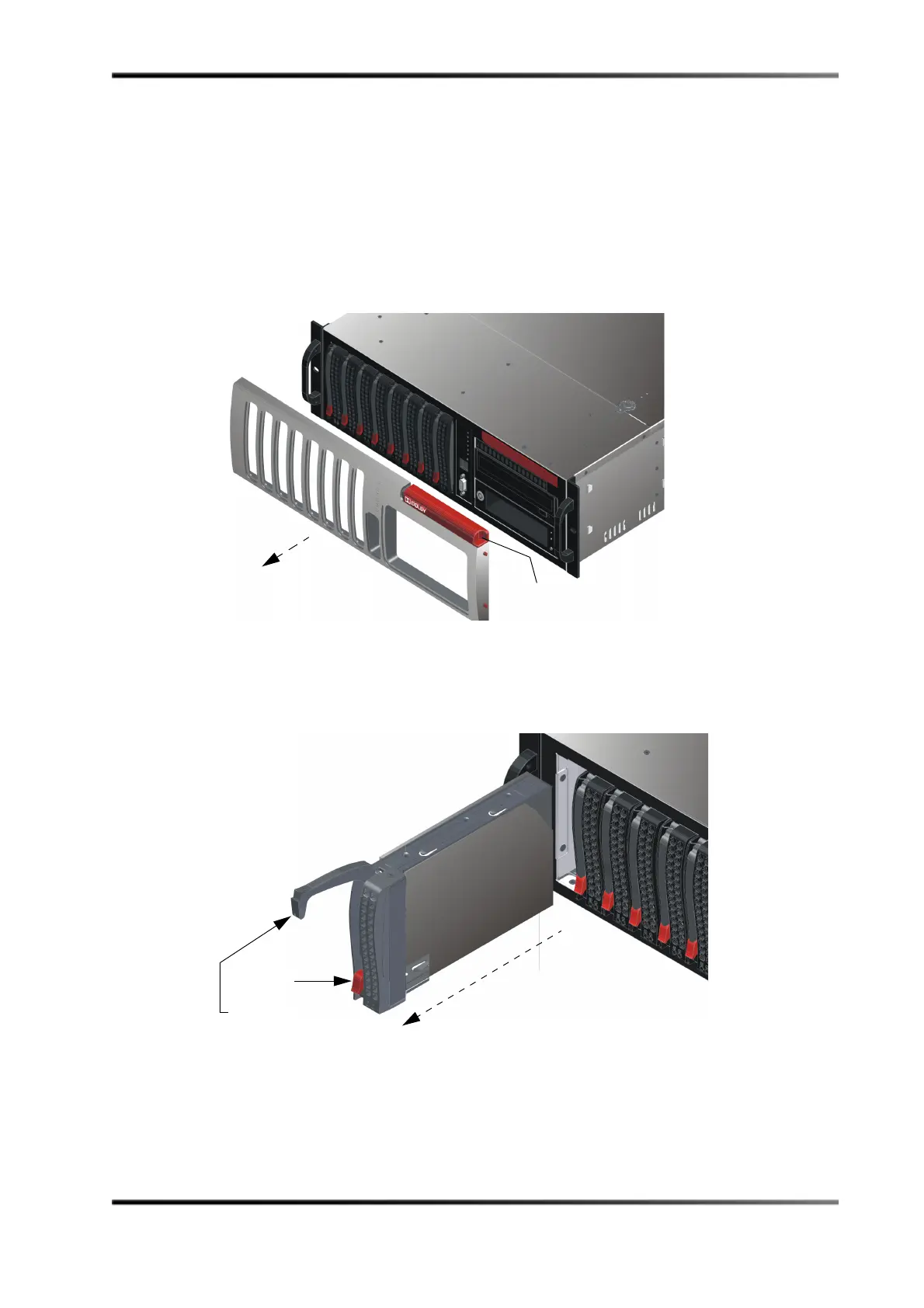
2. Removethefront‐panelcoverbyplacingafingeronthecover’sindentedarea(inthe
upper‐rightcorner),whilepressinginward(tothe left)andgentlypullingthecover
outof
thefrontpanel(seeFigure 2).
Figure2
Figure 2 Remove DSS200 Front-Panel Cover
3. Pressthefaileddrive’sredreleasebuttontoextendthedrivetrayhandle,thenusethe
handletopullthedrivetrayoutoftheDSS200chassis,asshowninFigure 3.
Figure3
Figure 3 Press Release Button to Extend Handle and Remove Drive
Press here and
remove cover
Press red
button to extend
handle and pull
drive out of chassis



 To Next Page