Replacing a DSS200 Drive
Dolby
®
DSS200 Hard Drive Replacement Guide DRAFT 0.9 3
4. Placethedrivetrayonaflat,stablesurfacesuchasadesk,table,orworkbench.
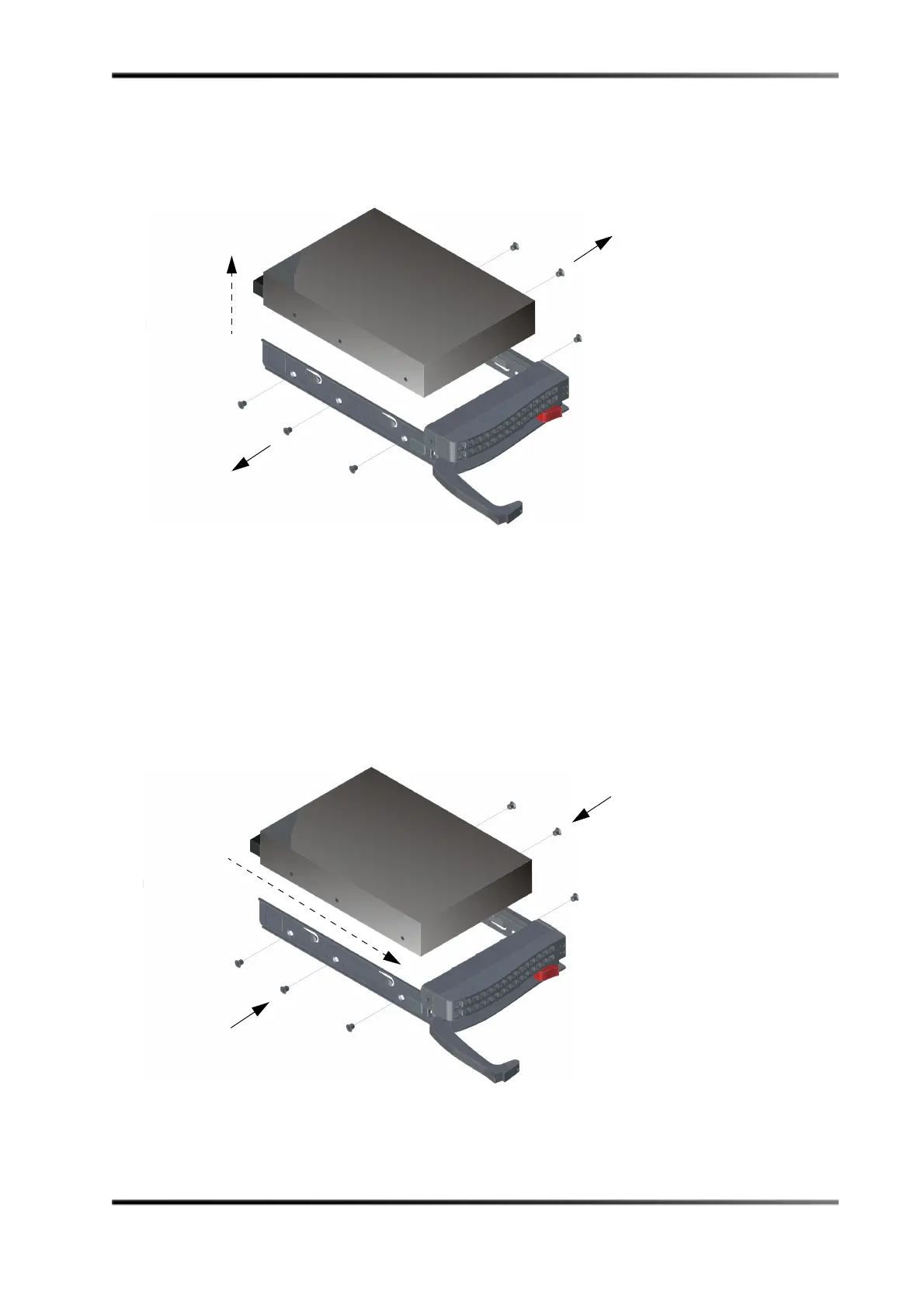
5. UseaPhillipsscrewdrivertoremovethesixscrewssecuringthefaileddrivetothe
drivetray,thenliftthedriveoutofthetray,asshowninFigure 4.
Figure4
Figure 4 Removing the Failed Drive from the DSS200 Drive Tray
6. Slidethereplacementdriveintothetraywiththeprintedcircuitboardfacingdown,
asshowninFigure 4.
Youcanreplaceadrivewithahigher‐capacityunit,butnotwithalower‐capacityunit.
7. Carefullyalignthemountingholesonthedriveandthetray.
Makesurethebottomofthedriveandthebottomofthetrayareflush.
8. UseaPhillipsscrewdrivertosecurethedrivetothedrivetrayusingallsixscrewsyou
removedinstep4.
Figure5
Figure 5 Installing the Replacement Drive in the DSS200 Drive Tray



 To Next Page