19
MAINTENANCE
CAUTION:
Before doing any work on the Power Cut turn off the engine,
remove the cutting disc, pull the plug cap off the spark plug
and wear protective gloves!
CAUTION:
Start the Power Cut only after complete assembly and
inspection.
IMPORTANT:
Because many of the parts and assemblies not mentioned
in this Instruction Manual are vital to the safety of the unit,
and because all parts are subject to a certain amount of
wear and tear, it is important for your own safety that you
have the unit checked and maintained regularly by a DOL-
MAR service center.
IMPORTANT:
If the cutting wheel breaks during cutting, the Power
Cut must be repaired by a DOLMAR service centre
before being used again!
SERVICE
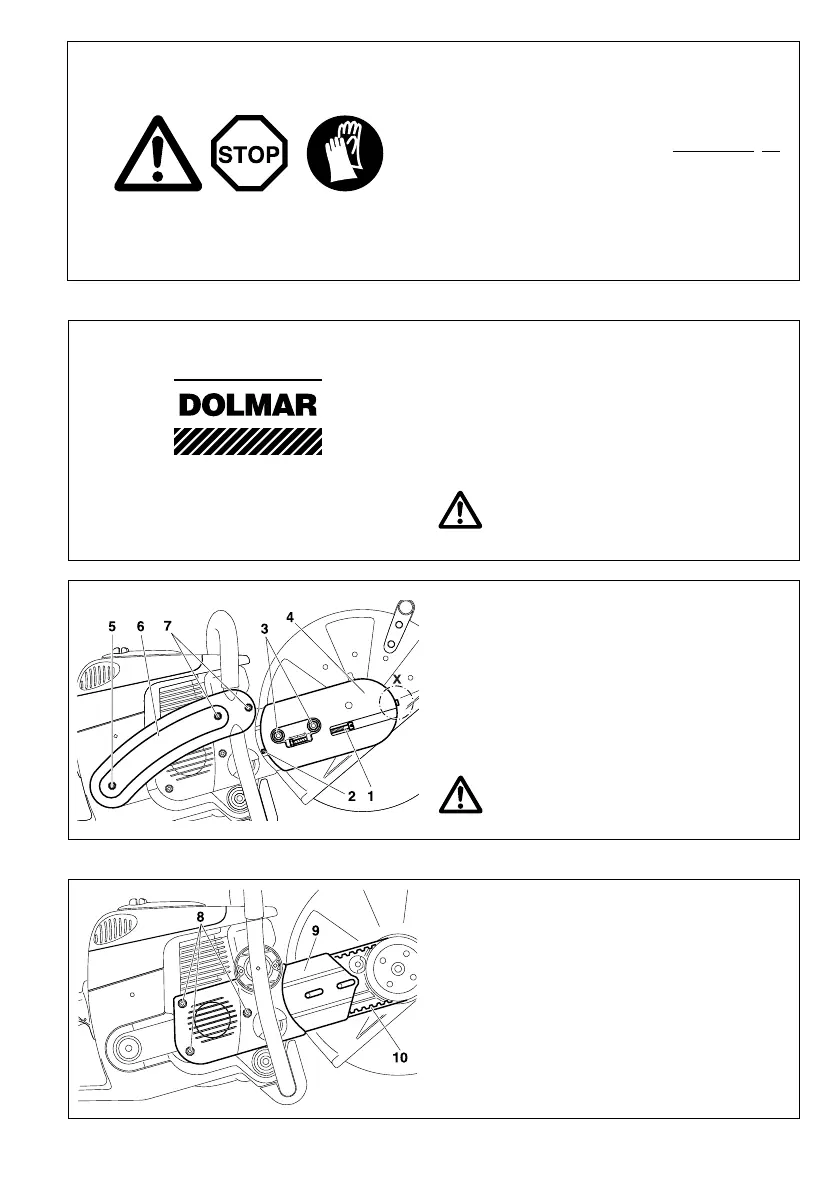
Unscrew the screws (8) and remove the crankcase housing
cover (9).
Remove the old belt (10) or belt pieces.
NOTE: The illustration shows the V-belt for models PC-6412
- 7314).
Clean out the inside of the drive arm with a brush.
Put in a new V-belt.
NOTE:
Reassemble the crankcase housing cover (9), side piece (6)
and cover (4) in the reverse order.
To tighten the V-belt see ”Tightening the V-belt / Checking
V-belt tension”.
Changing the V-belt
Loosen nuts (3).
Loosen the tightening screw (1) (counter-clockwise) until the
end of the screw (2) is visible in the gap.
Loosen and unscrew the screw (detail X, only for PC-8116).
Unscrew the nuts (3) and remove the cover (4).
Remove the screws (5) and (7) and remove the side piece
(6).
NOTE:
Screw (5) is longer than screws (7). Make sure
to put them back in the right places during reas-
sembly!



 To Next Page