EasyManua.ls Logo

Dometic 3312024 series - User Manual

Dometic 3312024 series
12 pages
Print Icon
To Next Page IconTo Next Page
Loading...
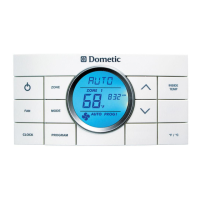
Comfort Control Center 2 Thermostat
Operating Instructions
Programmable Thermostat
MODEL
3312026.XXX With Dehumidify
3312024.XXX With Out Dehumidify
Question and Answer IconNeed help?

Do you have a question about the Dometic 3312024 series and is the answer not in the manual?

Summary

About Your New Thermostat

Features Overview

Lists the key features of the Dometic Comfort Control Center 2 thermostat.

System Configuration and Initialization

Explains how to configure and reset the thermostat for proper system operation.

LCD Icons Quick Reference

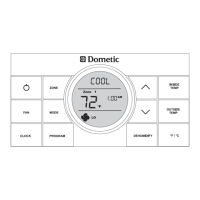
Visual guide to understanding the icons displayed on the CCC 2 thermostat LCD.

Control Buttons Quick Reference

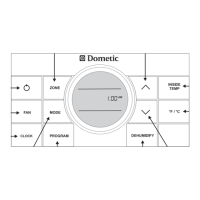
Overview of the functions for each button on the CCC 2 thermostat control panel.

Programming and Operations

Thermostat ON;OFF

Instructions for turning the Dometic CCC 2 thermostat on and off.

Clock Setting Procedure

Guide to setting the current time and AM/PM on the thermostat.

Temperature Format Selection

How to switch between Fahrenheit and Centigrade temperature displays.

Viewing Inside Temperature

How to view the current inside temperature reading on the thermostat.

Viewing Outside Temperature

How to view the current outside temperature reading from the sensor.

Zone Selection Process

Procedure for cycling through and selecting different zones (1-4) for control.

Mode Selection Guide

Details how to cycle through and select different operating modes like COOL, HEAT, FAN.

Fan Speed Adjustment

Explains how to select fan speeds (Auto, Low, Med, High) for optimal comfort.

Temperature Set-Point Adjustment

Guide to adjusting the desired temperature set-point for heating or cooling.

Dehumidify Setting

Setting the Dehumidify Set-Point

Instructions for setting the humidity level for dehumidify operation (select models).

Mode Descriptions

OFF Mode

Description of the thermostat's OFF mode.

Cool Mode Operation

Details on how the COOL mode cycles the compressor and fan.

Heat Pump (HP) Mode

Explanation of the Heat Pump mode's operation and fan speed selections.

Heat Strip (HS) Mode

Information on the Heat Strip mode's operation and fan speed controls.

Fan Mode

How the FAN mode operates with different fan speed selections.

Furnace;Aqua Mode

Details on operating the Furnace or Aqua mode and differential settings.

Auto Change Over Mode

Explanation of how the system automatically switches between cooling and heating.

Special Features

Auto Fan Operation

How the fan speed automatically adjusts based on temperature difference.

Zone Control Explained

Information on how the thermostat controls independent zones for cooling/heating.

Dehumidify Feature (Select Models)

Conditions and operation of the dehumidify feature, including limitations.

Program 1 & 2 Settings

Guide to setting up two programmable operating schedules for zones.

Advanced Features and System Operations

Auxiliary Heat (Heat Pump Models)

How auxiliary heat is activated based on outdoor temperature.

Stage Select (Two Units)

Configuration for controlling two AC/Heat Pump units in one zone.

Stage Select (Dual Compressor)

Operation of AC/Heat Pump units with dual compressors for optimized comfort.

CANbus Interface

Information on connecting the CCC 2 thermostat via the CANbus interface.

System Functions and Error Handling

Auto Generator Start (AGS)

How the AGS kit automatically starts the generator for cooling/heating needs.

Load Shed Functionality

How the Load Shed feature manages AC power to the compressor.

Defrost Cycle (Heat Pump Models)

Procedure to prevent frost formation on the outside coil during heating.

Compressor Time Delay

Explains the approximate two-minute delay before compressor activation.

Power Interruption Handling

How the system restarts with previous settings after a power interruption.

LCD Error Codes

List and explanation of error codes displayed on the LCD.

System Reset Procedure

Performing a System Reset

Step-by-step instructions to perform a system reset on the thermostat.

General Information and Maintenance

General Information on RV Air Conditioning

Factors affecting AC performance and tips for reducing heat gain.

Air Filter Maintenance

Instructions for cleaning or replacing the air conditioner/heat pump air filters.

Thermostat Cleaning

Guidelines for cleaning the Dometic CCC 2 thermostat surface.

Service and Support

Troubleshooting Before Calling Service

Checks to perform before contacting a service center for issues.

Service Contact Information

Details for contacting Dometic service centers in USA and Canada.

Overview

The Dometic Comfort Control Center 2 (CCC 2) Thermostat is an advanced programmable thermostat designed for recreational vehicles (RVs), offering precise climate control and a range of features for enhanced comfort and convenience. It is available in two models: 3312026.XXX with Dehumidify and 3312024.XXX without Dehumidify.

Function Description:

The CCC 2 thermostat serves as the central control unit for an RV's heating, cooling, and ventilation systems. It allows users to manage temperature, fan speed, and operating modes across up to four independent zones within the RV. The system automatically adjusts operation based on user-defined set-points and environmental conditions. It supports various heating and cooling sources, including air conditioners, heat pumps, heat strips, and furnaces/aqua systems. The thermostat features a Liquid Crystal Display (LCD) that provides real-time information on operation mode, temperature set-point, zone identification, fan speed, program status, inside and outside temperatures, clock, °F/°C format, compressor delay, filter maintenance reminders, and dehumidify operation (on select models).

Important Technical Specifications:

  • Temperature Control: Precise comfort control within 1°F of the set-point, utilizing a remote sensor for accurate indoor temperature readings.
  • Temperature Range: Outdoor temperature sensor measures between -5°F and 105°F. Indoor heating set-point minimum is 40°F, and cooling set-point minimum is 55°F, with a maximum set-point of 90°F.
  • Zones: Supports up to four independent zones, allowing for customized climate control in different areas of the RV.
  • Operating Modes: Includes OFF, Cool, Heat Pump (HP), Heat Strip (HS), Fan, Furnace/Aqua (FURN/AQUA), and Auto Change Over (AUTO). The available modes depend on the installed RV system.
  • Fan Speeds: Offers Auto, Low, Medium (MED), and High fan speed selections. In Auto fan mode, fan speed varies based on the temperature difference from the set-point (High for 8°F+ difference, Med for 5-7°F, Low for 4°F or less).
  • Dehumidification (Select Models): Allows setting a humidity set-point in 5% increments from 35% to 70%. Dehumidify operation is disabled under specific conditions: outdoor temperature below 40°F (resumes above 45°F), indoor temperature below 62°F (resumes above 65°F), indoor temperature above 100°F (resumes below 97°F), or when the freeze sensor temperature is 27°F or less (resumes above 55°F).
  • Programmable Programs: Stores two operating programs (Program 1 and Program 2) per zone, each with customizable mode, fan speed, temperature set-point, and time of day.
  • Compressor Time Delay: Approximately two-minute delay before compressor activation for cooling or heat pump cycles.
  • Furnace/Aqua Differential: Configurable ON/OFF temperature differential of either 1°F or 2°F.
  • Auxiliary Heat (Heat Pump Models Only): Activates when outdoor temperature is below 30°F (deactivates above 35°F), prioritizing furnace if available.
  • Stage Select (Two Air Conditioner/Heat Pump Units): Configurable for primary and secondary units in one zone, with a minimum 20-30 second delay between compressor starts.
  • Stage Select (Dual Compressor Air Conditioner/Heat Pump): Primary temperature set-point, with secondary stage preset at a differential of 3°F from primary.
  • Auto Generator Start (AGS): Optional feature that automatically starts the RV generator when any zone calls for cooling and shuts off when requests are satisfied.
  • Load Shed: System can detect a load shed signal, which will turn off the compressor.
  • CANbus Interface: Designed to communicate with a CAN (Controller Area Network) protocol generator.

Usage Features:

  • Easy Navigation: Intuitive control buttons for ON/OFF, ZONE, MODE, FAN, CLOCK, PROGRAM, DEHUMIDIFY, temperature up/down arrows, and °F/°C selection.
  • Clock Setting: Allows users to set the current time, including AM/PM, with flashing digits for hour and minute adjustments.
  • Temperature Format: Switch between Fahrenheit (°F) and Centigrade (°C) display.
  • Inside/Outside Temperature Display: Press and hold INSIDE TEMP or OUTSIDE TEMP buttons to view current readings.
  • System Reset: A procedure involving simultaneously pressing MODE and ZONE buttons, then ON/OFF, to initialize the system and restore factory default settings. This is necessary after installation or changes to DIP switch settings.
  • Power Interruption Recovery: System restarts with previous set-points after power is restored.
  • Error Codes: LCD displays specific error codes (E1-E9) to indicate system faults, such as communication loss, sensor issues, or invalid zone configurations.

Maintenance Features:

  • Filter Maintenance Reminder: An icon is displayed on the LCD when system fan run time exceeds 1000 hours, prompting users to clean or replace the air filter.
  • Filter Reset: Hold INSIDE and OUTSIDE buttons for three seconds to clear the fan run time and filter icon for the selected zone.
  • Thermostat Cleaning: Clean the CCC 2 thermostat with a moist soft cloth. Avoid spraying water directly on the unit or using solvents.
  • Troubleshooting Guide: Provides steps to check power supply, fuses, and circuit breakers before calling for service.
  • Service Information: Instructions to provide Unit Model Number, Serial Number, Electronic Control Kit Part Number, and Serial Number when calling for qualified service personnel.

Dometic 3312024 series Specifications

General IconGeneral
Model3312024 series
CategoryThermostat
BrandDometic
Power Source12V DC
InstallationWall-mounted
TypeRV Thermostat
CompatibilityDometic Air Conditioners and Furnaces
DisplayLCD
Voltage12V

Related product manuals