The Dometic Comfort Control Center 2 (CCC 2) thermostat is an advanced RV thermostat designed for ease of operation and reliable service. It allows for precise control of cooling and heating systems within recreational vehicles.
Function Description:
The CCC 2 thermostat manages the operation of air conditioners, heat pumps, heat strips, and furnaces (or Aqua/Hydronic heating systems) across up to four independent zones within an RV. It cycles these appliances ON and OFF based on room air temperature and user-defined temperature set-points. The thermostat features two programmable operating programs, allowing users to set different modes, fan speeds, temperature set-points, and times of day for each zone. It also includes an "AUTO" mode for automatic changeover between cooling and heating, prioritizing heat pump, then furnace, then heat strip if multiple heat sources are available.
Important Technical Specifications:
- Temperature Set-Point Range: Maximum 90 °F (32 °C). Minimum for heating is 40 °F (4 °C), and minimum for cooling is 55 °F (13 °C).
- Temperature Format: Switchable between Fahrenheit (°F) and Centigrade (°C).
- Fan Speeds: Auto, Low, Medium, High.
- Operating Modes: OFF, COOL, HP (Heat Pump), HS (Heat Strip), FAN, FURN/AQUA (Furnace or Hydronic Heating), AUTO (Auto Change Over).
- Zone Control: Up to four independent zones (Air Conditioner/Heat Pump).
- Temperature Differential (FURN/AQUA Mode): Configurable to 1 °F / °C or 2 °F / °C.
- Compressor Time Delay: Approximately 2 minutes before compressor starts.
- Defrost Cycle (Heat Pump Models Only): Initiated when outdoor temperature is between 30 °F (-1 °C) and 42 °F (6 °C). Compressor runs for 25 minutes, then fan shuts OFF, refrigerant flow reverses for 4.5 minutes, followed by a 30-second delay before fan resumes.
- Auxiliary Heat (Heat Pump Models Only): Activated when outdoor temperature is less than 30 °F (-1 °C) and de-activated when above 35 °F (2 °C).
- Dual Compressor/Two Unit Stage Select: Supports primary and secondary stages for enhanced comfort and efficiency. Secondary stage set-point is preset at a differential of +3 °F / °C for cooling and -3 °F / °C for heating from the primary set-point. Minimum delay of 20 to 30 seconds between compressor starts.
- CANbus Interface: Designed to communicate with a CAN (Controller Area Network) protocol generator.
- Load Shed: Provides a 12 Vdc source signal 1 second before compressor relay turns ON. Compressor turns OFF when Load Shed signal is detected.
- Power Interruption: System restarts with previous set-points once power is restored.
Usage Features:
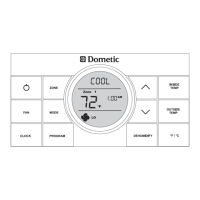
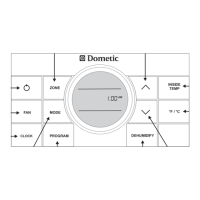
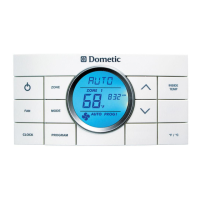
- Liquid Crystal Display (LCD): Identifies mode of operation, temperature set-point, zone identification, fan speed, program status, inside temperature, clock, temperature format, compressor delay, and filter maintenance reminders.
- Control Buttons:
- ON/OFF: Turns the thermostat ON or OFF.
- ZONE: Cycles through available zones (1, 2, 3, 4).
- MODE: Cycles through available operating modes.
- FAN: Selects desired fan speed (Auto, Low, Med, High).
- CLOCK: Initiates clock setting sub-menu (hour, minute, AM/PM).
- PROGRAM: Selects and saves operating programs (PROG 1, PROG 2).
- UP/DOWN Arrows (∧/✓): Adjusts temperature set-point, clock settings, and furnace differential.
- INSIDE TEMP: Displays current inside temperature when pressed and held.
- °F/°C: Switches between Fahrenheit and Centigrade temperature formats.
- System Reset Procedure: Performed by simultaneously pressing MODE and ZONE buttons while in OFF mode, then releasing and pressing ON/OFF. This restores factory default settings and allows the thermostat to recognize system configurations.
- Programmable Programs (PROG 1 & PROG 2): Allows users to store two distinct operating programs for each zone, including mode, fan speed, temperature set-point, and time of day. Programs can be manually cancelled by holding the PROGRAM button for 3 seconds.
- Auto Fan Feature: Fan speed automatically adjusts based on the difference between set-point and room temperature (HIGH for 8°F/°C or more, MED for 5-7°F/°C, LOW for 4°F/°C or less).
- Auto Generator Start (AGS): For RVs with an optional AGS Kit, the generator automatically starts when any zone calls for cooling and shuts OFF when set-point is reached.
Maintenance Features:
- Air Filter Reminder: The filter icon displays on the LCD when system fan run time exceeds 1000 hours, indicating the need for cleaning or replacement.
- Air Filter Reset: To clear the filter icon and reset fan run time, hold the INSIDE TEMP and °F/°C buttons for 3 seconds.
- Thermostat Cleaning: Clean the CCC 2 thermostat with a moist soft cloth. DO NOT spray water directly on it or use solvents.
- LCD Error Codes: Displays error codes (E1-E9) to indicate specific system faults, such as loss of communication, sensor issues, invalid zone configuration, or power loss. A blinking zone number indicates a fault.
- Reduce Heat Gain: Recommendations include parking in shade, using window shades, keeping windows/doors closed, and avoiding heat-producing appliances. Operating in High Fan/Cooling mode can improve efficiency in high humidity.
- Disclaimer: The manufacturer is not responsible for damage caused by condensation forming on surfaces due to humidity, emphasizing the importance of keeping doors and windows closed during operation.

 Need help?
 General


 To Next Page