18
CCC Ducted Installation Instructions
10. SYSTEM CONFIGURATION, RESET & CHECKOUT
A. ELECTRONIC CONTROL CONFIGURATION
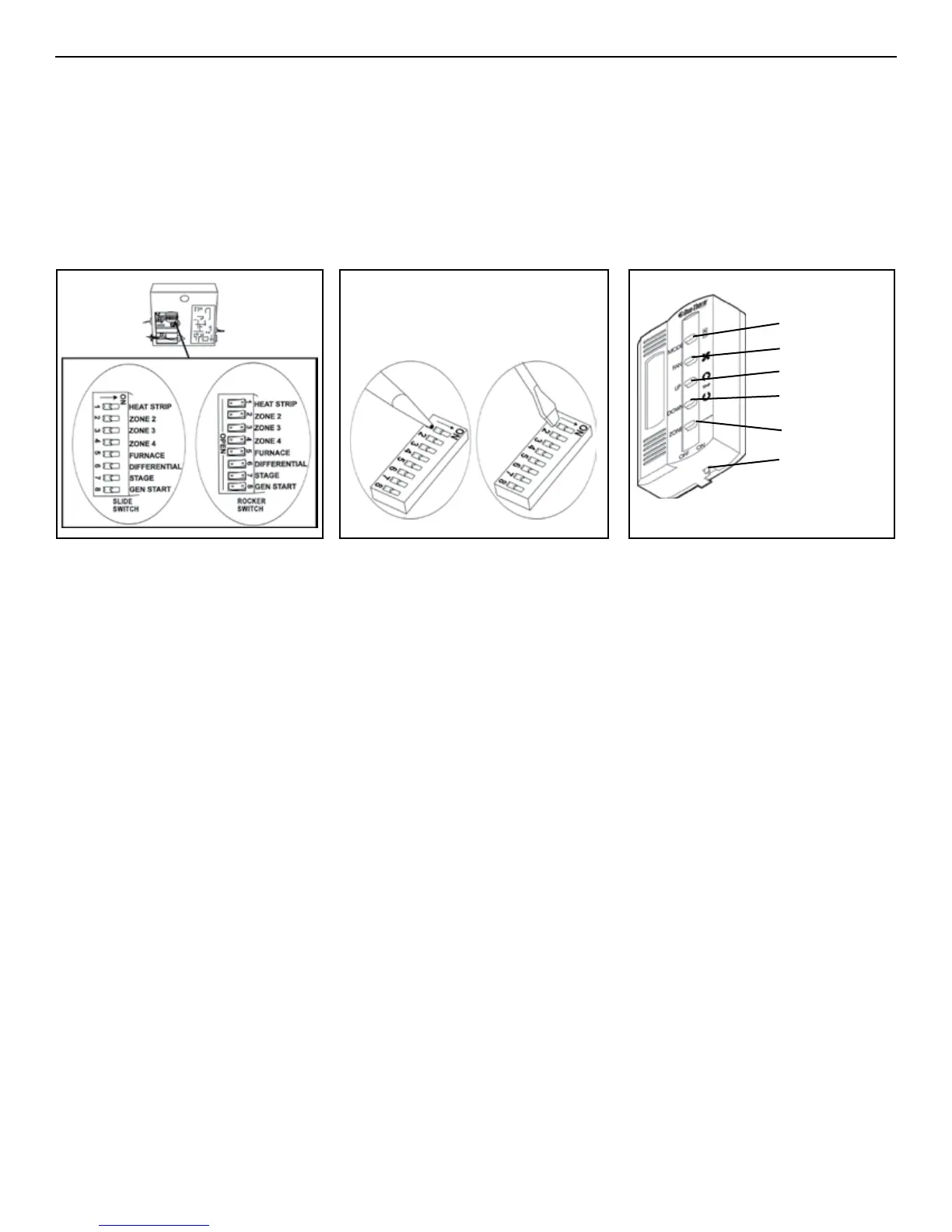
Depending on the equipment options installed by the recreational vehicle manufacturer, the appropriate dip switches will
need to be switched to the "ON" position. See Fig. 20 & 21. Placing the switch in the "ON" position selects that option.
Note: Dip switches are in the "OFF" position when shipped from the factory.
Note: The dip switches are visible through the opening in the ceiling template into the control box. Dip switches can be either
a rocker or slide style switch. (FIGS. 20, 21 & 22)
1. Zone selection - when two or more units are installed and controlled by one Comfort Control Center
TM
, the second
unit becomes Zone 2, the third unit Zone 3, and the fourth unit Zone 4. The appropriate zone dip switch must be set
in each electronic control box for the Zone 2, 3 and 4. See FIG. 20 & 21.
2. Heat Strip selection - For units with a heat strip push the #1 dip switch to the "ON" position. See FIG. 20 & 21.
3. Heat pump models must have the red plug of the outdoor ambient sensor plugged into the RED (P3) plug in the
electronic control box.
4. Furnace selection - when a furnace has been connected to a zone, place the furnace dip switch "ON" for that zone.
5. Differential - differential is the temperature difference between the "ON/OFF" cycle of the thermostat. The normal
differential is preset in the circuit board with the dip switch set to the "OFF" position. In some situations, it may be
necessary to decrease the Differential. The location of the thermostat may create a condition where the normal Dif-
ferential will not maintain your comfort zone. If this occurs, the Differential can be shortened by placing the Differential
dip switch in the "ON" position.
Note: Setting the Differential dip switch should only be required when the installation conditions are less than desirable and
this procedure is not covered under the limited warranty.
6. STAGE is not used on these units. Leave in the "OFF" position.
7. Gen start selection - leave in the "OFF" position.
8. Replace the unit electrical box cover.
9. Replace the return air cover.
10. Repeat this procedure for each additional zone.
B. SYSTEM RESET
After setting the dip switches in the electric box, do a system reset. See FIG. 22.
1. Turn the ON/OFF switch to the "OFF" position.
2. Simultaneously Depress and hold the MODE and ZONE push-buttons while turning the ON/OFF switch to "ON". FF
should appear in the LCD display until the MODE and ZONE push-buttons are released.
3. When a dip switch is turned on or off after initial conguration, a system reset will need to be done before the Com-
fort Control Center
TM
will recognize the updated selection.
C. SYSTEM CHECKOUT
Verify that all features of the installed system work. Check fan speeds, cooling mode, heat pump mode, furnace (if con-
nected) and heat strip. If the features do not work, check all wiring and conrm that the correct options have been selected
on the Electronic Control Board. See Comfort Control Center™ Operating Instructions.
FIG. 21
Mode Push-Button
Fan Push-Button
Up Push-Button
Down Push-Button
Zone Push-Button
ON/OFF Switch
FIG. 22
DO NOT USE
A BALL POINT
PEN To Move
Dip Switch
Use Flat Blade
Screw-driver Wider
Than Dip Switch
Slot to Move Dip
Switch
Not Correct Correct
Important: Dip switch damage will occur if they are not set in proper manner. A ball point pen or similar object
that will slip in the switch slot. can damage the switch causing loss of connection. Use only a small at blade screw
driver ( wider than the dip switch slot) to move the dip switch. see FIG. 21.
FIG. 20



 To Next Page