EasyManua.ls Logo

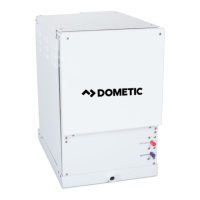
Dometic VARC 48 - User Manual

Dometic VARC 48
72 pages
Print Icon
To Next Page IconTo Next Page
Loading...
VARC Chiller Control
Operations Manual
Dometic Group Marine Division
Rev. 20170511
L-3499 English
P/N 338208
COPYRIGHT © 2011-2017 Dometic Group Marine Division. All Rights Reserved.
No part of this publication may be reproduced, translated, stored in a retrieval system, or transmitted in any form or by any means
electronic, mechanical, photocopying, recording or otherwise without prior written consent by Dometic Corporation. Every
precaution has been taken in the preparation of this manual to insure its accuracy. However, Dometic Corporation assumes no
responsibility for errors and omission. Neither is any liability assumed for damages resulting from the use of this product and
information contained herein.

Table of Contents

Question and Answer IconNeed help?

Do you have a question about the Dometic VARC 48 and is the answer not in the manual?

Summary

PGD1 and PLDPRO Navigation

Touchscreen Navigation

Alarms

Accesses active alarms, alarm history, and troubleshooting information.

System Overview

Startup

Explains how the VARC Chiller controller operates in single or multistage configurations.

Compressor Startup

Describes the ramped startup procedure for the BLDC compressor to prevent damage.

Setpoints

Operational Modes

Cooling Mode

Explains system operation, compressor control, and staging in cooling mode.

Heating Mode

Explains system operation, compressor control, and staging in heating modes.

Main Menu Navigation Tree

Menu B: Setpoints

Allows adjustment of heating/cooling setpoints and current limiting modes.

Menu E: Alarm History

Captures and displays system parameters at the time of the alarm.

Service and Configuration Settings

Sub Menu C: Control Loops

Allows setting superheat setpoint and other PID parameters for valves and drives.

Sub Menu: F Stage Disable

Allows disabling a stage off-line for repairs while the system remains operational.

Electrical Specifications

Appendix I: Touchscreen Navigation

MAIN PAGE

Displays the main screen with navigation icons for system control.

Chiller Stage

Active Alarms

Alarm History

Shows how to access and view past alarm events and data.

Alarm Help

Appendix IV Configuration & Setup

Setting Time and Date

Step-by-step guide to setting the system's time and date.

Enabling Electric Heat

Steps to enable the Electric Heat functionality through system settings.

Select Unit of Temperature

Instructions to select and change temperature units (Fahrenheit/Celsius).

HMI Setup

Uploading program

Step-by-step guide for uploading the correct program onto the touchscreen.

Deleting old program:

Steps to delete old programs using the Project Manager.

Activating Maintenance Mode

Enabling via PGD1 Display

Steps to enable maintenance mode using the PGD1 display.

Enabling via Touchscreen

Steps to enable maintenance mode using the touchscreen interface.

Appendix V Alarm Table

Water Flow and Pressure Alarms

Details alarms for chilled water flow, discharge pressure, and suction pressure.

Power+ System Alarms

Details alarms related to the Power+ system components and faults.

Appendix VI Default Parameters

Alarm Setup Defaults

Default settings for various alarm conditions and parameters.

Appendix VII I;O Table & Wiring Diagram

Analog Inputs

Table listing Analog Inputs (AI) and their corresponding Board I/O and description.

VARC Standard Wiring Diagram

Summary

PGD1 and PLDPRO Navigation

Touchscreen Navigation

Alarms

Accesses active alarms, alarm history, and troubleshooting information.

System Overview

Startup

Explains how the VARC Chiller controller operates in single or multistage configurations.

Compressor Startup

Describes the ramped startup procedure for the BLDC compressor to prevent damage.

Setpoints

Operational Modes

Cooling Mode

Explains system operation, compressor control, and staging in cooling mode.

Heating Mode

Explains system operation, compressor control, and staging in heating modes.

Main Menu Navigation Tree

Menu B: Setpoints

Allows adjustment of heating/cooling setpoints and current limiting modes.

Menu E: Alarm History

Captures and displays system parameters at the time of the alarm.

Service and Configuration Settings

Sub Menu C: Control Loops

Allows setting superheat setpoint and other PID parameters for valves and drives.

Sub Menu: F Stage Disable

Allows disabling a stage off-line for repairs while the system remains operational.

Electrical Specifications

Appendix I: Touchscreen Navigation

MAIN PAGE

Displays the main screen with navigation icons for system control.

Chiller Stage

Active Alarms

Alarm History

Shows how to access and view past alarm events and data.

Alarm Help

Appendix IV Configuration & Setup

Setting Time and Date

Step-by-step guide to setting the system's time and date.

Enabling Electric Heat

Steps to enable the Electric Heat functionality through system settings.

Select Unit of Temperature

Instructions to select and change temperature units (Fahrenheit/Celsius).

HMI Setup

Uploading program

Step-by-step guide for uploading the correct program onto the touchscreen.

Deleting old program:

Steps to delete old programs using the Project Manager.

Activating Maintenance Mode

Enabling via PGD1 Display

Steps to enable maintenance mode using the PGD1 display.

Enabling via Touchscreen

Steps to enable maintenance mode using the touchscreen interface.

Appendix V Alarm Table

Water Flow and Pressure Alarms

Details alarms for chilled water flow, discharge pressure, and suction pressure.

Power+ System Alarms

Details alarms related to the Power+ system components and faults.

Appendix VI Default Parameters

Alarm Setup Defaults

Default settings for various alarm conditions and parameters.

Appendix VII I;O Table & Wiring Diagram

Analog Inputs

Table listing Analog Inputs (AI) and their corresponding Board I/O and description.

VARC Standard Wiring Diagram

Dometic VARC 48 Specifications

General IconGeneral
BrandDometic
ModelVARC 48
CategoryChiller
LanguageEnglish

Related product manuals