EDITOR Parameters
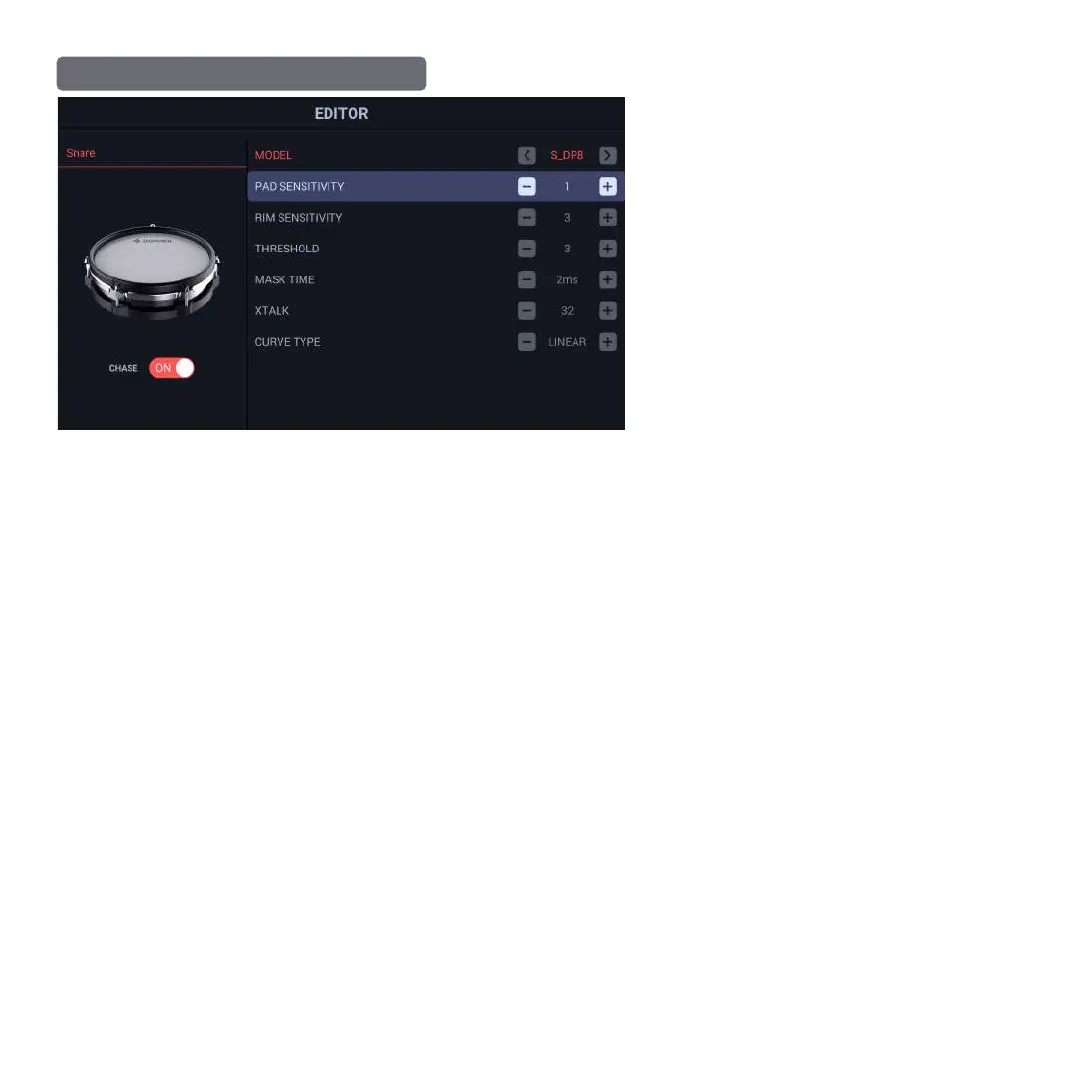
The function of EDITOR is to adjust the triggering of
current drum to adapt to your most suitable triggering
parameters. When the function is enabled, the default
CHASE status is ON; at this moment, you may use a
drumstick to strike on any drum to select one to be
changed; when CHASE status is OFF, the drum knock
function is disabled, and you may click the drop-down list
of the drum information bar to manually select a drum to
change its parameters.
Adjustment of Relevant Parameters
Click and highlight any option, use +/- or the encoder for parameter adjustment;
Model:
Cymbal Options: S_CY10/D_CY10/D_CY10L/S_CY12/S_CY12L/D_CY12ST/T_CY12R/T_CY14R
Drum Pad Options: S_DP8/D_DP8/D_DP8L/S_DP10/D_DP10/D_DP10L/D_DP12S
Bass Drum Options: D_KD6/D_KD8
Select the appropriate trigger data for your drum pads based on different expansion accessories.
Pad Sensitivity: 1-32
This is the sensitivity of the electronic signal from striking a pad. It gives the effect of making the instrument sound louder, but in reality it is the strength of the
signal. THis should be adjusted to trigger the softest strikes you perform. If set to high, the following parameters will need to work harder for a clean performance.
Rim Sensitivity: 1-32
Like Pad sensitivity above, but dedicated to the rim of a drum or the edge of a cymbal.
Threshold: 1-32
This is the point at which a soft stroke will be allowed to trigger a musical event. This also works hand in hand with the Mask time and XTalk to make sure only
the signal you intend are passed on to create the sound.
Mask Time: 1-32ms
This is a time gate that is used for subsequent strikes on the same area. Set to high and techniques like a buzz roll will miss a lot of notes. Set to low and the
Threshold and XTalk may need to be adjusted to compensate.
XTalk: 0-100
This is a specific control to keep the drum selected from triggering when a pad next to it on the rack is struck. This should only be set high enough for the
loudest strikes to be ignored. Set to high and your Threshold and Mask times will be effected.
Curve Type: LINERAR - LOUD- LOG-EXP
LINEAR = a smooth signal curve from soft to loud. LOUD is a linear curve that starts higher on the velocity range.
LOG = Logarithmic. This is actually the most common curve for the way most drummers play. EXP = Exponential and is a curve where you get higher velocities
sooner in the total velocity range.
Pro Tip: Make small subtle adjustments and remember that all of these parameters work together. If one is set to high, the others will be effected. It is best to
make small adjustments and return to regular playing for a little while. You want to make sure it plays in real world performance.
MAIN INTERFACE OPERATION OF EDITOR
21


 To Next Page
 Loading...