Saving Recording to Flash
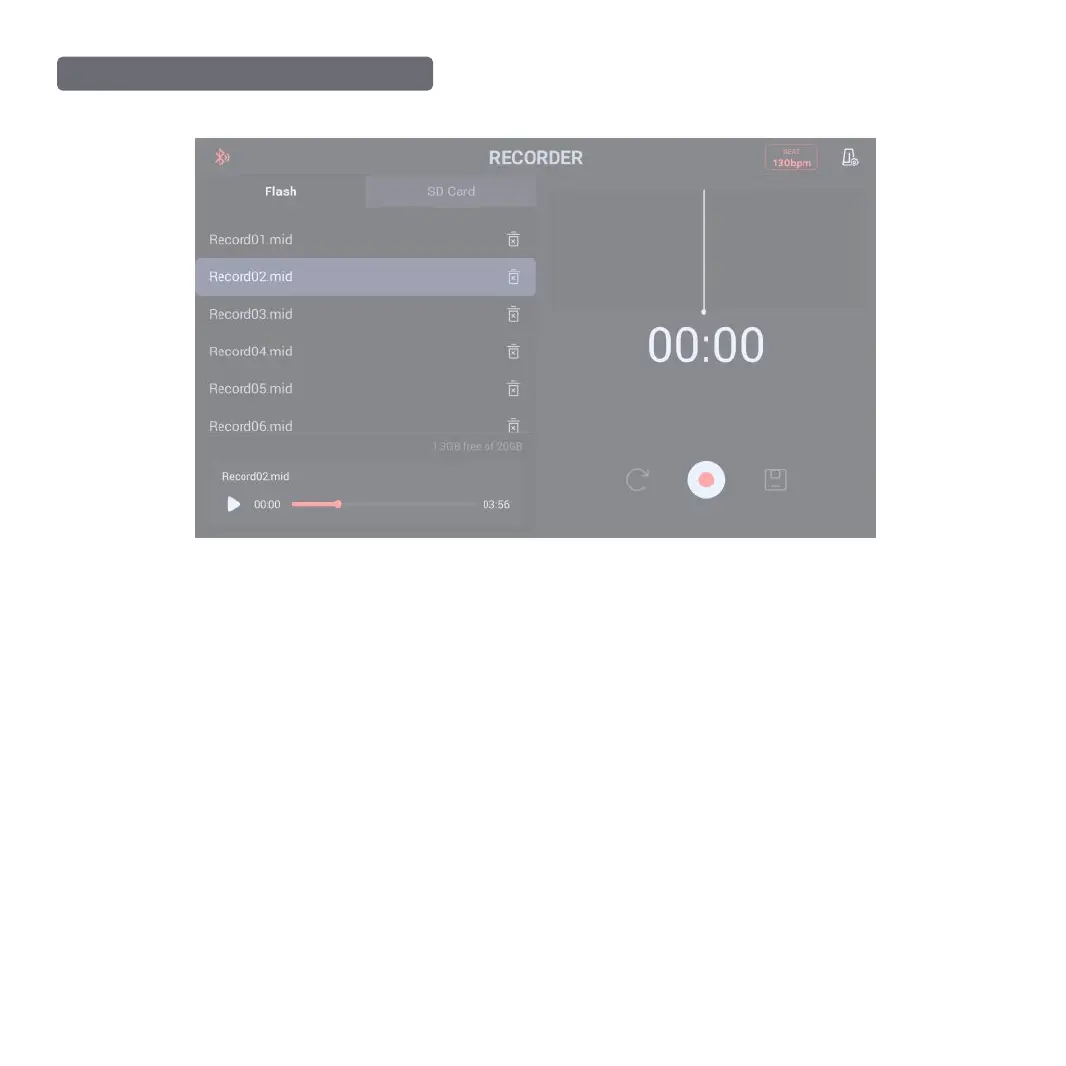
The recording of current record interface is saved in local disk space. The stored recording information includes the name, duration, and delete key.
Saving Recording to SD Card
The recording in current Record interface is stored in an external SD Card. The recorded file is stored in the folder “RECORD” in the SD Card root directory (When
the SD Card is plugged into the SD Card port of the Module, it will automatically create two folds, Song and RECORD)
(The SD Card is not included in the product package; the format of your SD Card should support FAT32)
Recording Play/Pause
Select the recording in current Record interface and perform play/pause function for it; the progress bar is the progress of current recording.
Recording Information
Recording waveform and duration display.
Saving Recording
Click the Reset button to reset current recording; click the “REC/Pause” button to record/pause recording; click the “Save” button to save current recording.
Saving and Playing Record
❶
MAIN INTERFACE OPERATION OF RECORD
19



 To Next Page