1
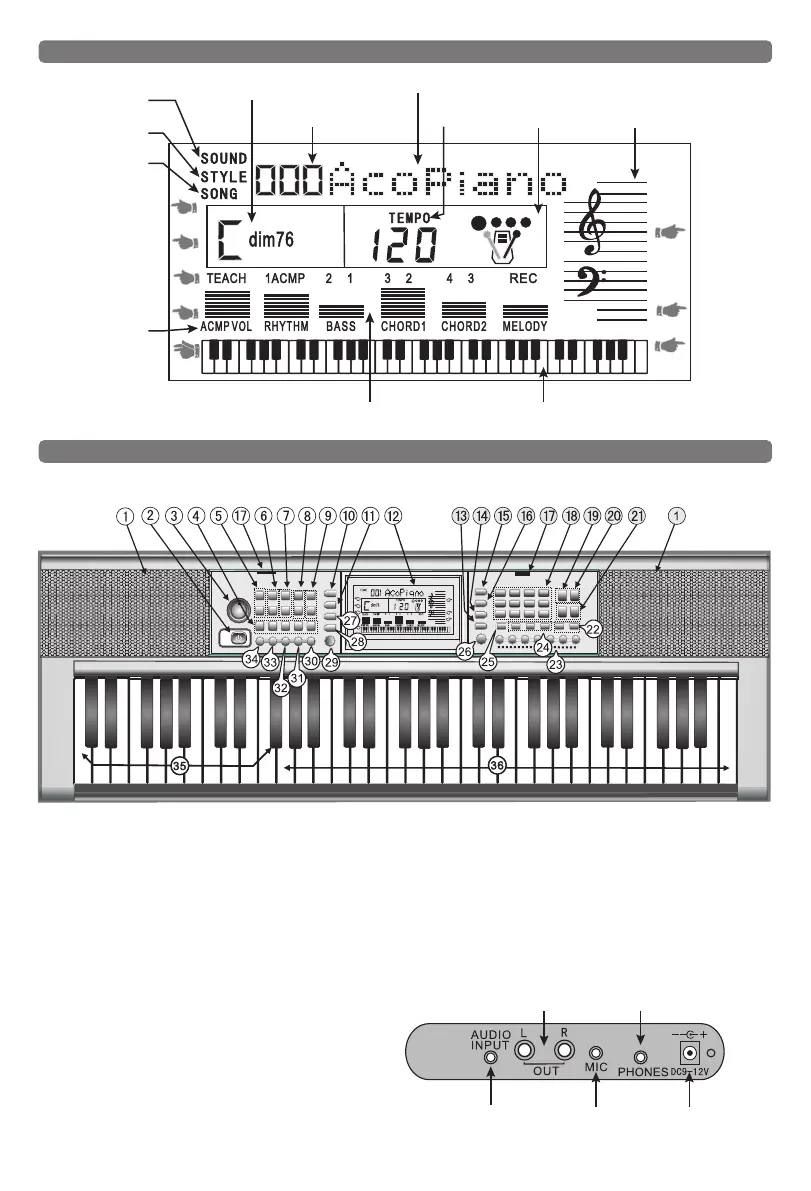
I. Instruction of LCD screen
II. Controls of panel
Tone selection
Chord display
Digital display
Character display
Tempo Metronome Music score
Split-voice
Record
Rhythm
Program
Rhythm selection
Song selection
Single chord
Fingered chord
Teach
Sustain
Acmp. volume
Vibrato
Dynamic display area Playing keyboard
1. Speakers
2. Power Switch
3. Rotary Master Volume
4. Memory the Settings Key
5. Master Volume +/-
6. Rhythm Volume +/-
7. Chord Volume +/-
8. Transpose+/-
9. Tempo +/-
10. Split Keyboards
11. Fill In
12. Liquid Crystal Display
13. Sustain Key
14. Vibrato Key
15. Tone Selection Key
16. Rhythm Selection Key
17. Slot for Music Stand
18. Numeric Keypad
19. Programming Button
20. Playback Button
21. Record/Play Key
22. Demonstration
23. Panel Percussion
24. Teach 1/2/3
25. Metronome
26. Keyboard Percussion
27. Ending Key
28. Intro Key
29. Start/Stop Button
30. Bass Chords
31. Chord Off Key
32. Multi Finger Chord Key
33. Single Finger Chord Key
34. Sync Key
35. Chord Keyboard Area
36. Play The Keyboard Area
1. Control panel:
2. Basic external ports:
Stereo Audio
lnput Jack
Audio lineOutput(R/L)
Microphone
Jack
Headphone Jack
Power Adapter DC
power Jack(9V DC)



 To Next Page