2
III. External ports used by
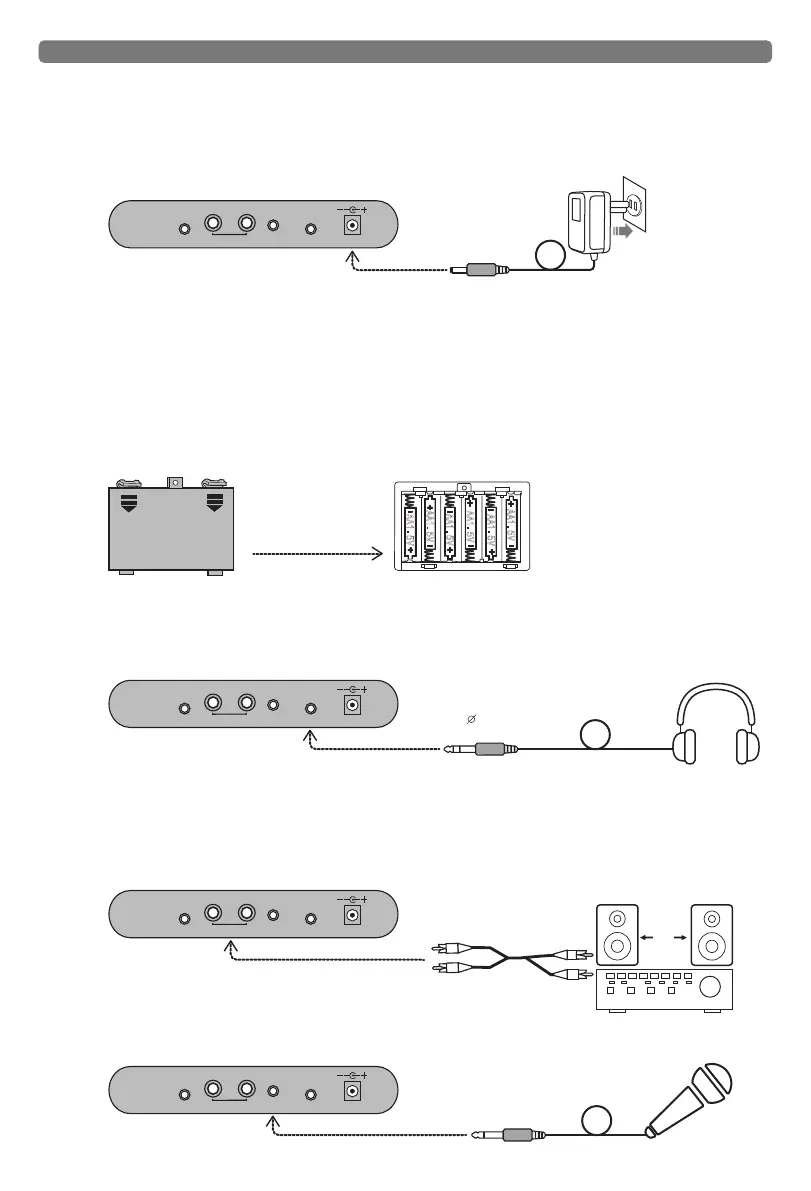
1. Using the AC power adapter
Insert the DC plug of the power adapter into the DC power jack in the rear panel of the electronic piano, then, insert the
other end into the mains socket. Warning: Please use the supplied power adapter only. Using the not recommended power
supply adapter and voltage will cause the machine to overheat and damage internal components. Note: when the product is
not in use or during a thunderstorm, please remove the power adapter from the AC outlet.
2. Using the batteries
Open the battery cover at the bottom and install the batteries, ensuring the polarity of the battery must conform to the
bottom cell indicating the direction of positive and negative polarity, and then install the battery cover. When using battery
power, please unplug the power adapter's DC plug.
Note:
1. Do not use different types of batteries, and do not mix old and new batteries.
2. The low battery power will reduce the volume or timbre variations, please replace with new batteries.
3.
Please take out the batteries to avoid possible damage caused by the batteries leakage if you don’t use the unit for a long time.
4. Non-rechargeable batteries cannot be charged.
3. Headphones
A standard pair of headphones can be plugged into (PHONES) Jack for private practice or late-night playing. The internal
speaker system is automatically shut off when a pair of headphones is plugged into the (PHONES) Jack.
4. Connecting amplifier or stereo
The keyboard has a built-in speaker system, it can also be connected to other external amplifiers used on the speaker
system. First of all turn off the keyboard and the external device power, then insert two-channel audio connector into the
back line out [L/R OUT] jack, and insert the other end to the line input [LINE IN] or auxiliary input [AUX IN] jack on audio
equipment.
5. Microphone
A condenser microphone can be plugged into a microphone (MIC) input jack.
Battery cover
The tank battery slot is
loaded into six 1.5 volt
battery power.
A
A1.
5
V
A
A1.5
V
AA1
.5
V
AA1
.5V
AA
1.
5V
A
A1
.5
V
3.5mm
Headphone plug
DC9-12V
MIC
AUDIO
INPUT
OUT
L
R
PHONES
DC9-12V
MIC
AUDIO
INPUT
OUT
L
R
PHONES
the mains socket
Power Adapter
DC plug
DC9-12V
MIC
AUDIO
INPUT
OUT
L
R
PHONES
Insert audio PA
Two-channel audio
cable(Optional)
Audio amplifier
Audio loudspeakers
Speaker
DC9-12V
MIC
AUDIO
INPUT
OUT
L
R
PHONES



 To Next Page