2.EN
Control and function
English
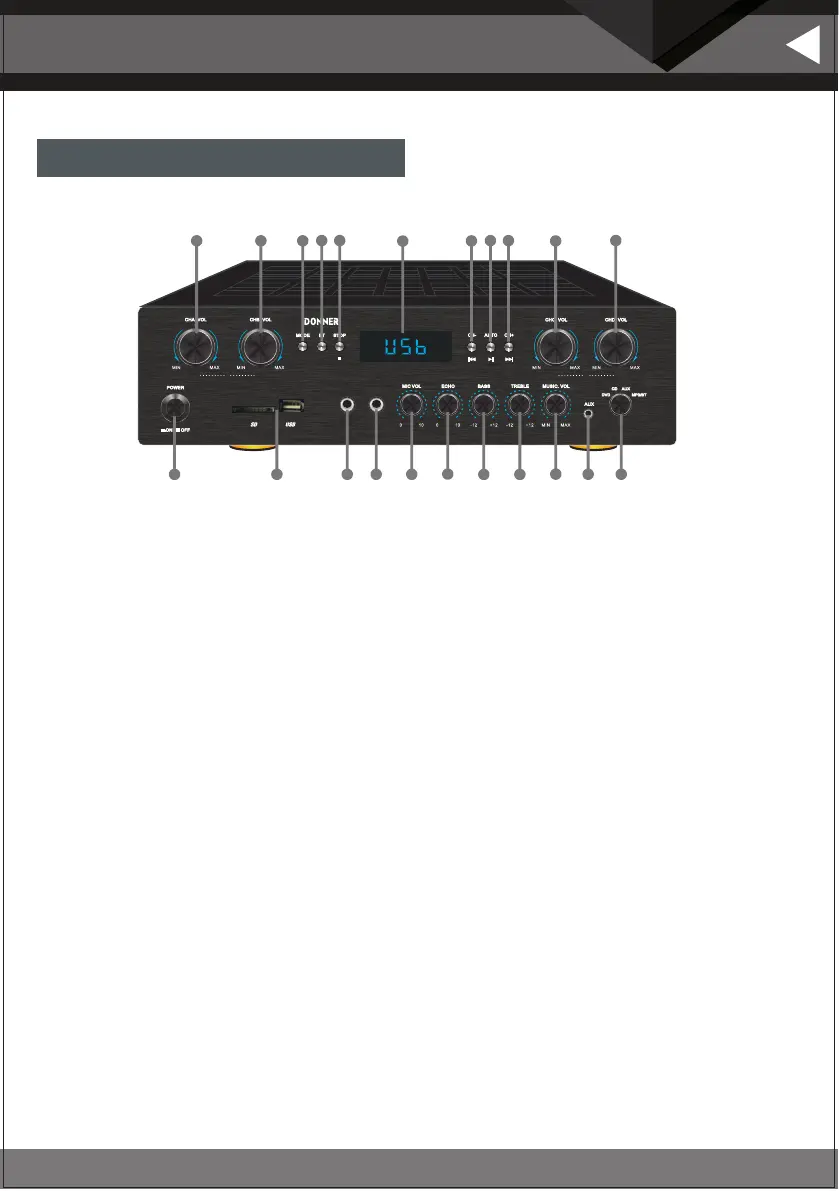
1. Power switch: press this button to turn on or off the power.
2. USB/SD: Card input.
3. Microphone input jack 1: The microphone is connected to this jack.
4. Microphone input jack 2: The microphone is connected to this jack.
5.Mic VOLUME: Turn the knob clockwise to increase the microphone VOLUME, and turn the knob counterclockwise to
reduce the microphone VOLUME.
6. Echo Control: Rotate the knob to adjust the reverberation of the microphone.
7. BASS: Rotate the knob to adjust the BASS of the main sound channel.
8. TREBLE: Turn the knob to adjust the treble of the main sound channel.
9. MUSIC VOLUME: Adjust the volume by turning the knob clockwise to increase the volume and counterclockwise to
decrease the volume.
10. AUDIO INPUT JACKS : Connect the AUX audio output jacks to these jacks.
11. INPUT: For selecting the input source: DVD / CD / AUX / MP3 / Bluetooth / FM.
12. L CHANNEL A VOLUME CONTROL: Adjust the volume. Turn the knob clockwise to increase the volume of L channel A.
13. L CHANNEL B VOLUME CONTROL: Adjust the volume.Turn the knob clockwise to increase the volume of L channel B.
14. Mode: Used to select the input source MP3 / Bluetooth/FM.
15. BT: Press to select Bluetooth mode directly.
16. STOP:PRESS to stop playback in MP3 mode.
17. LED window for functional display
18. PREV:USB/SD input is used to select the last song while FM input is used to select the last station saved in the system.
19. PLAY/PAUSE: Play/pause button for songs on USB/SD card and search function for FM input.
20. NEXT:USB/SD input is used to select the next song and FM input is used to select the next station saved in the system.
21. Volume control for R channel C : Adjust the volume. Turn the knob clockwise to increase the volume of R channel C.
22 .Volume control for R channel D: Adjust the volume. Turn the knob clockwise to increase the volume of R channel D.
Functions of the front panel
MIC 1 MIC 2
MA MP 5
INPUT SELE CTOR
DIGITAL BLUET OOTH AMPLIFI ER
1 2
3
4
5
6
7
8 9 10
12 17
11
13
15 16
14
19 2018
21 22
L R


 To Next Page