7.EN
English
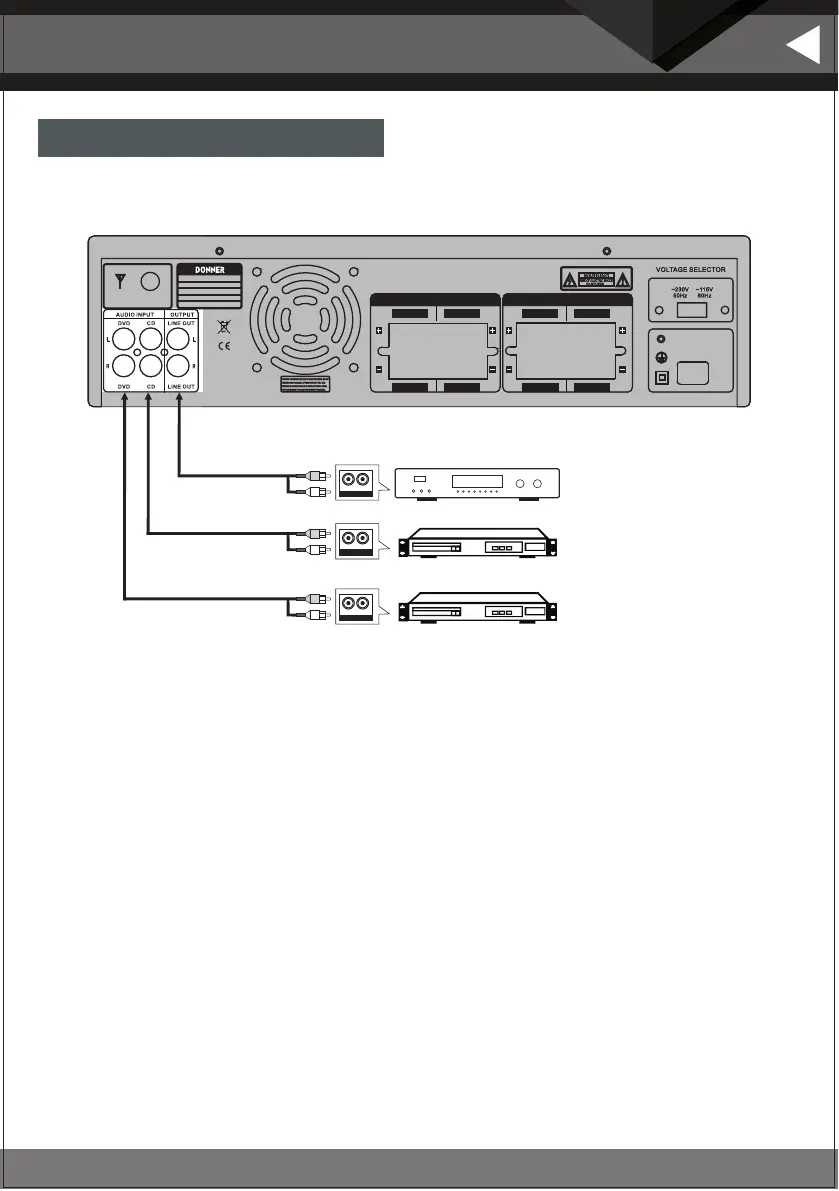
Connection of audio input
Safety guidance
1. Make sure all lines are connected correctly. Please set the volume to the lowest before turning on the machine.
2.Please use the same type of speaker. If the speakers come from two pairs of speakers, make sure that the
speakers you are using have the same power and impedance. Otherwise, two speakers with different power
may damage the equipment if used for a long time.
3. To avoid unnecessary noise such as buzzing, please make sure that all wires are connected correctly.
4. For the speaker wire, the vinyl coating should be stripped and the end of the wire should be bent. Before
inserting the cable, push the pink jack or loosen the screw port. Then fix it and tighten the screws. Don’t let the
wire out of the port, otherwise when the wires of different ports contact each other, it may cause short circuit
and burn the machine.
5. Turn on the machine and adjust the volume, bass and treble of the unit to the level you need.
AMPLIFIER
CD
DVD
R L
AUD IO INPU T
R L
AUD IO OUPU T
R L
AUD IO OUPU T
AUDIO OUTPUT
CH.B CH.A
CH.B CH.A
AUDIO OUTPUT
CH.D CH.C
CH.D CH.C
AC115V/60H z 6A
POWER INPUT
AC230V/50 Hz 4 A
Model:
Peak power:
Frequency response:
Input: AC~115/ -230V/5060Hz Hz
Pro duct:
Amp lifie r
MAMP5
440W
20Hz-20KHz


 To Next Page