4.EN
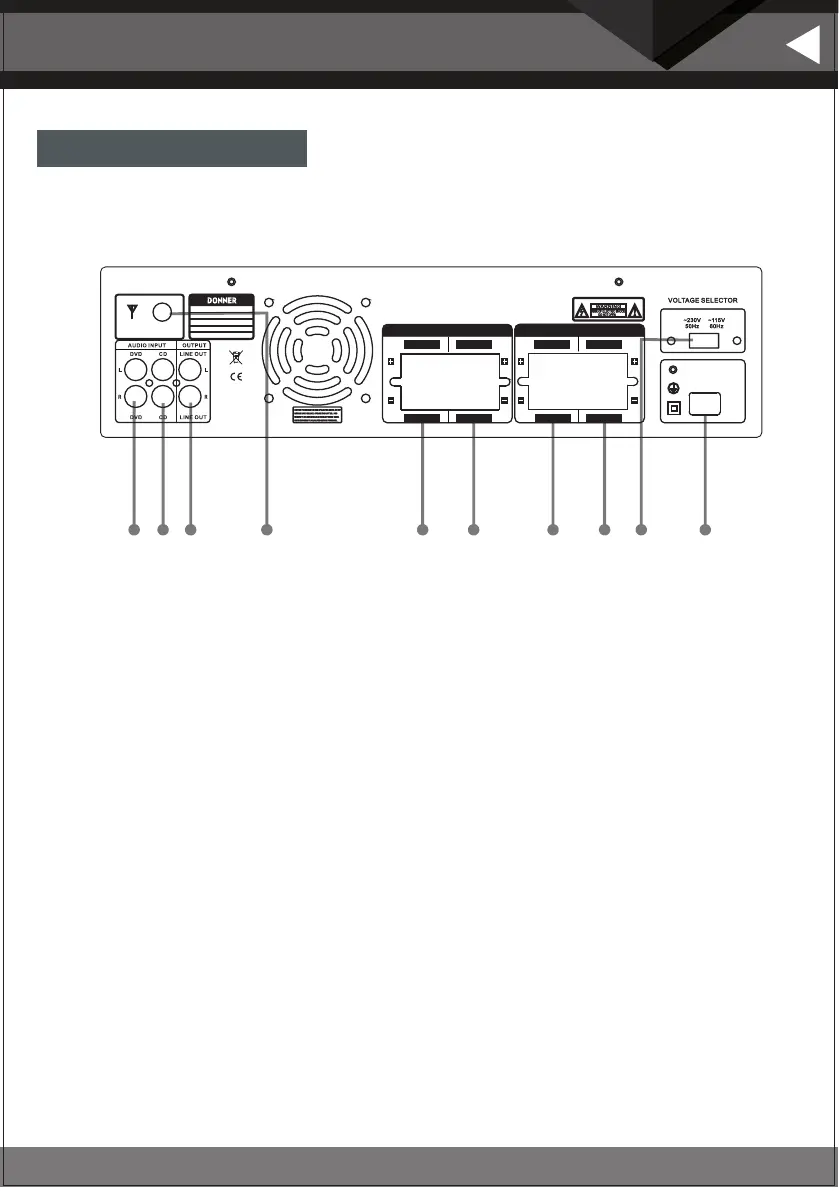
Rear panel function
English
6
7
8
1 2
3
4
5
9 10
AUDIO OUTPUT
CH.B CH.A
CH.B CH.A
AUDIO OUTPUT
CH.D CH.C
CH.D CH.C
AC115V/60H z 6A
POWER INPUT
AC230V/50 Hz 4 A
Model:
Peak power:
Frequency response:
Input: AC~115/ -230V/5060Hz Hz
Pro duct:
Amp lifie r
MAMP5
440W
20Hz-20KHz
1.Audio input jack: Connect the audio output jack of the DVD to this jack.
2.Audio input jack: Connect the audio output jack of the CD to this jack.
3.LINE AUDIO OUT jack: Connect another amplifier input jack to the LINE OUT jack.
4.Tuner antenna: Connection to FM antenna.
5.Speaker D channel output terminals: Connect your speaker system to these terminals, be careful
not to reverse the "+" and "-" before connecting.
6.Speaker C channel output terminals: Connect your speaker system to these terminals, be careful
not to reverse the "+" and "-" before connecting.
7.Speaker B channel output terminals: Connect your speaker system to these terminals, be careful
not to reverse the "+" and "-" before connecting.
8.Speaker A channel output terminals: Connect your speaker system to these terminals, be careful
not to reverse the "+" and "-" before connecting.
9.115/230 switch: Push this button to the 115V or 230V station according to the local supply voltage applied.
10.Power cable : Connected to AC 115V/60Hz or 230V/50H.


 To Next Page