REVERB LEVEL SETTING
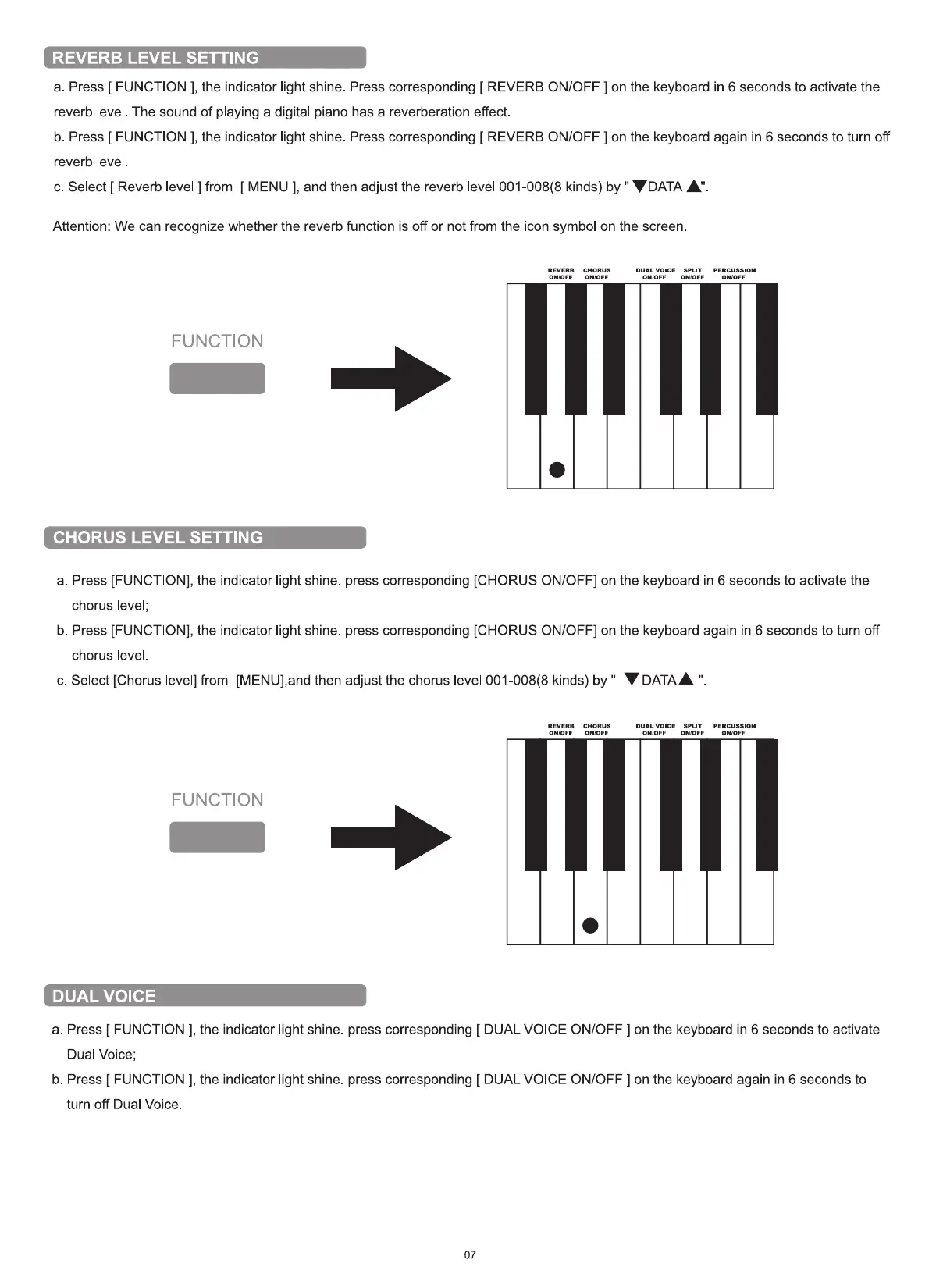
a. Press [ FUNCTION ], the indicator light shine. Press corresponding [ REVERB ON/OFF ] on the keyboard in 6 seconds to activate the
reverb level. The sound of playing a digital piano has a reverberation effect.
b. Press [ FUNCTION ], the indicator light shine. Press corresponding [ REVERB ON/OFF ] on the keyboard again in 6 seconds to turn off
reverb level
c. Select [ Reverb level ] from [ MENU ], and then adjust the reverb level 001-008(8 kinds) by " V DATA A"
Attention: We can recognize whether the reverb function is off or not from the icon symbol on the screen.
REVERB CHORUS
OWOFF ONYOFF
FUNCTION
CHORUS LEVEL SETTING
DUAL VOICE SPLIT
OWOFF OWOFF
PERCUSSION
OWOFF
a. Press [FUNCTION], the indicator light shine. press corresponding [CHORUS ON/OFF] on the keyboard in 6 seconds to activate the
chorus level;
b. Press [FUNCTION], the indicator light shine. press corresponding [CHORUS ON/OFF] on the keyboard again in 6 seconds to turn off
chorus level.
V DATAA
c. Select [Chorus level] from [MENU],and then adjust the chorus level 001-008(8 kinds) by "
REVERB CHORUS
ONIOFF ON/OFF
FUNCTION
DUAL VOICE
DUAL VOICE
ONIOFF
SPLIT
ONIOFF
PERCUSSION
ON/OFF
a. Press [ FUNCTION ], the indicator light shine. press corresponding [ DUAL VOICE ON/OFF ] on the keyboard in 6 seconds to activate
Dual Voice;
b. Press [ FUNCTION l, the indicator light shine. press corresponding [ DUAL VOICE ON/OFF ] on the keyboard again in 6 seconds to
turn off Dual Voice.


 To Next Page