8
MX 2000/2500/3000 MX25ATCE26
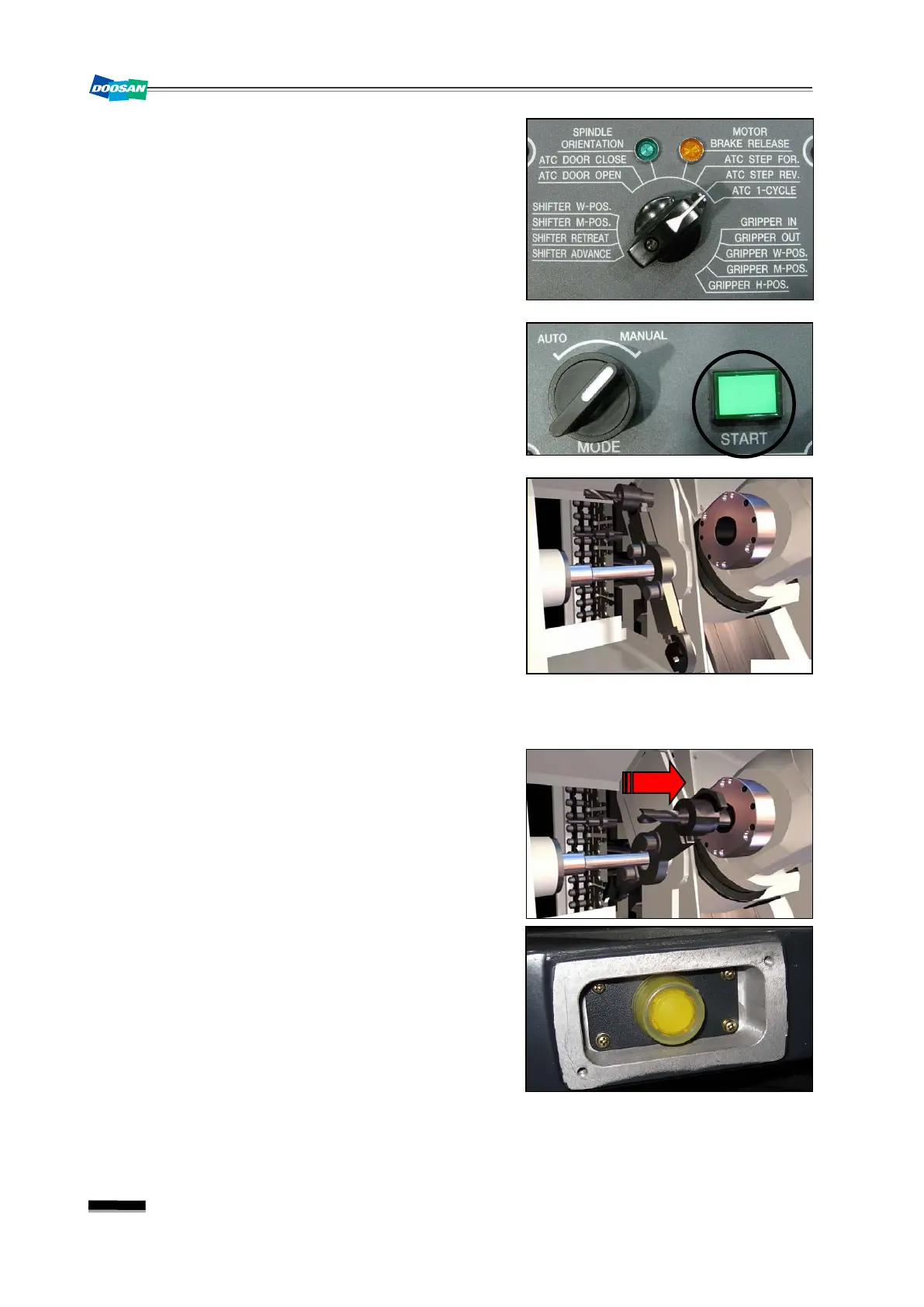
4) Turn the mode switch in the ATC manual OP to
“ATC STEP REV.”
.
5) Check the stop position of the changer arm. Press
briefly the
“START”
button in the ATC manual OP
to check the operation direction of the changer
arm.
-1) If the changer arm is completely pulled out of the
spindle, or if it moves outside of the spindle by
your pressing briefly the
“START”
button
①
Repeat pressing briefly the “START” button in
the ATC manual OP until the main changer
arm is removed completely from the spindle.
②
Press the locking pin of the changer arm with
force before pulling out either tools.
③
Perform the tool clamping manually.
5-2) If it moves inside of the spindle by your pressing
briefly the
“START”
button
①
Repeat pressing briefly the
“START”
button
until the main changer arm inserts to the end
of the spindle and stops.
☞
An excessive number of pressing may get
the changer arm off of the spindle,
causing a fall of the tool. So you must
stop pressing the button when the tool is
inserted nearly to the end of the spindle.
②
Perform the tool clamping manually.


 To Next Page
 Loading...