EasyManua.ls Logo

Dorman 99162 - User Manual

Dorman 99162
3 pages
Print Icon
To Next Page IconTo Next Page
Loading...
1
99162
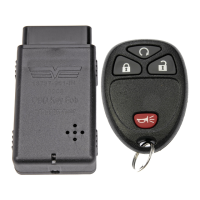
Programming Instructions
Disclaimer: All currently programmed and new remotes must be reprogrammed to your vehicle. Please have all
remotes in hand at the time of programming.
Once plugging the programmer in you will have 2 minutes to program all new and existing remotes to the vehicle. After
2 minutes your session will time out and your vehicle will no longer be in programming mode. Programmer will work for
no more than 3 sessions.
1. Close and lock doors.
2. Insert Key into ignition and turn to IGN ON. (Do not crank)
3. Insert Programmer into your vehicle’s OBD2 Port. This port is typically located underneath the dashboard below
the steering wheel. It may be covered by a faceplate that will easily pop off.
4. Once the Programmer is inserted, wait for a chime or orange light on the Programmer to come on. This will
indicate that the unit is ready to program the first remote.
5. Press and hold the lock and unlock button on the remote simultaneously until you hear a chime, buzzer, or the
door locks cycle (approximately 10-15 seconds)
6. To program additional remotes, repeat step 4.
7. When all remotes are programmed wait 60 seconds for buzzer to sound continuously, then remove programmer
from OBD2 Port.
Question and Answer IconNeed help?

Do you have a question about the Dorman 99162 and is the answer not in the manual?

Summary

Dorman Remote Programming Instructions

Programming Disclaimer

All programmed and new remotes must be reprogrammed; have all remotes ready.

Programming Session Duration

You have 2 minutes per session. Session times out after 2 minutes or 3 sessions.

Step 1: Secure Vehicle Doors

Ensure all vehicle doors are closed and locked before starting the programming process.

Step 2: Ignition Status

Insert the key into the ignition and turn it to the IGN ON position, do not crank the engine.

Step 3: Connect Programmer

Insert the programmer into the vehicle's OBD2 port, typically located under the steering wheel.

Step 4: Programmer Ready Indicator

Wait for a chime or orange light on the programmer, indicating it's ready for the first remote.

Step 5: Program Remote

Press and hold lock/unlock buttons on remote simultaneously (10-15 sec) until confirmation.

Step 6: Program Additional Remotes

To program more remotes, repeat the process from Step 4.

Step 7: Finalize Programming

After programming all remotes, wait 60 seconds for a continuous buzzer before removing the programmer.

Dorman 99162 Specifications

General IconGeneral
BrandDorman
Model99162
CategoryAutomobile Accessories
LanguageEnglish

Related product manuals