EasyManua.ls Logo

Doro 1370 - User Manual

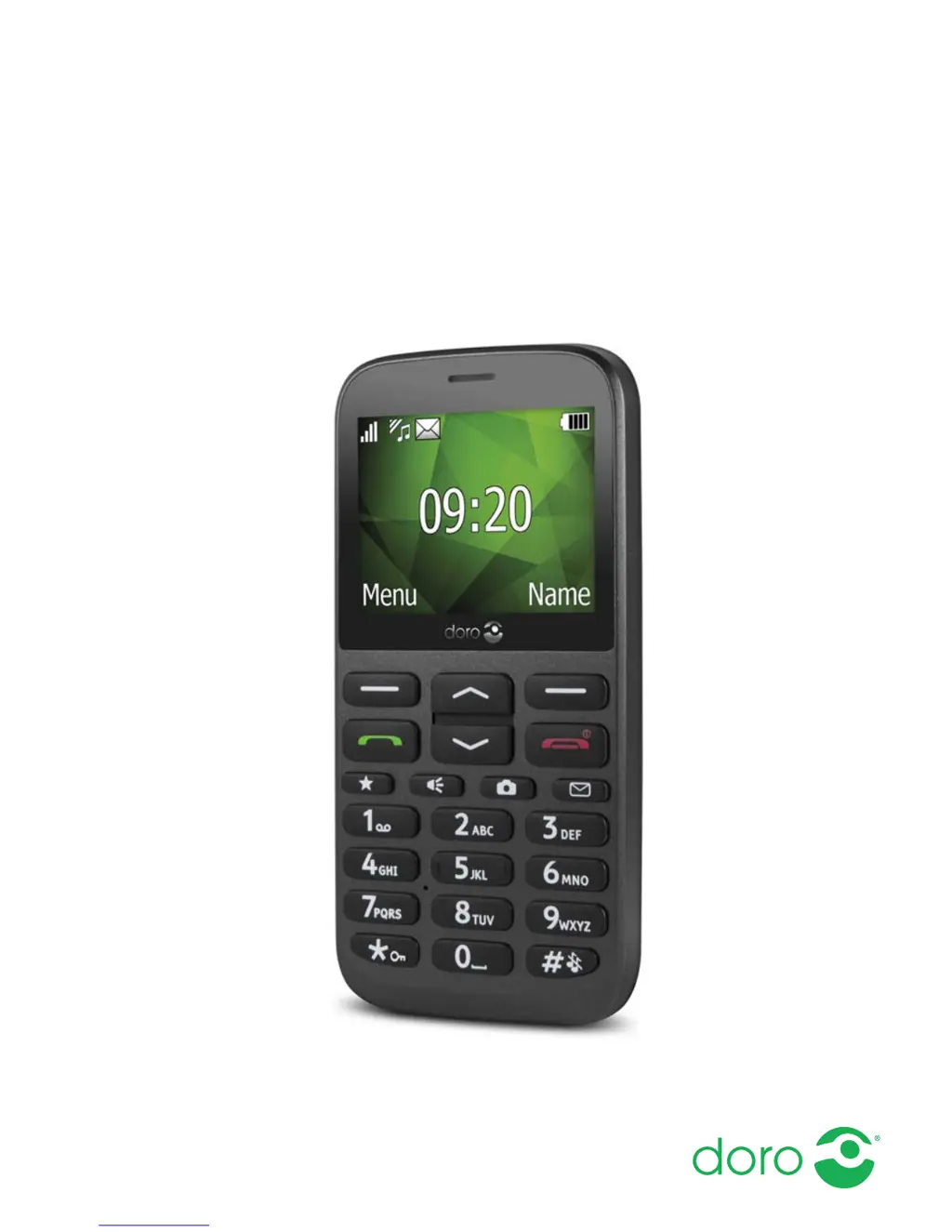
Doro 1370
60 pages
Print Icon
To Next Page IconTo Next Page
Loading...
English
Doro 1370

Table of Contents

Other manuals for Doro 1370

Questions and Answers

  • M
    Mr. John MillerAug 17, 2025
    What to do if my Doro Cell Phone shows a SIM card error?
    • R
      Rebecca DeckerAug 17, 2025
      If your Doro Cell Phone displays a SIM card error, check the condition of the SIM card. If it is damaged, contact your service provider. Also, check the installation of the SIM card by removing it and reinstalling it. Ensure the contact surfaces of the SIM card are clean by wiping them with a clean cloth.
  • S
    Steven YoderAug 19, 2025
    Why can't I add a contact on my Doro 1370 Cell Phone?
    • M
      Ms. Jessica WhitakerAug 19, 2025
      If you are unable to add a contact to your Doro Cell Phone, the phonebook memory might be full. Delete contacts to free up memory.
  • M
    Melvin JacobsAug 22, 2025
    How to fix Doro Cell Phone that cannot be switched on?
    • C
      Charles MedinaAug 22, 2025
      If your Doro Cell Phone cannot be switched on, it might be due to a low battery. Connect the power adapter and charge the battery for 3 hours. Note that full battery capacity is reached after the battery has been charged 3–4 times. Alternatively, the battery might be incorrectly installed. In this case, check the installation of the battery.
  • A
    Amanda DiazAug 26, 2025
    Why is my Doro Cell Phone battery not charging?
    • M
      Matthew GarzaAug 26, 2025
      If your Doro Cell Phone battery isn't charging, there could be several reasons. First, the battery or charger might be damaged, so check their condition. Second, ensure the charging environment is within the temperature range of 0 °C and 40 °C. Finally, verify that the charger is correctly connected to both the phone and the power socket.
  • N
    nashbrianAug 28, 2025
    Why does standby time decrease on Doro Cell Phone?
    • C
      Christopher LarsenAug 28, 2025
      If the standby time of your Doro Cell Phone is decreasing, it could be due to a low battery charge capacity, in which case you should install a new battery. Alternatively, if you are too far from a base station, the phone constantly searches for a signal, which consumes battery power. Try to find a place with a stronger signal, or temporarily turn off the phone.
  • J
    James LarsonAug 30, 2025
    What to do if I hear echo or noise on my Doro Cell Phone?
    • J
      Jason SnyderAug 30, 2025
      If you are experiencing echo or noise on your Doro Cell Phone, it might be a regional problem from a bad network relay. Try hanging up and redialing, as this may switch you to another network relay.
  • P
    Pamela JohnsonSep 2, 2025
    Why is the signal weak on my Doro 1370?
    • L
      lsolomonSep 2, 2025
      A weak signal on your Doro Cell Phone can occur if you are too far from the base station. Try again from another location. Network congestion can also cause a weak signal, so try calling at a later time.
  • J
    Jordan MasseySep 5, 2025
    How to fix failure to place calls on Doro 1370 Cell Phone?
    • S
      Stephanie WalkerSep 5, 2025
      If you cannot place or receive calls on your Doro Cell Phone, call barring might be activated. Deactivate call barring.
  • J
    James MolinaSep 7, 2025
    Why can't I send or download MMS on my Doro 1370?
    • C
      Cameron HartSep 7, 2025
      If your Doro Cell Phone is failing to send or download MMS, it may be because the phone memory is full. Delete received MMS or select to set the default storage for MMS to be saved on a memory card (not included). Also, ensure that the correct MMS profile is selected manually.
  • D
    Donna JordanSep 12, 2025
    What to do if Doro Cell Phone PIN code not accepted?
    • M
      martinezandrewSep 12, 2025
      If your Doro Cell Phone is not accepting the PIN code, you may have entered the wrong PIN code too many times. Enter the PUK code to change the PIN code, or contact your service provider.

Summary

Congratulations on your purchase

Get started

Insert SIM card, memory card and battery

Instructions for inserting the SIM card, memory card, and battery into the phone.

Charge the phone

Guidance on how to connect the charger and charge the phone's battery.

Get to know your phone

Assistive functions

Explains symbols used to guide users through specific sections of the manual.

Turn the phone on and off

Step-by-step instructions on how to power the phone on and off.

Start-up wizard

Guide to initial basic settings configuration upon first phone use.

Phone indicators

Information on what the various lights and indicators on the phone signify.

Navigate the phone

Instructions on how to move through menus and use the phone's interface.

Enter text

Methods and tips for entering text, including manual and predictive input.

Hearing aid compatible

Details on the phone's compatibility with hearing aids and usage guidelines.

Phone settings

Configuration options for time, date, language, and block functions.

Calls

Make a call

Instructions on how to dial a phone number and initiate a call.

Call from the phonebook

Steps to find and call contacts stored in the phonebook.

Receive a call

How to answer or reject an incoming call.

Volume control

Adjusting the sound volume during a call.

Silent

Activating and deactivating silent mode for the phone.

Calls

Headset

Using a headset with the phone for calls and audio.

Call options

Accessing additional call functions like hold, mute, and conference.

SPK on (right selection button)

Using the loudspeaker feature for hands-free calls.

Calls

SOS calls

Instructions on how to make an emergency call from the phone.

Call log

Viewing and managing call history.

Call settings

Configuring call timer, answer mode, call waiting, and call divert.

Phonebook

Add contact

Steps to add new contacts with name, number, and picture.

Manage phonebook contacts

Options for editing, deleting, copying, and sending contacts.

Phonebook

Phonebook settings

Configuring storage and display options for the phonebook.

Phonebook

Voice mail

Setting up and accessing voice mail messages.

Call voice mail

How to directly call the voice mail service.

Speed dial

Configuring and using speed dial for quick dialing.

Add speed dial numbers

Instructions to assign numbers to speed dial keys.

Phonebook

Top 10

Setting up and managing the top 10 contacts list.

Owner number

Information about the owner number assigned by the SIM card.

Add numbers

Adding numbers to the owner number list.

ICE (In Case of Emergency)

Assistance button

Make an assistance call

Steps to initiate an assistance call in case of emergency.

Assistance button

Activation

Configuring how the assistance button is activated.

Number list

Adding and managing emergency contacts for assistance calls.

Activate text messages (SMS)

Enabling SMS alerts for the assistance function.

Assistance button

Create assistance message

Writing the custom text message for assistance alerts.

Messages

Create and send text message (SMS)

Steps to compose and send SMS messages.

Create and send picture message (MMS)

Instructions for sending multimedia messages (MMS).

Messages

Create and send voice message

Recording and sending voice messages.

Inbox, Outbox and Sent

Managing received, sent, and draft messages.

Messages

Message settings

Configuring predictive text, writing language, and write speed.

Messages

SMS settings

Settings for memory status, storage, and SMS centre.

Messages

Cell broadcast

Receiving cell broadcast messages and managing channels.

Input method

Selecting text input methods for messages.

Messages

MMS settings

Configuring MMS memory, storage, and profile settings.

Messages

Add new MMS profile

Steps to manually add MMS profile settings for service providers.

MMS roaming

Information on using MMS while roaming.

Messages

Reminder

Setting up reminders for unread messages or voice mail.

Vibration

Configuring vibration alerts for text messages.

Delivery report

Enabling notifications for message delivery status.

Camera (take photos)

Adjustments

Adjusting camera settings like zoom, EV, and flash.

Camera settings

Configuring image size, shutter sound, and storage.

Gallery

Send

Options for sending pictures/videos via MMS or Bluetooth.

Use (picture only)

Using pictures for wallpaper or phonebook contact.

Connectivity

Bluetooth

Activating and configuring Bluetooth settings.

Bluetooth settings

Managing visibility, device name, and searching for devices.

My device

Viewing and managing paired Bluetooth devices.

Connectivity

Audio path

Configuring audio output for calls via Bluetooth.

Network setup

Configuring network selection and mode.

Services

Accessing pre-programmed network services.

File manager

Managing files and folders on the phone or memory card.

Connectivity

Connect the phone to a computer

Instructions for transferring files between phone and PC via USB.

Drag and drop content between phone and a computer

Using USB Mass Storage for file transfer.

Sound & Display

Audio setup C

Adjusting audio settings for hearing aid compatibility.

Tone setup (ringtone)

Selecting and adjusting ringtones for the phone.

Sound & Display

Ringtone volume C

Adjusting the volume level for ringtones.

Silent

Activating or deactivating silent mode.

Alert type

Configuring ringtone and vibration settings for incoming calls.

Extra tone

Enabling warning and error tones for alerts.

Main menu

Customizing the appearance and style of the main menu.

Sound & Display

Wallpaper

Setting predefined or user-defined images as wallpaper.

Text size

Adjusting the font size for menus and messages.

Idle display

Configuring what information is shown on the display in standby mode.

LCD backlight

Adjusting the delay time for the display backlight.

Brightness

Adjusting the brightness level of the display.

Additional functions

Alarm

Setting and managing single or repeated alarms.

Snooze or stop

Handling the alarm when it sounds (stop or snooze).

Organiser

Accessing and using the organiser functions.

Calendar

Adding and managing tasks in the calendar.

Additional functions

Daily reminder

Setting and managing daily reminders.

Snooze or stop

Handling reminders when they sound (stop or snooze).

Calculator

Performing basic mathematical calculations using the phone.

FM radio

Turning the radio on

Steps to connect a headset and turn on the FM radio.

Volume

Adjusting the volume of the FM radio.

Save frequency

Saving tuned radio frequencies as channels.

Switch off

Turning off the FM radio.

Loudspeaker

Using the loudspeaker for the FM radio.

Channel list (editing the channel list)

Managing and editing the list of radio channels.

FM radio

Manual input (changing search mode)

Manually tuning or using auto search for radio stations.

Auto save

Automatically saving available radio stations.

Torch

Torch settings

Configuring torch timeout and sound.

Display status symbols

Display main symbols

Reset settings

Reset all

Deleting all phone settings and content except SIM memory.

Troubleshooting

Troubleshooting

Failure to charge the battery

Troubleshooting steps for battery charging issues.

Standby time decreases

Solutions for rapid battery drain.

Failure to place or receive calls

Troubleshooting call connection problems.

PIN code not accepted

Resolving issues with incorrect PIN entry.

SIM card error

Troubleshooting SIM card related errors.

Failure to connect to network

Resolving network connectivity issues.

Troubleshooting

Weak signal

Troubleshooting poor network signal strength.

Echo or noise

Resolving audio quality issues during calls.

Failure to add a contact

Troubleshooting issues when adding contacts.

Failure to set a function

Resolving problems with unsupported or unavailable functions.

Unable to send or receive Picture Messages; MMS with the SIM card

Troubleshooting MMS sending/receiving issues.

Failure to send or download MMS

Resolving issues with sending or downloading MMS.

Incorrect MMS profile selected.

Troubleshooting incorrect MMS profile configuration.

Safety instructions

Network services and costs

Operating environment

Medical units

Implanted medical devices

Areas with explosion risk

Li-Ion battery

Protect your hearing

Emergency calls

GPS;Location based functions

Vehicles

Protect your personal data

Malware and viruses

Care and maintenance

Warranty

Copyright and other notices

Specifications

Hearing aid compatibility

Specific Absorption Rate (SAR)

Correct disposal of this product

Correct disposal of batteries in this product

Declaration of Conformity

Doro 1370 Specifications

General IconGeneral
Display diagonal2.4 \
External display-
Display resolution- pixels
Internal memory8 MB
Flash card supportYes
Compatible memory cardsMicroSD (TransFlash)
SIM card typeMicroSIM
2G bands (primary SIM)900, 1800, 1900 MHz
Flash typeLED
Rear camera resolution (numeric)3 MP
Form factorBar
PersonalizationWallpaper
Subscription typeNo subscription
Product colorGray
Headphone connectivity3.5 mm
Polyphonic rings quantity9
Talk time (2G)- h
Battery voltage3.7 V
Battery capacity1000 mAh
Multimedia Messaging Service (MMS)Multimedia Messaging Service (MMS) is a standard way to send messages that include multimedia content to and from a mobile phone over a cellular network
Body SAR (EU)1.479 W/kg
Head SAR (EU)0.392 W/kg
Bluetooth version3.0+HS
Storage temperature (T-T)-20 - 60 °C
Operating temperature (T-T)0 - 40 °C
Standby time530 h
Weight and Dimensions IconWeight and Dimensions
Depth61.5 mm
Width125 mm
Height12.6 mm
Weight106 g

Related product manuals