English
traffic. By law, location-based services must be permission-based. That
means that you, must opt in (actively say yes) to the service in order to
use it.
Tip:
is shown in the status bar when your phones location is being
used by any app.
Note! Turning off location for your device also turns it off for Google apps
and other non-Google apps. This means that apps can’t use your phone's
location, and many useful features will be turned off.
How to disable GPS location services
1. From the Home screen, open the notification panel, tap
Set
My other connections The geolocation options.
2. Switch
to disable location services.
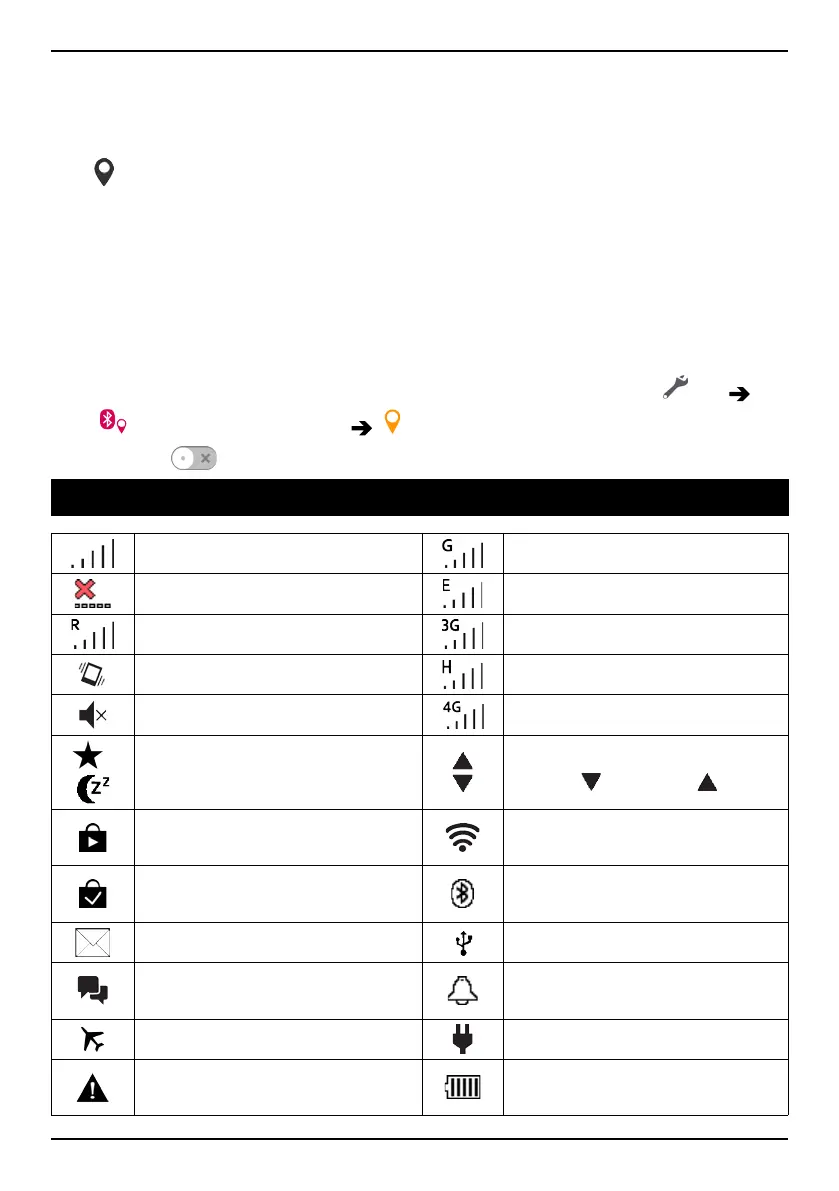
Status icons
Signal strength
2.5G GPRS data
No signal
EDGE data
Roaming (in other network)
3G data
Vibrate mode
HSPA data
Silent mode 4G data
/
Sleep mode
Data transmission:
data in
, data out .
Google Play Store software
updates available
Wi-Fi AP connected
Google Play Store, update
completed
Bluetooth on
Unread email
Connected to computer
New text message or multi-
media message
Alarm active
Flight mode activated
Charger connected
Error occurred or caution
required
Battery level
72



 To Next Page